
looneymouse
Participant
May 10, 2018
Answered

Legacy title properties missing from Legacy title

  • May 10, 2018
  • 8 replies
  • 26860 views

Everything was fine yesterday with all the color options and small caps options etc etc when I open the legacy titler, but when I continued with my project today, none of the options mentioned above are available to me, which makes it hard for me to continue my project, help pls! ><
    This topic has been closed for replies.
    Correct answer Vidya Sagar

    Hi looneymouse,

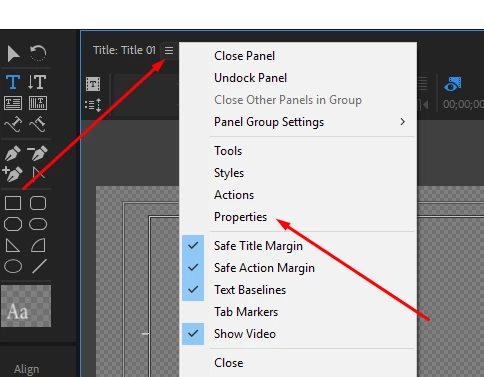
    The panel might have got closed accidentally. Click on the Title panel settings button > Choose Properties.

    Please let us know it that helps.

    Thanks,

    Vidya

    8 replies

    KazuT
    Inspiring
    June 30, 2019

    I finally remembered how to fix this. The error occurs because, while in the Title Tool, I hit Cmd-W, hoping to close the Title; instead, it closes whatever panel is selected and won't bring that panel back when I open the Title Tool again.

    The fix is:

    • Use the three dashes drop down menu to open the panel you want (ex. Properties).
    • This is the critical step: Drag the panel and place it where you want it (see below).
    • Repeat with other panels you want to always be open (Tools, etc.)
    • These panels should now be there when you open Title Tool again.

    Participant
    February 11, 2019

    I am so sick o those bugs on and on and on. I got so many titles on my project right now, which is legacy and Iam suffering the same problem i takes whole workflow so slooooowwww  and could count hours of showing those menus every time i want to change a simple font. ADOBE for that kind of money youre charging its unacceptable to having those issues.

    Inspiring
    January 14, 2019

    I too am suffering from what everyone else is suffering from, where this works, but it is not a permanent fix... Every time I open a text window, I am having to reveal these panels manually.

    Stan Jones
    Community Expert
    Community Expert
    January 14, 2019

    By reveal panels, do you mean resizing the assembled panels (Ann's comment in post 27), or the panels not staying part of the legacy title group (a problem that should now be fixed)? What specific dot version of PR are you using?

    teamk89946126
    Participant
    January 12, 2019

    This workaround is becoming very tedious. Is there a fix yet to make it go back the way it used to be?

    Stan Jones
    Community Expert
    Community Expert
    January 12, 2019

    Fixed in 2019.0.2. If not working for you in that version, let us know.

    Ann Bens
    Community Expert
    Community Expert
    January 12, 2019

    Fixed partially: panels now stick but don't keep the same dimensions: re scaling all the time

    Participant
    December 10, 2018

    Yes this is awful! I have a text heavy project and this is killing me! Why are all the tools, actions, and properties not automatically available like it used to be??

    How do we fix this ??

    Stan Jones
    Community Expert
    Community Expert
    December 10, 2018

    Here are the main options:

    a) Try the custom workspace I described in post 14. That has worked for me (but apparently not for anyone else).

    b) Suffer with the "all panels" option.

    c) Roll back and wait for the fix.

    Participant
    December 10, 2018

    Thank you for the timely response and help. This is a very unfortunate error on Adobe's part...

    go4bach
    Participating Frequently
    October 15, 2018

    It used to be that every time I clicked on a title to edit it, all 4 of these options came up.  Now every time I open a title, I have to show these options (Tools, Styles, Actions, Properties) and then the next time I open a title to edit it, I have to do it all over again.  The latest update seems to have caused this glitch as near as I can tell.  I have tried clicking on each of these options and then saving the file, I've tried saving the workspace.  Nothing works.  Every time I go to edit a title, I have no tools.

    Ann Bens
    Community Expert
    Community Expert
    October 15, 2018

    Yes I have seen this too.

    Participant
    October 21, 2018

    Yeah just updated to latest Premiere and I have the same issue

    Vidya Sagar
    Adobe Employee
    Vidya SagarCorrect answer
    Adobe Employee
    May 10, 2018

    Hi looneymouse,

    The panel might have got closed accidentally. Click on the Title panel settings button > Choose Properties.

    Please let us know it that helps.

    Thanks,

    Vidya

    looneymouse
    Participant
    May 10, 2018

    YEA IT HELPSSSS, THANKS A BUNCH!!

    Vidya Sagar
    Adobe Employee
    Adobe Employee
    May 10, 2018

    Glad it worked. You are welcome.

    Vidya

    looneymouse
    Participant
    May 10, 2018