


paisleyz15123876
Participant
February 25, 2018
Answered

Masking doesn't work right anymore! HELP please!

  • February 25, 2018
  • 4 replies
  • 28895 views

Hi guys, I'm experiencing a very weird problem. When I draw a mask, with the pen tool on a clip (to create a simple walk by transition) the mask that I drew doesn't match with the actual area that is being masked by the program. It's impossible for me to mask the area that I want in this way! I don't understand why this is happening! any sort of help would be super appreciated.
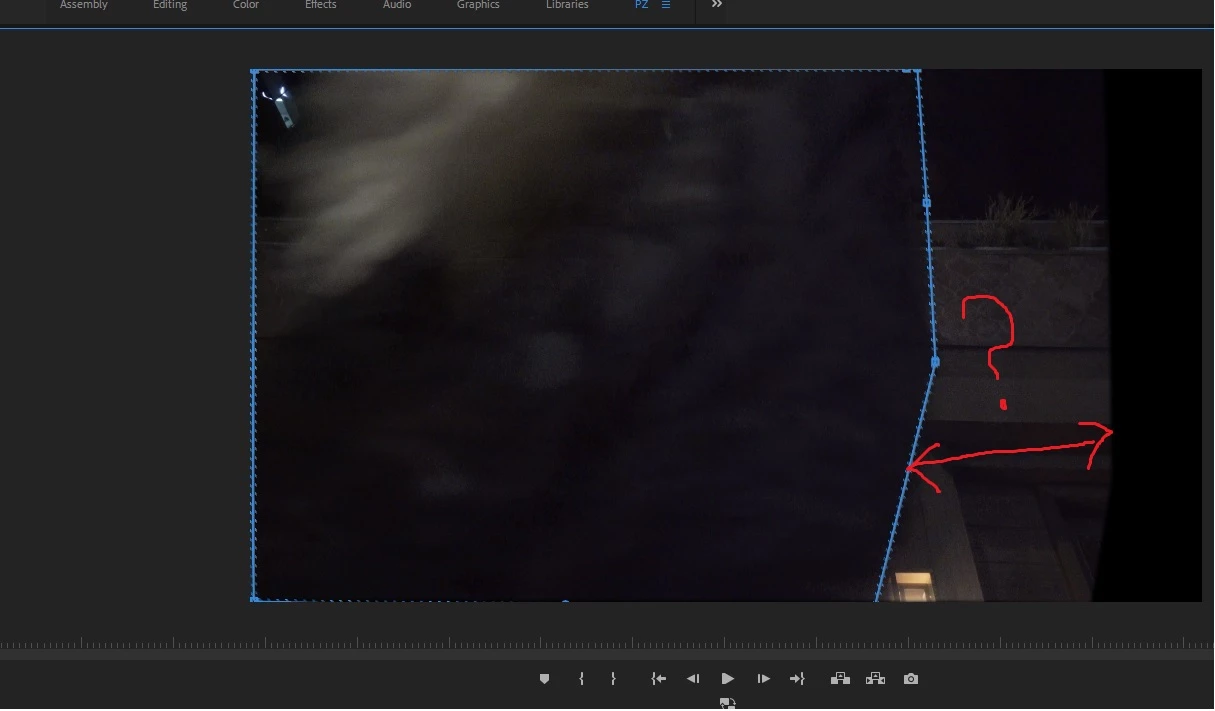
As you can see there's this weird gap between the mask area that I drew and the actual masked area. This is becoming a nightmare! I'm using the latest Premiere Pro 2018 verison.

Correct answer partnerss79277407

Are the Adjustment layer, media clip and sequence all the same resolution?


Nope. That was the problem. So sorry guys.
The clip was 1920 x 1080 but, for whatever reason, the adjustment layer was set at 1440 x 1080 by default. I hit 'scale to frame' on the adjustment layer and the masked area popped back to where it should be.
Thank you so so much. Really sorry to bug you guys with such a rookie mistake.

4 replies

Participant
October 16, 2020

I found out what was my problem at least. I don't think premiere likes masking and changing of speed in a clip. So I think you have to nest the clip before you add a mask. Worked for me anyways 🙂

R Neil Haugen
Legend
October 17, 2020

Yes, if you're changing speed/ramping/whatever and applying a mask, you need to nest the clip after whichever you do firts. It somehow separates the order of processing so Premiere gets it right.


Neil

Everyone's mileage always varies ...
Participant
February 6, 2020
I still haven't found a solution, as the exact same thing is happening to me, except I'm not even using an adjustment layer, I'm putting the mask right on the clip. I tried copying the mask to an adjustment layer instead and it still did it, even with the resolution set properly.
 
Participant
October 12, 2020

Hi there. Did you ever find a solution to your error? I'm also just applying a mask directly to a clip (no adjustment layer) and the mask is the wrong shape.

Ann Bens
Community Expert
Community Expert
March 4, 2018

Which property/effect is used for the mask?

Any other effects applied?

partnerss79277407
Participant
March 6, 2018

It's an opacity mask on an adjustment layer with one instance of Lumetri Color.
In the screenshot below, I've decreased exposure on the color adjustment in order to more clearly show where the affected area appears. It's inexplicably offset from the shape I've drawn. This is the case with every frame. The camera rotation and distance change rapidly in this shot which made the key-framing rather tedious so starting over is definitely a last resort.


Many thanks.

R Neil Haugen
Legend
March 6, 2018

Is there any resizing or scaling involved in this clip?

Neil

Everyone's mileage always varies ...
partnerss79277407
Participant
March 4, 2018

I've encountered the same (or very similar) problem. The masked area is offset and distorted from the actual path I drew. Did you ever figure out how to fix this?

Other masks are working just fine. I'm guessing it would work if I were to start over, but I'd really like to avoid completely redoing mine because it's a rather complex shot and took about an hour to keyframe.