Participant
September 25, 2019
Question

Measure Distance In Premiere Pro

  • September 25, 2019
  • 3 replies
  • 5087 views

I want to quickly measure the relative length of these two lines:
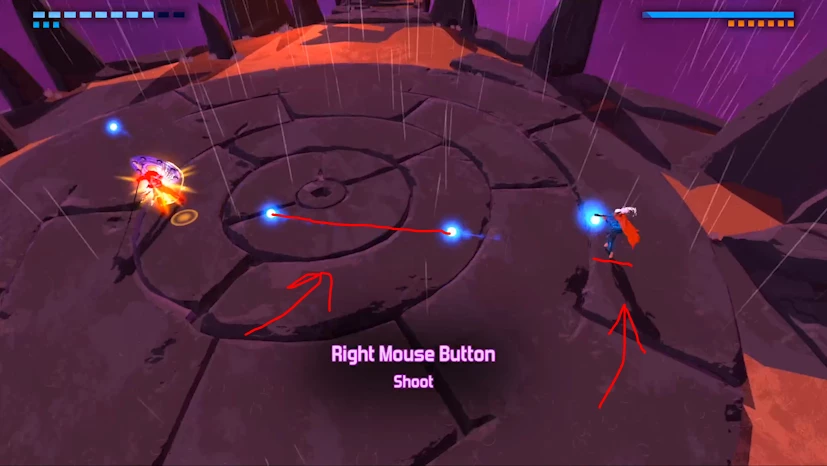


How do I do that?

    This topic has been closed for replies.

    3 replies

    Shivangi_Gupta
    Community Manager
    Community Manager
    September 28, 2019

    Hi there,


    I understand your point, however, as @BrandedChannels mentioned there is no feature in Premiere Pro to measure distance between two points. 

    You can use Ruler in Program monitor to do the task.


    Let us know if it helps.


    Thanks,

    Shivangi

    Community Expert
    September 25, 2019

    Maybe you would have to do a screenshot and this open it in Photoshop to make a measuring.

    Byron.
    Participant
    September 25, 2019
    You can calculate the distance in Photoshop? Can you tell me how, please?
    Community Expert
    September 25, 2019
    Richard van den Boogaard
    Community Expert
    Community Expert
    September 25, 2019

    There is no tool available for measuring other than calculating it with the help of Rulers in the Program Monitor inside PPro.


    Under the "+"-sign in the button bar of the Program Monitor you can now find the icons for Show Rulers / Show Guides. By dragging a few lines (hold while dragging will give you a pixel position on the canvas) you would be able to calculate how many pixels they are apart from each other.