
Exit
  • Global community
    • Language:
      • Deutsch
      • English
      • Español
      • Français
      • Português
  • 日本語コミュニティ
  • 한국 커뮤니티
0

Motion Tracking in Premiere Pro

New Here ,
Jan 02, 2020 Jan 02, 2020

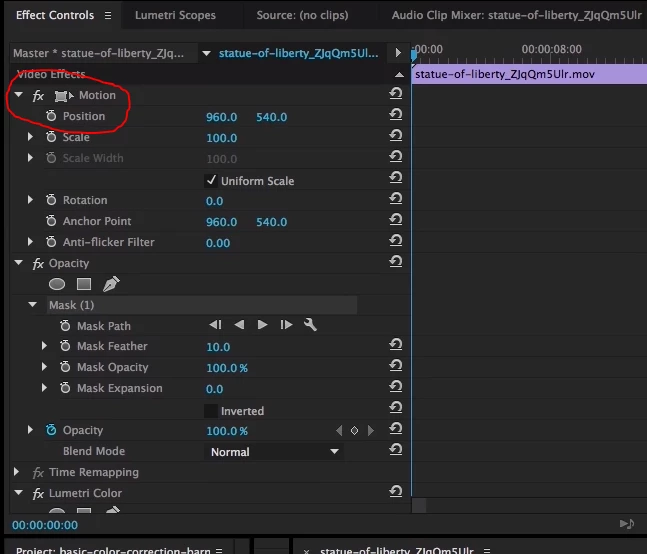
I was trying to figure out how to do motion tracking in premiere pro 2020, and the tutorials I was using all had a button i don't. Where do I get the button? Am I missing a package I need to download/buy?

Below is two images attached. One is of my screen where the button is not there, and the other is from a tutorial where the button is not missing. I want to make the camera follow a point, and also make an image follow a point later on. I've done this in other editing softwares, but Premiere pro is being a little tricky
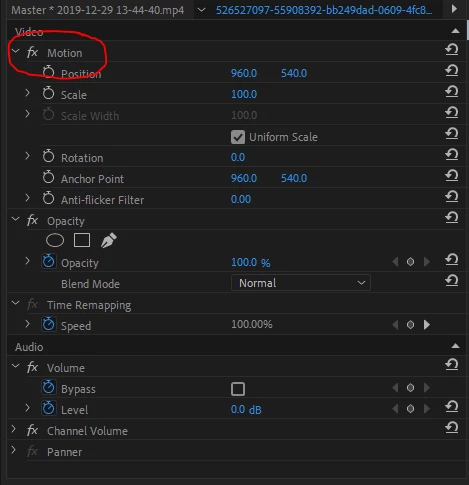
 

Missing button.PNG


button not missing.PNG


TOPICS
Error or problem , How to , User interface or workspaces
8.4K
Translate
Report
Community guidelines
Be kind and respectful, give credit to the original source of content, and search for duplicates before posting. Learn more
community guidelines
Community Expert ,
Jan 02, 2020 Jan 02, 2020

The second image is an old image.

Its the transform icon. It is not realy a button. Clicking on it produces the wireframe in the Program window.

In newer versions of Pr just highlight the word Motion.


Premiere does not have motion tracking.

Either have to do it manually or use Ae.

Translate
Report
Community guidelines
Be kind and respectful, give credit to the original source of content, and search for duplicates before posting. Learn more
community guidelines
New Here ,
Jan 02, 2020 Jan 02, 2020

What is the button I'm missing though? Everyone else I watch seem to have it

Translate
Report
Community guidelines
Be kind and respectful, give credit to the original source of content, and search for duplicates before posting. Learn more
community guidelines
Community Expert ,
Jan 02, 2020 Jan 02, 2020

There is no button missing.

Translate
Report
Community guidelines
Be kind and respectful, give credit to the original source of content, and search for duplicates before posting. Learn more
community guidelines
Community Expert ,
Jan 02, 2020 Jan 02, 2020

If you are watching tutorials you need to pay attention to the version they are using.

Things change over time.

Translate
Report
Community guidelines
Be kind and respectful, give credit to the original source of content, and search for duplicates before posting. Learn more
community guidelines
Community Expert ,
Jan 02, 2020 Jan 02, 2020
LATEST

afbeelding.png

Geussing this is what you call motion tracking (wireframe).

Translate
Report
Community guidelines
Be kind and respectful, give credit to the original source of content, and search for duplicates before posting. Learn more
community guidelines