
Participant
February 25, 2018
Answered

Move into Sync/Slip into Sync issues

  • February 25, 2018
  • 2 replies
  • 4908 views

I'm on Premiere Pro 12.01 and I'm trying to use the Move into Sync/Slip into Sync functionality. It is my understanding that I can right-click the red box that tells me that my video and audio are out of sync. i actually saw this happen once. Now when I right-click the red box, I can't get that sync menu back anymore.  I keep watching Lynda.com and she's able to do it! But she's on a slightly earlier version.  Maybe it's a bug? Maybe I have something selected that inhibits this functionality? Anyone have any ideas?

1. Put a sequence in the timeline that has the video and audio not synced.

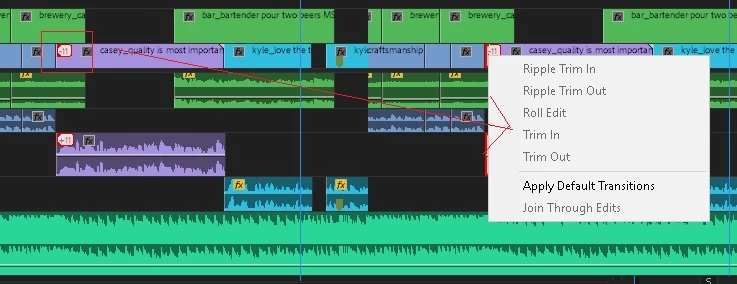
2. Right-click on the red box in the video, attempting to bring up the Move into Sync/Slip into Sync menu

3. Notice that a different menu comes up.

Thank you for any ideas and help you may have.

-Karin
This topic has been closed for replies.
Correct answer iamhammer42

Okay I got it. The clickable area for the move/slip into sync feature is not the box itself. It's the right side of the box, directly on the line. It's hard to actually get.

This may be a bug, if you expect the box itself to be the clickable area, but at least I can use the functionality.

Thanks!

-Karin

2 replies

iamhammer42AuthorCorrect answer
Participant
February 27, 2018

Okay I got it. The clickable area for the move/slip into sync feature is not the box itself. It's the right side of the box, directly on the line. It's hard to actually get.

This may be a bug, if you expect the box itself to be the clickable area, but at least I can use the functionality.

Thanks!

-Karin

Peru Bob
Community Expert
Community Expert
February 27, 2018
Peru Bob
Community Expert
Community Expert
February 26, 2018

Are you sure that you are clicking inside the box and not at the line where the clips join?

Participant
February 26, 2018

Oh yes, in the box, sides of the box, all over the box.