
December 20, 2020
Answered

MP4 AAC 5.1 Audio Edit

  • December 20, 2020
  • 2 replies
  • 3188 views

I,ve imported an MP4 with AAC 5.1 audio track and would like to just edit the volume of each of 6 audio tracks. 

When I extracted the audio track it showed up as 1 track so I guess the presets were off or something. I did try once before and the tracks appeared as separate 5.1 tracks. I'm a newbie withis particular program and it's quite a challenge for me to navigate the interface. If someone could help me to separate the audio tracks and then export the whole thing as MP4 it would be greatly appreciated.

Don
This topic has been closed for replies.
Correct answer Brandon Loshe

I would like to thank you very much for helping me through this. I'm a senior and sometimes learning apps that I haven't navigated through before can be challenging. I had all the changes I wanted to make to the audio files ready to go in Audacity but the export failed a few times before I attempted Premiere CS5. I've had this software for about 6 years and just never needed to use it before. This has also been a learning experience that at times such as this year, 2020 that is, can be a helpful distraction from all the negative events around us.

Thanks again,

Don 


Sure thing! Audio, especially 5.1, can be tricky. And yeah, 2020 is the perfect time to learn new skills like this.


Take care,

Brandon Loshe

2 replies

December 21, 2020


I simply want to export the MP4 with the edited AAC 5.1 track back in the container. I thought I was on the right path when I was able to extract the file as 6 separate channels (tracks?) ie: FL, FR, C, LFE, SL, SR as per AAC 5.1 format but when gain/normalize selected I noticed that all the tracks are exactly the same (6 master tracks) so I guess I should extract as the single master track and separate the channels from there? How? I just don’t know.

Thanks in advance,

Don


Sent from Mail for Windows 10


Edited by mod

Please do not quote the original message when replying by email, and turn off your signature block.


Brandon Loshe
Legend
December 21, 2020

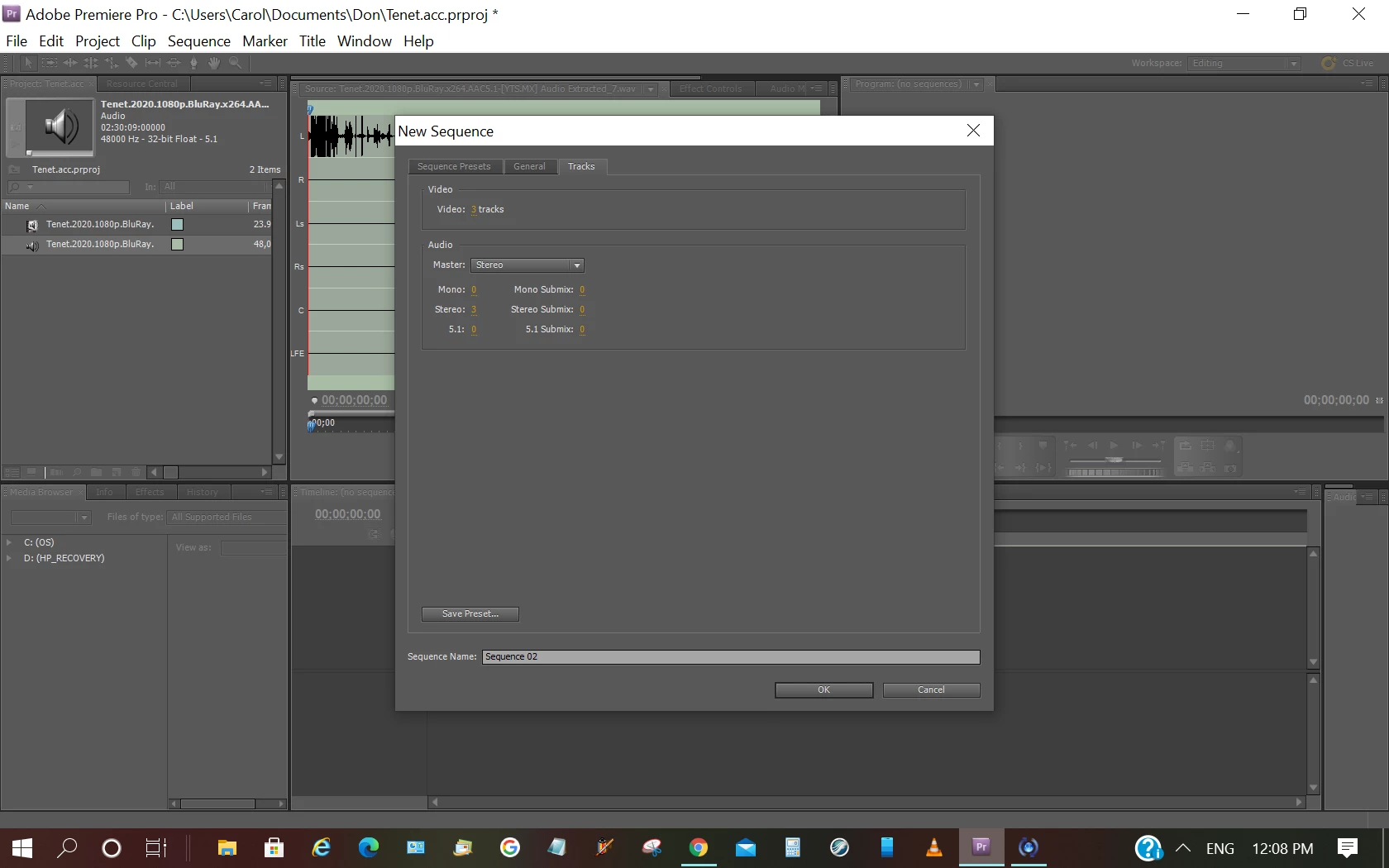
Can you share a screenshot of your audio export settings?

December 21, 2020

This is as is.

Brandon Loshe
Legend
December 21, 2020

Hi Don,

So when you create a new sequence, you can select mono or 5.1 for the master track. In this case, I don't think you would want Stereo as the master.


If you're just wanting an individual track as the final, you can select mono. Then when you bring in the track, you should get 5.1 (or 6 audio stems).


If you're still wanting to export 5.1 as one file, then you'll need to select 5.1 as your master track. Even if 5.1 is selected as your master track, you can still create a new mono track or 5.1 track. If you create 6 mono tracks and drop the 5.1 clip onto it, does it break into 6 different tracks?