
Exit
  • Global community
    • Language:
      • Deutsch
      • English
      • Español
      • Français
      • Português
  • 日本語コミュニティ
  • 한국 커뮤니티
0

My Undo/Redo has disappeared / shortcuts dead in Premiere CC 2018?!?!?!

New Here ,
Nov 04, 2017 Nov 04, 2017

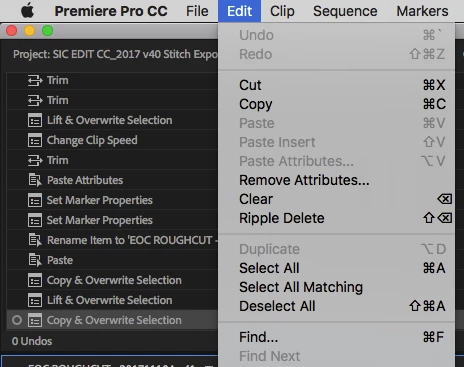
I've just updated to the new version of Premiere, and suddenly the Undo/Redo function and my shortcuts for them are dead / not working.

Even in the Edit drop-down list they are disabled...?!?!

Any help much appreciated! I'm a professional working in feature films, and I need to Undo/Redo constantly in my workflow.

Or am I now expected to click in the History window everytime I want to Undo something?!

Also in the History window (bottom left) it says "0 Undos"...?

Am I losing my mind?!
Screen Shot 2017-11-04 at 17.00.53.png

1.9K
Translate
Report
Community guidelines
Be kind and respectful, give credit to the original source of content, and search for duplicates before posting. Learn more
community guidelines

correct answers 1 Correct answer

LEGEND , Nov 04, 2017 Nov 04, 2017

First step when Premiere starts acting strange is to trash your preferences:

FAQ: How to reset preferences in Premiere Pro?

Since you are Mac based you can use Preference Manager (free) from Digital Rebellion to do the heavy lifting and also make a copy of your existing preference before you trash them in case you want to restore them:

Preference Manager - Digital Rebellion

MtD

Translate
LEGEND ,
Nov 04, 2017 Nov 04, 2017

First step when Premiere starts acting strange is to trash your preferences:

FAQ: How to reset preferences in Premiere Pro?

Since you are Mac based you can use Preference Manager (free) from Digital Rebellion to do the heavy lifting and also make a copy of your existing preference before you trash them in case you want to restore them:

Preference Manager - Digital Rebellion

MtD

Translate
Report
Community guidelines
Be kind and respectful, give credit to the original source of content, and search for duplicates before posting. Learn more
community guidelines
New Here ,
Nov 05, 2017 Nov 05, 2017
LATEST

Thanks Meg, it worked! You're an angel. My sanity is most most grateful!

Translate
Report
Community guidelines
Be kind and respectful, give credit to the original source of content, and search for duplicates before posting. Learn more
community guidelines