Participant
April 12, 2019
Resuelto

No audio in Premiere! HELP!

  • April 12, 2019
  • 13 respuestas
  • 8132 visualizaciones

Hello,

I'm having huge problem on Premiere cc 2019. I have no sound at all!

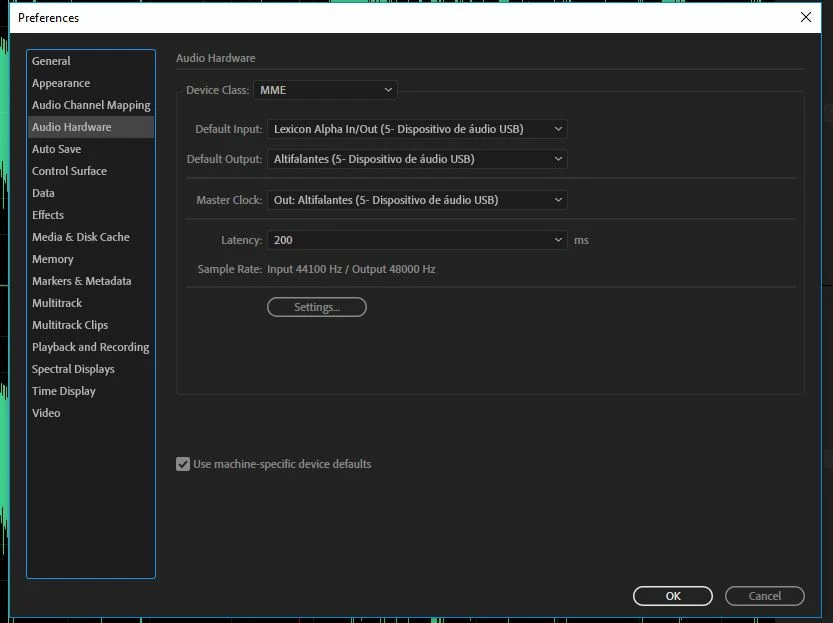
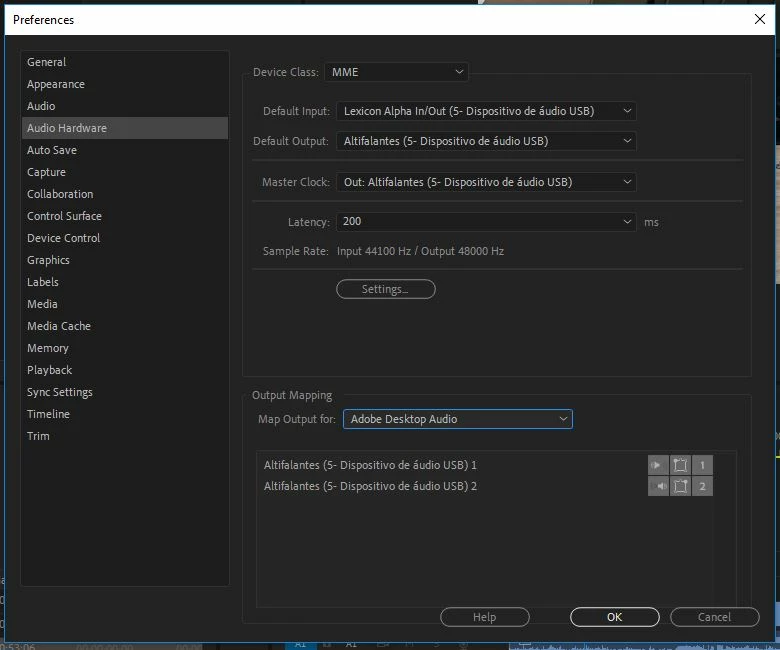
Checked hardware settings (the same as Audition, an in Audition same clip plays ok), reinstall app deleting prefs, cleared all cashes and peak files, changed device class from MME to ASIO an back,...

Nothing works!

Please help, I'm getting desperate!

Best regards,

Margarida
Este tema ha sido cerrado para respuestas.
Mejor respuesta de Vídeo FCdM

Hello,

We've finally found the problem!

It seems that the Newtek NDI Tools Adobe CC plugins (we tried versions 3.5, 3.6 and 3.8) interfere with Premiere Pro CC 2019 (with last updates).

We uninstalled only these plugins, leaving the remaining components of Newtek NDI tools, and got audio again on Premiere. We tested on three different PCs , including a laptop, and the result was always the same. 

So, bottom line, there is an compatibility issue with Newtek NDI Tools Adobe CC plugins!

We are going to contact Newtek guys to update them too on this matter.

We hope you can look into the problem also.

It's not a final solution, but it's something!

Best regards,

Margarida

13 respuestas

Participant
July 24, 2021

I am having this same problem... but can't even run the NDI installer to check if that's an issue.  I tried the other link (ALT + SHIFT) to clear cache and preferences, but it doesn't help either.  I was online with Adobe support for FOUR AND A HALF hours, while they remotely logged into my desktop and even uninstalled and reinstalled the whole Photoshop Suite.  I am in a band, and I can't edit our videos or make promotional videos if I can't hear us playing in the video editor!  Please please please someone help me with this!!!!

Participating Frequently
August 17, 2020

Thank you, I did run through that but still see the same behavior.


Premiere just wont play video.  You can shuffle the head back and forth, and the audio is fine.  Found that there was one other NDI bug report on it.


I also pulled the plugins as mentioned more recently, but now I have no video in adobe character. 

I tried to find older versions of NDI tools and cant find that either.  So I remain stuck 😕😕 

Participant
February 16, 2021

I am disheartened that it's now Feb 21 and I'm still having this issue too. Seems this thread has been open for ages. Did you resolve the issues with video and audio playback?

Participant
July 28, 2020

Hi Just found this post and its saved me after half a day of trying to get it to fix it! 


The KET thing to the fix which joshuak99192299 said is that you NEED to uninstall the NewTek ndi tools adobe cc plugins.

You can do this by getting the installer and unticking the box that say Adobe plugins.

Thank you joshuak99192299

You helped me out! 


Participating Frequently
August 11, 2020

Are there any fixes to this other than actually uninstalling the CC plugin?  I am trying to use animator, but I can't if every time I import a video to premiere I have to uninstall the plug in and then re-install to use animator.


ATaylorTCA
Participant
August 17, 2020

This worked for me. Definitely an NDI plugins issue.


NDI Adobe CC Plugin Audio Issue With Adobe Premiere

Some customers have reported an issue in which they lose audio within Adobe Premiere CC.  In most cases, the issue seemed to be resolved by clearing cache.  In a few instances, the customer needed to quit or uninstall the NewTek NDI Adobe CC Plugin to enable audio again. 

Here are instructions obtained online that show how to reset cache:

1) To reset preferences and plug-in cache at the same time, hold down Shift-Alt (Windows) or Shift-Option (Mac OS) while the application is starting.

2) Release the Shift-Alt keys or Shift-Option key when the splash screen appears.

3) You should receive a prompt asking you if you want to reset. Click OK. Relaunch the application.

For more information and resources direct from Adobe, please visit: https://forums.adobe.com/welcome


Current as of 7/30/2019


https://support.newtek.com/hc/en-us/articles/360033789453-NDI-Adobe-CC-Plugin-Audio-issue-with-Adobe-Premiere


lenscutter
Participant
June 18, 2020

Thank you! And, bless you!

JBCM Media Production
Participating Frequently
April 22, 2020

Thank you! Same thing happened to me NDI disabled my audio in Premiere Pro

Participant
May 10, 2021

instalei o NDI Premiere nao reconhece. Alguem pode me ajudar

Natzodesu
Participant
February 3, 2020

Thank you Margarida! Such a life saver!

Participant
October 3, 2019

Just in case anyone else runs across this. 

https://support.newtek.com/hc/en-us/articles/360033789453-NDI-Adobe-CC-Plugin-Audio-issue-with-Adobe-Premiere

If you need to find the plugins on a mac to delete them.  /Library/Application Support/Adobe/Common/Plug-ins/7.0/MediaCore  

JNCVIdeos
Participant
November 9, 2019

The tips and the link you sheared was fantastic. I have been having the same proble; I inported my videos and even with other projects that already had audio, and play them back just to see there was no audio coming out. The audio signal was there so I knew my clips had audio but not thru the speaker. I follow the steps on this link you sheared, and Booom", it was fixed. Thank you so much.

Participant
October 2, 2019

Sorry to pick up an old thread but I am getting deperate. How do you delete the plugins?  I can't find the Adobe CC plugins anywhere on my mac.  And NewTek doesn't seem to have any uninstall info in their forums or anywhere that I can find.  I have no audio output from premiere after installed their NDI tools.

MikeBarker
Participant
June 18, 2019

Margarida

Adding my thanks, as it's been driving me nuts also

Fortunately I'd kept 2018 on my machine so managed to keep on editing - but can try out those new features I've been reading about now!

May 12, 2019

Thank you Margarida, that worked for me perfectly!!! It was so weird as Premiere worked that morning, came back and started a new project in the afternoon and it was dead until I ran across this post!!! Thanks again!!!