
Participant
October 17, 2017
Answered

No Audio - Premiere Pro CC

  • October 17, 2017
  • 3 replies
  • 1821 views

I recently got back into editing in Adobe Premiere, but I can't seem to get any sound.

The audio waves are not showing, even though I've expaned the viewing window and selected "show audio waveform"

This is how it looks like now:
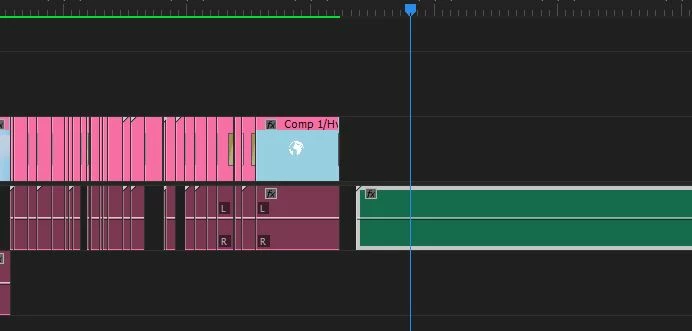
Anyone who can help?

This topic has been closed for replies.
Correct answer Peru Bob

Convert the mp3 to wav and then import into Premiere Pro.  MP3 files can behave strangely in Premiere Pro.

3 replies

kulpreet singh
Inspiring
October 17, 2017

Hi Eliseg96996216,

I am sorry that you are not able to see audio waveforms in Premiere Pro CC & getting no audio output.

  • What is the source of your media files?
  • Is this issue specific to a file/sequence/project?
  • Try cleaning the media cache and re-import files in a new project. FAQ: How to clean media cache files?

Let me know if that helps.

Thanks,

Kulpreet Singh

Participant
October 18, 2017

Hello,

The video files in the project are After Effects Compositions and the Audio file is a song from ITunes (MP3)

The issue is not specific to this sequence or project as I’ve tried to re-import the files in new projects. I can’t get the sound to work or the audio waves to show at all.

I’ve checked the “Show audio waveforms”, rendered the Audio and cleaned the media cache both within the project and manually deleted the files. I re-imported the files in a new project but yet, there is no sound..

Peru Bob
Community Expert
Peru BobCommunity ExpertCorrect answer
Community Expert
October 18, 2017

Convert the mp3 to wav and then import into Premiere Pro.  MP3 files can behave strangely in Premiere Pro.

Peru Bob
Community Expert
Community Expert
October 17, 2017

Sequence > Render audio

Community Expert
October 17, 2017

You may want to click on the wrench in the timeline (settings) and check “show audio waveforms”