istanbouly
Participating Frequently
April 22, 2017
解決済み

Obs exported files to premiere gives poor quality

  • April 22, 2017
  • 返信数 1.
  • 3737 ビュー

Hello when I import an obs recorded video to premiere and edit it then export it the resolution of the final video will be bad I tried to export using different extensions

the obs recorded files are in mp4 format when I import them to premiere and then export them they give me bad resolution please help what to do.

Thanks in advance.
このトピックへの返信は締め切られました。
解決に役立った回答 R Neil Haugen

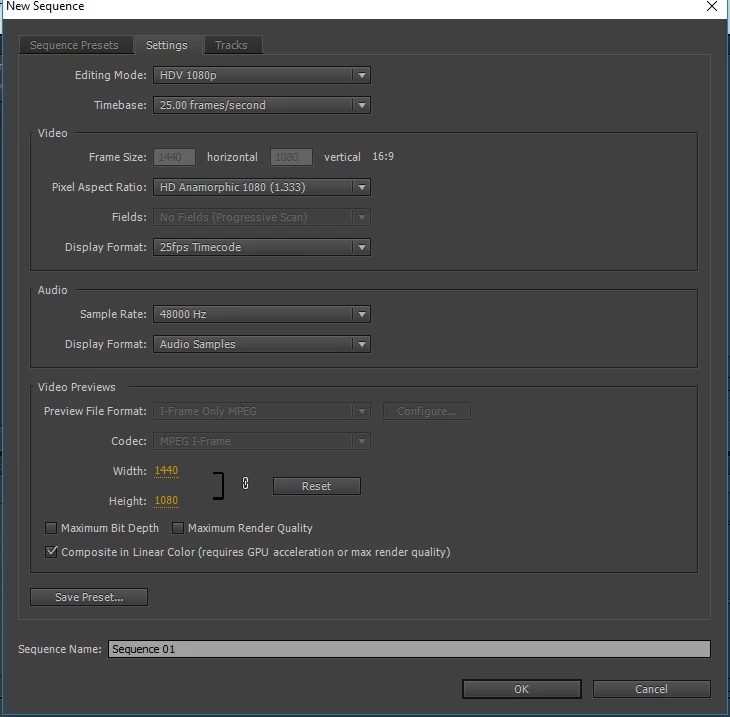
for the presets I didn't mess with anything here are some more screen shots that could be helpful


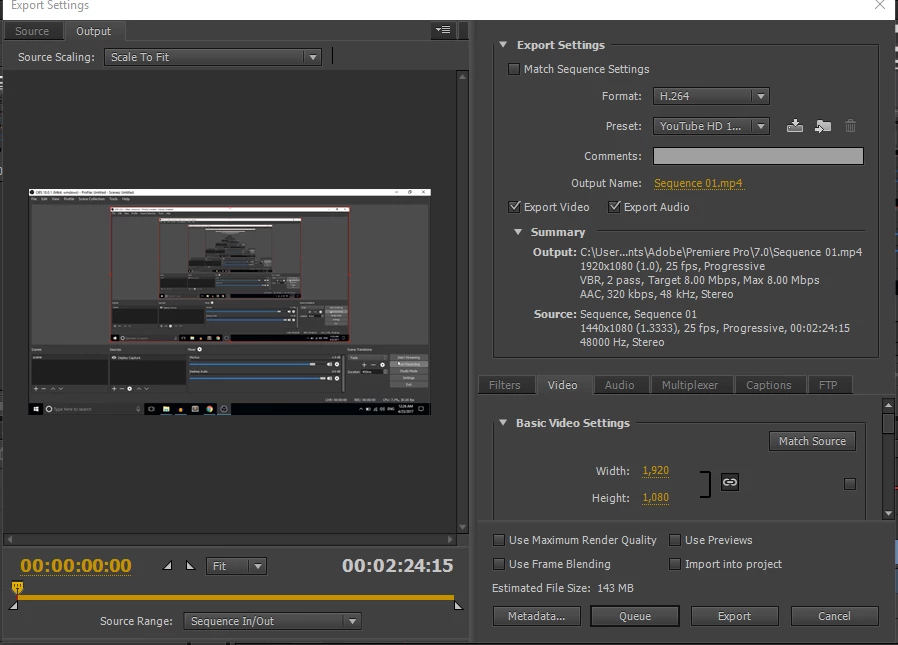
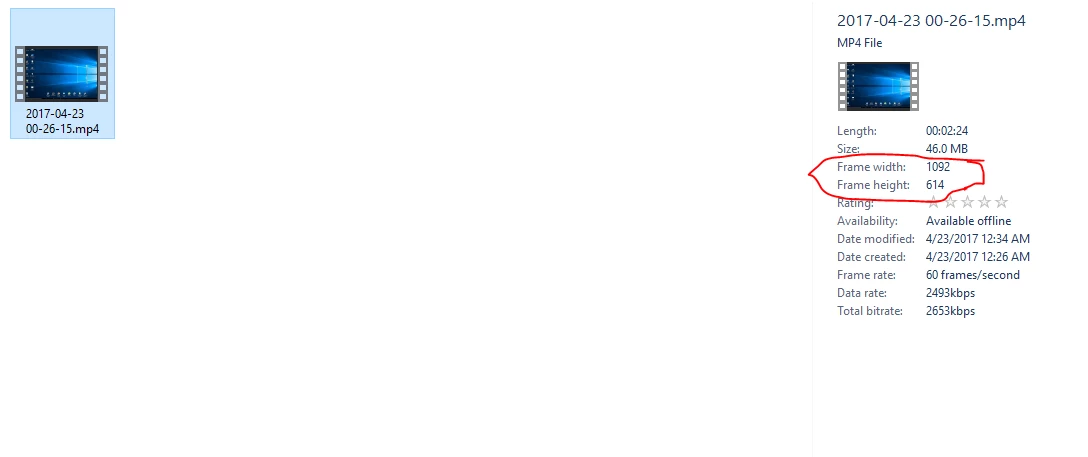
So ... you've got 1092x614 media, worked on a 1440x1080 sequence, exported to 1920x1080 with a very low 8Mbps bitrate.

Is "Scale to frame size" set as a default in your Edit/Preferences/Media tab? If so, un-check it.

And a screen grab of what this looks like in the Program monitor and after export would be good. I'd like to see if you're maintaining the aspect ratio of the original, or what ...

Neil

返信数 1

R Neil Haugen
Legend
April 22, 2017

What are the frame-sizes of the files you're creating in OBS? In PrPro's Project panel, go to list view, and see what frame size is listed for the media.

What are the sequence settings you're getting in PrPro? Show a screen grab of your sequence settings dialog box in your reply, using the little flower-looking icon in the middle of the formatting bar of the reply box.

And of course, what are your export settings? Again, give a screen grab.

Neil

Everyone's mileage always varies ...
istanbouly
istanbouly作成者
Participating Frequently
April 22, 2017

here is the settings in obs

here is the sequence settings in premiere

here is the media metadata in premiere

here is the export settings in premiere

Hope this help

R Neil Haugen
Legend
April 22, 2017

Unfortunately, as you showed your selection list, not the final settings ... I can't see what the actual data is showing in the Export dialog box for frame size of the export. I can of course see the YouTube preset you're using, but can't tell if you left it at it's normal settings or futzed with anything.

You show a sequence preset panel, but I requested the Sequence/Settings dialog box which shows the specific settings of the sequence as-is with media in place. They're not the same thing.

The OBS settings box doesn't tell me the frame-size, that I'd asked for. The Project panel list shows a section with the frame size of the media, but by going to the Metadata panel and showing the section you did, you show the frame-rate but not the frame-size that I'd asked for.

It looks like it might be 1092x614, from what I can see "looking around" the drop-down list in the way.

So ... I'm still needing information. What is the frame-size of the original media. What are the sequence settings of the media ... not the preset used. And what were the final settings of the Export dialog box after you made all the settings choices, without any drop-down lists covering up the used settings.

Neil

Everyone's mileage always varies ...