
Participant
December 13, 2016
Answered

Panorama Cropping in Adobe Premiere?

  • December 13, 2016
  • 2 replies
  • 1344 views

Hey Guys,

I worked with Sony Vegas Pro 13 for a while and switched now to Adobe Premiere. However I miss one important function: In Sony Vegas it was called "Panorama Cropping". You can include movement into your videos with this tool and it was really important for me as I created montage videos which need this tool a lot. For example I could make a huge zoom in with setting certain keypoints to make the timing perfectly.

So my question is, Is there any similar option/tool like Panorama Cropping in Adobe Premiere?

I hope you could give me a fast answer.

Greetings.
This topic has been closed for replies.
Correct answer R Neil Haugen

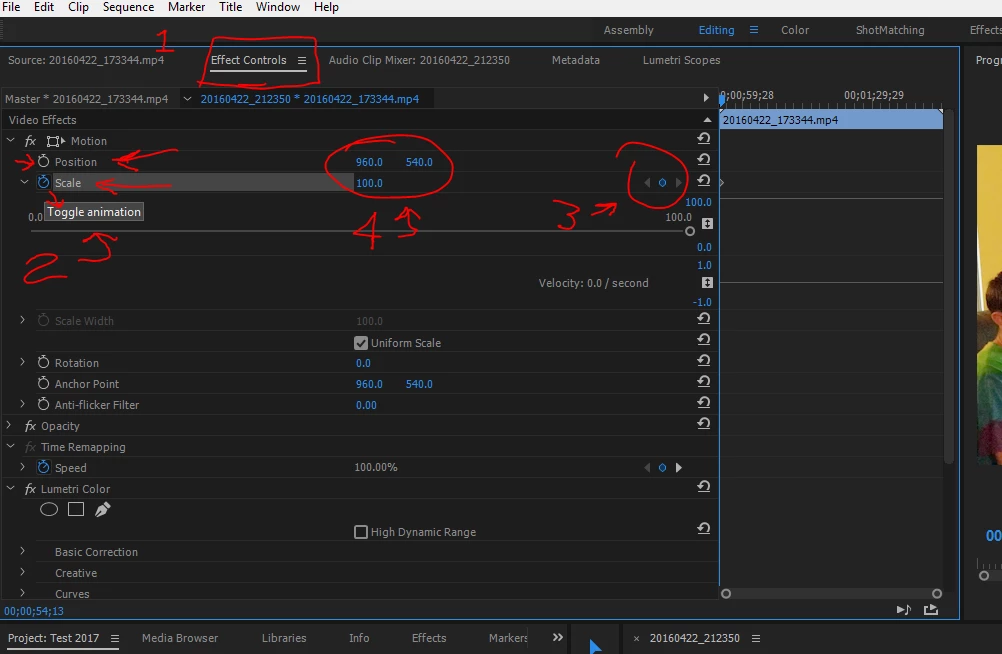
Have you tried the Motion Effects controls in the Effects Control panel, as shown below?

In the Editing space, the ECP should be a tab in the upper left quadrant as here ... twirling down the arrow by "Motion" gets these options. By the red 2 above, you turn on key-framing via clicking on the little stop-watch icons. Over at red 3, you can set and navigate between key-frames ... and at red 4, are the settings for zoom and position ...

Neil

2 replies

Participant
December 13, 2016

Thank you very much! This is what I was looking for.

R Neil Haugen
Legend
December 13, 2016

Glad to be of help ...

Neil

Everyone's mileage always varies ...
R Neil Haugen
R Neil HaugenCorrect answer
Legend
December 13, 2016

Have you tried the Motion Effects controls in the Effects Control panel, as shown below?

In the Editing space, the ECP should be a tab in the upper left quadrant as here ... twirling down the arrow by "Motion" gets these options. By the red 2 above, you turn on key-framing via clicking on the little stop-watch icons. Over at red 3, you can set and navigate between key-frames ... and at red 4, are the settings for zoom and position ...

Neil

Everyone's mileage always varies ...