
armins19226229
Participant
September 26, 2017
Answered

Possible to preview VR video on HMD while editing?

  • September 26, 2017
  • 5 replies
  • 1295 views

Hi, I'm editing some VR footage and I was wondering if it was possible to view the program monitor source in my oculus headset?
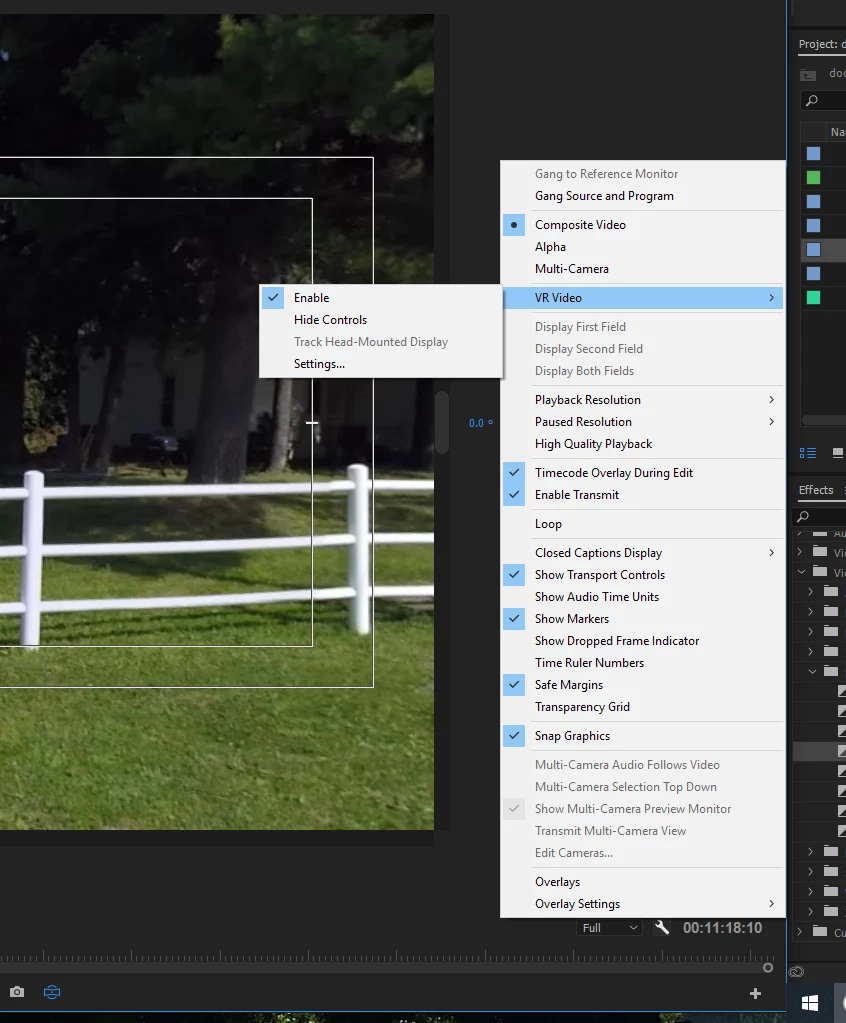
This is what I get if I try to enable track head mounted display. We have the Mettle suite, is this something that we need to purchase separately to be able to do maybe, or is it a setting I'm just not selecting in Premiere?

The VR properties are coming up correctly in the sequence. Equirectangular and monoscopic.

Thank you!!

Lauren

    This topic has been closed for replies.
    Correct answer Rameez_Khan

    Hi Lauren,

    Are you looking for something like this at 0:32? What's New in Premiere Pro (Coming Soon) | Adobe Creative Cloud

    Thanks,

    Rameez

    5 replies

    Participant
    February 19, 2018

    Has the situation changed now that Adobe has integrated Skybox plugins? I've seen a number of articles saying that you can link an HMD but no instructions on how to do it. Does it support Samsung VR headsets for example? In the adobe VR workflow page, it talks about Tracking HMD only being available with third-party plugins such as mettle enabled. That surely can't be the case if the plugins are integrated into premiere now.

    jasontcox
    Inspiring
    September 27, 2017

    As Stan said, with the current state of Premiere Pro 2017, yes you need the Mettle plug in, but Lauren said she had already downloaded the Mettle suite so I assumed she had it. Usually also a Mettle window pops up upon starting Premiere if I remember correct. But as Rameez hinted at, with the upcoming 2018 release, this capability will be built in!

    Stan Jones
    Community Expert
    Community Expert
    September 27, 2017

    See the Mettle tutorials here:

    360/VR Master Series: 360 Post-Production Tutorial Series | Mettle

    Pick Chapter 2.5. According to this, headset access is through the VR player and not available through PR without a plugin. I wonder if that is changing with the spot that Rameez points to. I suspect your "Track head-mounted" is greyed out because the VR player is not open.

    I have not tried setting up my headset yet. Jason, are you using this? I'm curious as to whether it will work with the type that have a smart phone mounted.

    Rameez_Khan
    Rameez_KhanCorrect answer
    Legend
    September 27, 2017

    Hi Lauren,

    Are you looking for something like this at 0:32? What's New in Premiere Pro (Coming Soon) | Adobe Creative Cloud

    Thanks,

    Rameez

    jasontcox
    Inspiring
    September 27, 2017

    Have you gone to Preferences-> Playback and selected the Oculus under Video Playback?