

MyerPj
Community Expert
Community Expert
April 7, 2019
Answered

PP 2019 - Making Proxies - Runs Well wTask Manager

  • April 7, 2019
  • 1 reply
  • 2081 views

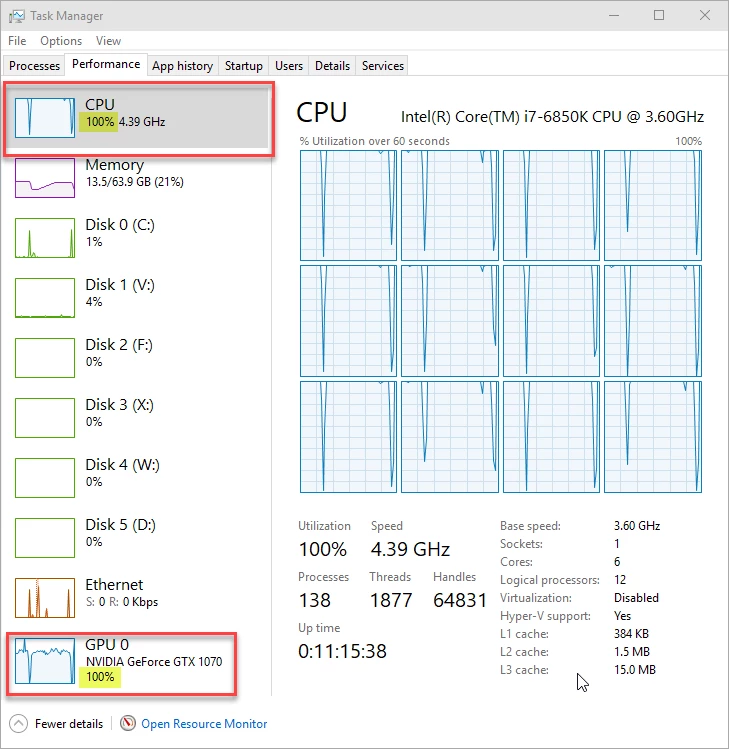
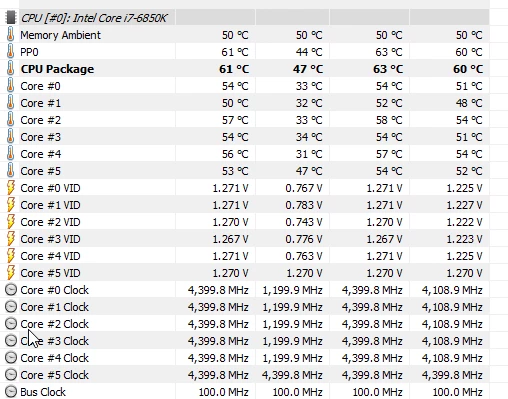
I like making proxies actually. It's a good chance to see the system running at full tilt! This is when running 13.1.0, but it did the same thing in 13.0 and all versions of cc2018 12.x. This is while making 720p Cineform proxies from UHD 4k Sony XAVC 100Mb/s
    This topic has been closed for replies.
    Correct answer MyerPj

    Here's a few helpful websites to reduce the number of process you have running.

    These two are the most helpful, but unfortunately Black Viper has stopped updating his profiles. Still the last ones are there and they can be used to get you going. MadBomb's program puts a GUI to Black Vipers script.

    Black Viper's Windows 10 Service Configurations | Black Viper | www.blackviper.com

    madbomb122 · GitHub

    http://www.blackviper.com/service-configurations/black-vipers-windows-10-service-configurations/

    A useful utility to close down some of the Windows Telemetry

    O&O ShutUp10

    Nvidia tracks users info also, here's how you can get rid of parts of it

    Software to disable Nvidia Telemetry - gHacks Tech News

    You actually may need need to install only the Nvidia driver and none of the other items.

    Make sure you only install Nvidia drivers you need - gHacks Tech News

    1 reply

    MyerPj
    Community Expert
    MyerPjCommunity ExpertAuthor
    Community Expert
    April 13, 2019

    Here's a shot making proxies from HD content (above was from UHD). You can see the GPU load is lighter. Also, note the Processes. If you have much more you could need to optimize your OS. I had a bunch of things running above. Only below was media encoder, task manager and SnagIt, both SnagIt screen capture utitilty and it's editor. so it's down to 113 without those.

    MyerPj
    Community Expert
    MyerPjCommunity ExpertAuthorCorrect answer
    Community Expert
    June 18, 2019

    Here's a few helpful websites to reduce the number of process you have running.

    These two are the most helpful, but unfortunately Black Viper has stopped updating his profiles. Still the last ones are there and they can be used to get you going. MadBomb's program puts a GUI to Black Vipers script.

    Black Viper's Windows 10 Service Configurations | Black Viper | www.blackviper.com

    madbomb122 · GitHub

    http://www.blackviper.com/service-configurations/black-vipers-windows-10-service-configurations/

    A useful utility to close down some of the Windows Telemetry

    O&O ShutUp10

    Nvidia tracks users info also, here's how you can get rid of parts of it

    Software to disable Nvidia Telemetry - gHacks Tech News

    You actually may need need to install only the Nvidia driver and none of the other items.

    Make sure you only install Nvidia drivers you need - gHacks Tech News