
Exit
  • Global community
    • Language:
      • Deutsch
      • English
      • Español
      • Français
      • Português
  • 日本語コミュニティ
  • 한국 커뮤니티
0

Premier Pro CS4 protected by PACE iLok

Guest
Apr 02, 2020 Apr 02, 2020

Hi,


I've haven't used Premier pro CS4 for a while and when I've come back to it it's forcing me to attempt to purchase a license. It forces me to add my name and email address before wanting an iLok to be put into the machine with this error:
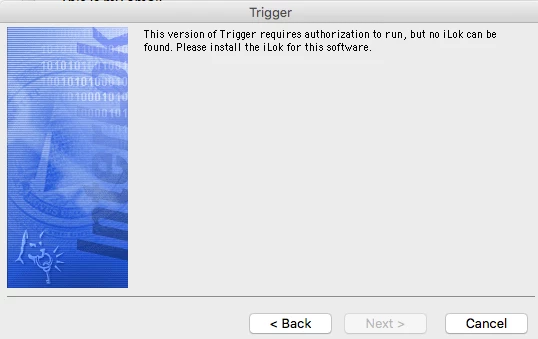
Screen Shot 2020-04-02 at 13.33.06.png

I add the iLok to the machine but then I'm presented with this error instead:
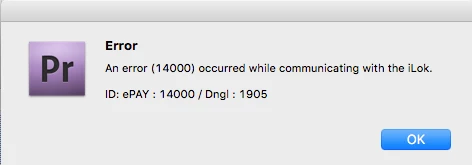
Screen Shot 2020-04-02 at 13.34.08.png

As far as I'm aware the CS4 package never required an iLok for licensing. All others in the package work fine. Anyone any ideas what to do?

Macbook pro 13" mid 2012 running 10.13.4.

TOPICS
Error or problem
775
Translate
Report
Community guidelines
Be kind and respectful, give credit to the original source of content, and search for duplicates before posting. Learn more
community guidelines
Community Expert ,
Apr 02, 2020 Apr 02, 2020

Try removing this Pace ilok from your machine.

Translate
Report
Community guidelines
Be kind and respectful, give credit to the original source of content, and search for duplicates before posting. Learn more
community guidelines
Guest
Apr 02, 2020 Apr 02, 2020

If you remove the iLok you just end back up at at the first menu and no chance to continue.

Translate
Report
Community guidelines
Be kind and respectful, give credit to the original source of content, and search for duplicates before posting. Learn more
community guidelines
Community Expert ,
Apr 02, 2020 Apr 02, 2020
LATEST

This trigger thing is no part of CS4.

Remove this also.

Translate
Report
Community guidelines
Be kind and respectful, give credit to the original source of content, and search for duplicates before posting. Learn more
community guidelines