


chriso59575957
Participant
August 5, 2019
Question

Premiere Pro CC 2019 encoding issue

  • August 5, 2019
  • 1 reply
  • 519 views

Hello all,

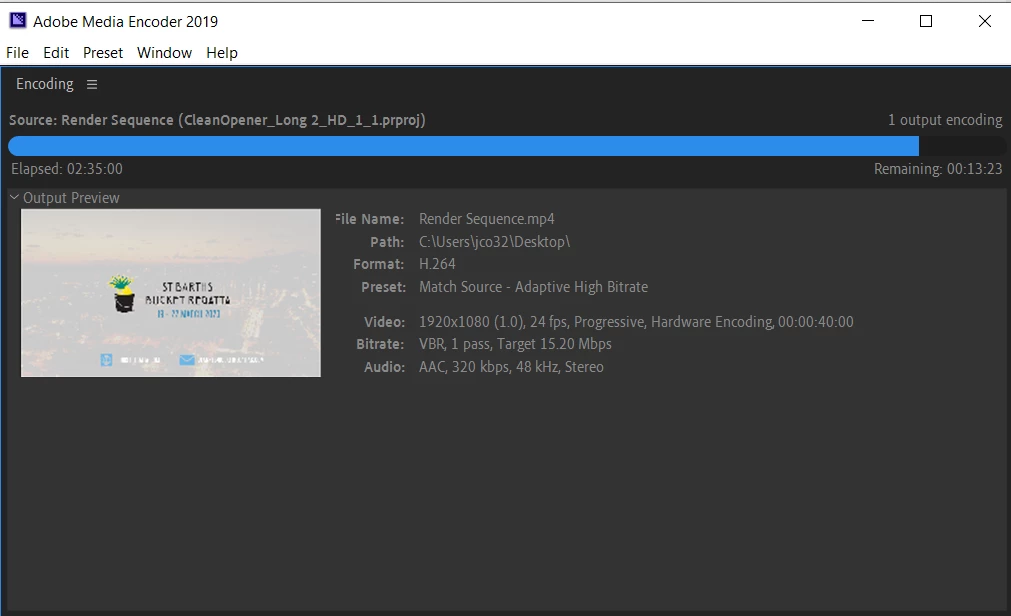
Can someone here help me figure out why my encodes are taking forever? See the screenshot...

Over 2 hours to encode a HD :40 sec clip with minimal effects should not this long. I have spent almost two days trying to figure out why this may be happening. Everything is up to date. I am on an 6th gen i7 with 16GB of RAM, SSD HD and a nVidia geforce gtx 960m video card, CUDA acceleration is selected. All in all, I know that my laptop is a bit out of date BUT, the encode should NOT TAKE THIS LONG!!!

Everything was fine on 2018 but this project was started on 2019 so Im stuck here. Anyone have any insights? I was leaning towards the issue being with my laptop but as I mentioned, while its not top of the line, its def should be powerful enough to export a :40sec HD video in less than 2 hours!

Help please.
This topic has been closed for replies.

1 reply

Legend
August 5, 2019

I agree that seems a bit long for a 1-pass on a 40 second clip, especially as you say if effects are minimal - that said I have no base of reference with your specifications so to speak.

For the sake of experimentation, does switching to Software Encoding (since I see you have Hardware Encoding enabled) make it faster at all? If so, I wonder if your GPU drivers need to be updated. When was the last time you updated your GPU drivers?

Also, do you have Render at Maximum Depth and Use Maximum Render Quality enabled? If so, maybe assess if you actually would see any real benefit from using them given the source material and what you are encoding. Disabling them would reduce render time.

chriso59575957
Participant
August 5, 2019

All of my drivers are the latest as I spent almost a whole day updating everything to figure out if that was part of the issue.

I will try your suggestion of using the software render and also try the OpenCL to see if those are any better or worse.