
Participant
January 31, 2017
Answered

Premiere Pro - Crop is transparent, not black

  • January 31, 2017
  • 1 reply
  • 8599 views

I dropped an adjustment layer on top of my video (sequence Canon 1080p 24fps, automatically adjusted for DJI Phantom 4 4K 24fps) and cropped top and bottom part 12% but it does not show black bars, it is transparent. I tried to put black matte under the video sequence, but crop is still present as transparent. I also tried to crop video directly, but same result.

Would there be any setting that can change crop from transparent to black? Or maybe there is another way to make anamorphic screen..

It seems like only I have this problem.

[Here is the list of all Adobe forums... https://forums.adobe.com/welcome]

[Moved from generic Cloud/Setup forum to specific Program forum... Mod]
This topic has been closed for replies.
Correct answer Meg The Dog

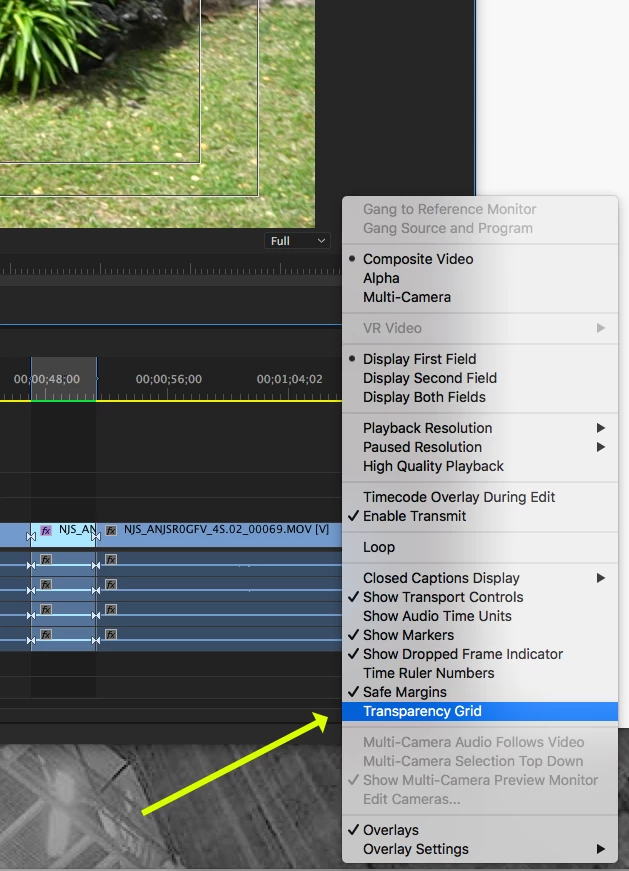
Click the wrench in the lower right of the Program Monitor and UNCHECK "Transparency Grid"

MtD

1 reply

Legend
January 31, 2017

The default "background" is nothing.  Black shows only because you can't actually show transparent on a computer screen, revealing the wall behind your monitor.  So when you crop, you see whatever is behind.

If you want black, you need actual black.

The easier method is to just change the sequence settings to the aspect you want, rather than adding black bars top and bottom.  I often edit in a 1920 x 800 sequence to achieve a 2.40 aspect ratio.

Participant
January 31, 2017

JIm_Simon, thank you for your reply.

How would I be able to change the default background to black?

I wanted to preview the footage with black bars, I understand, even though I did not try, these transparent bars should become black after I render the video.

This method of editing in 1920x800 sequence works too, but I wanted to have something not invasive so I can just "flip the switch" and also have the preview with black bars. 

Meg The DogCorrect answer
Inspiring
February 1, 2017

Click the wrench in the lower right of the Program Monitor and UNCHECK "Transparency Grid"

MtD