
Inspiring
April 4, 2019
Answered

Premiere Pro going slow for no reason, 14 core system 64gb ram

  • April 4, 2019
  • 3 replies
  • 3306 views

Premiere Pro started going SLOW a few days ago. I've tried uninstalling, and reinstalling. I updated to the newest version, i've tried old versions.

I have uninstalled and reinstalled the Geoforce 1080 Ti driver (clean) I have the i9 7940 chip, and 64 gb ram.

Literally a few days ago it just started going slow. I had not updated anything.

I have a deadline (of course) in a few days and my computer lags even on proxies. PLEASE HELP
This topic has been closed for replies.
Correct answer HifiDiaries

SOLVED:

With the new update to premiere, it seems to have reset or "disconnected" the graphics card. I could watch my CPU and card live monitor and see the card not doing much if anything at all. So I did 2 things:

I powered down, unplugged the card and cleaned, then put back in. The machine is pretty new, but who knows.

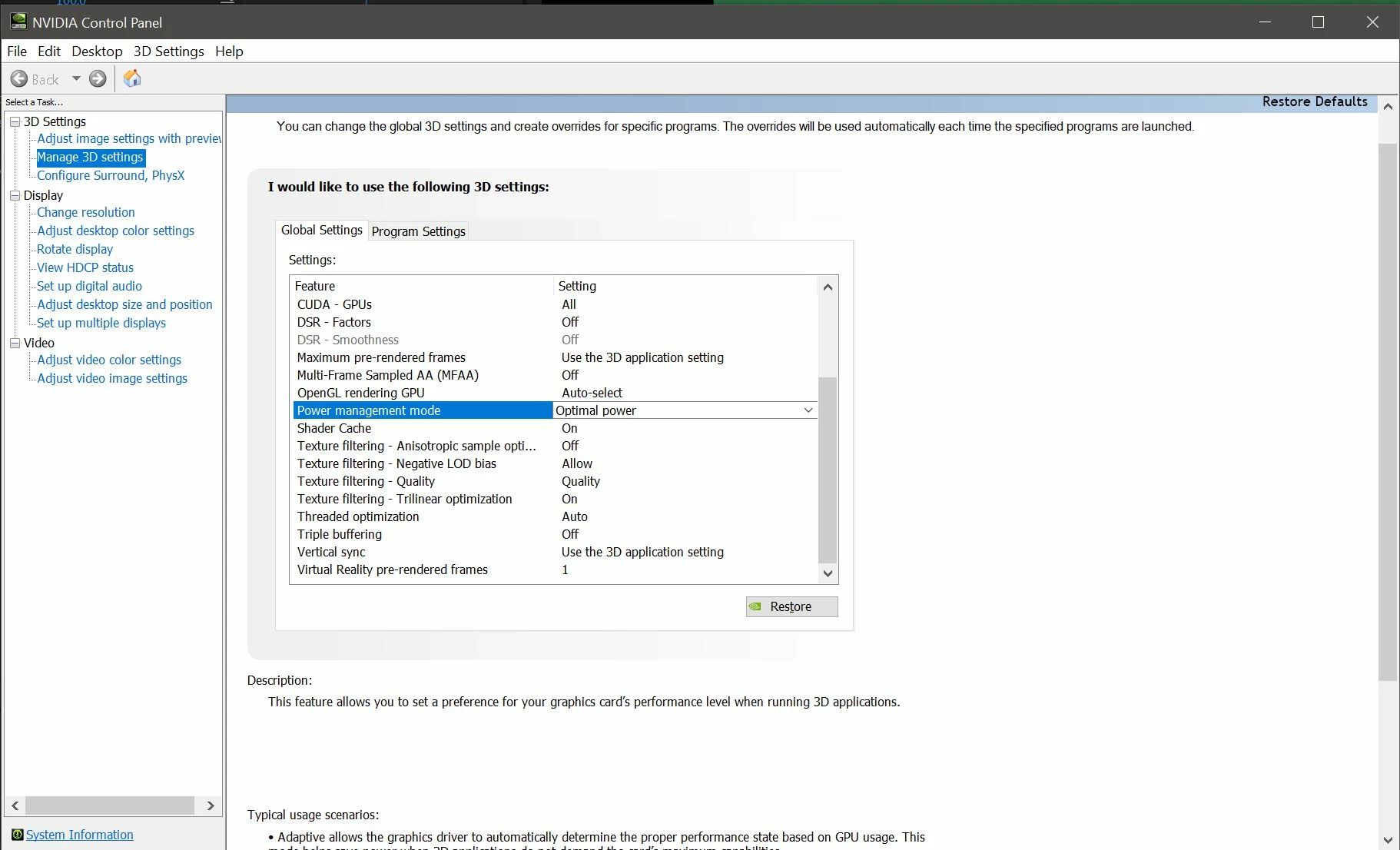
The second thing I did was I noticed these settings were changed. I turned Power management to Optimal power, it was on adaptive (the main issue, the new Premiere - I think - isn't turning it on. So crank it up. And 2nd, Vertical sync i turned off, reset computer, and back on.

It's back to normal on the newest version of Premiere.

And I went into

3 replies

HifiDiariesAuthorCorrect answer
Inspiring
April 5, 2019

SOLVED:

With the new update to premiere, it seems to have reset or "disconnected" the graphics card. I could watch my CPU and card live monitor and see the card not doing much if anything at all. So I did 2 things:

I powered down, unplugged the card and cleaned, then put back in. The machine is pretty new, but who knows.

The second thing I did was I noticed these settings were changed. I turned Power management to Optimal power, it was on adaptive (the main issue, the new Premiere - I think - isn't turning it on. So crank it up. And 2nd, Vertical sync i turned off, reset computer, and back on.

It's back to normal on the newest version of Premiere.

And I went into

Inspiring
April 4, 2019

Is this slowness on one project or all and any projects? 

If on one project, or some projects, but not all:  You may have corrupted preferences, footage, project, sequence, or plug-in instance.  Any of those can cause slowness, or worse.  Tracking down the culprit is usually a matter of search and destroy:  eliminating each suspect one by one.

If on any and all projects, even brand new simple ones and with different versions of Pr, that suggests the issue is with your OS or hardware.

Inspiring
April 5, 2019

Hi Jim, It's on all projects.

I can open After Effects with a 8k raw file, key it, track it, and color it with no problems, machine works as normal.

I can then open Premiere (any version) and have it stuttering with a proxy.

Wes Howell
Adobe Employee
Adobe Employee
April 5, 2019

Troubleshooting over a thread can be tricky. I'd love to see you get this issue resoled quickly.

Sorry if some of my replies have been delayed - things are a bit crazy pre-NAB and post ship.

Have you tried Adobe support?  Are you open to giving this a shot?

Did you manually find your media cache folders and delete them in full?

Have you disconnected the proxies?  How are things working with other media?

If you want to continue to try to resolve via this thread, can you provide more details on exactly what is slow? How slow, etc?

Would be great to understand as much about the problem as possible.

You can open a case with support via call or chat at this link: https://helpx.adobe.com/contact.html

Wes Howell
Adobe Employee
Adobe Employee
April 4, 2019

When did the slowdown start happening?

Did you install any new plugins, panels or 3rd party software?

Was there anything else that changed before the slowdown occurred?

Inspiring
April 4, 2019

Hey Wes! I have not installed any new plugins for Premiere - but i'd be happy to try wiping clean?

I installed plexus for After Effects a few weeks back.

I will do anything to have this working.