
Participating Frequently
February 23, 2018
Question

Premiere Pro Issue With Editing Sound inside Audition

  • February 23, 2018
  • 2 replies
  • 602 views

If I try and edit a sound file in premiere pro to edit it in audition - Premiere pro seems to not let the audio run.

if I go >> "Edit Clip in Adobe Audition"

So it processes >> "Render and replace"

Then I get a warning >> "Audition has detected a problem with the current audio hardware settings".
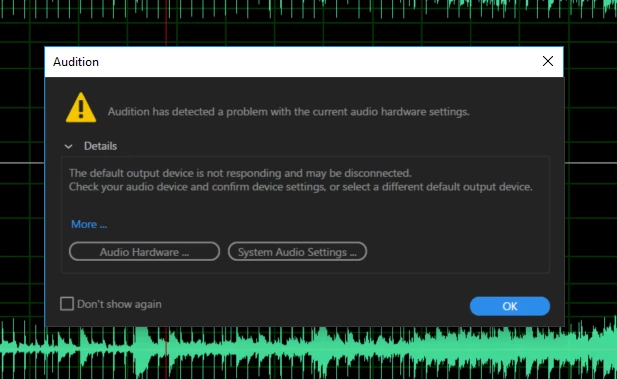
(The hardware settings are as they always are I believe).
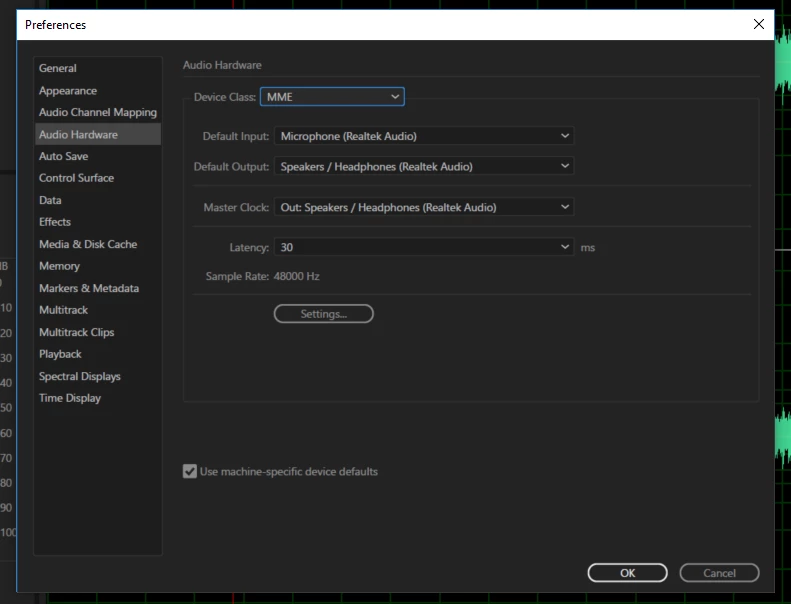
Currently I have to close down premier pro if I want to use audition to edit the sound file which means I have lost this functionality. 

Anyone suggestions?

Thanks

This topic has been closed for replies.

2 replies

Legend
February 23, 2018

Try setting Default Input to None.

R Neil Haugen
Legend
February 23, 2018

What other output options do you have?

Neil

Everyone's mileage always varies ...
Participating Frequently
February 23, 2018

Hi Neil - not sure I understand what you mean (sorry). Can you elaborate please? many thanks!

R Neil Haugen
Legend
February 23, 2018

The warning is for the Audio hardware output ... what other options do you have for audio hardware output? And as Jim suggests, often setting Default Input to "none" clears up audio issues.

Neil

Everyone's mileage always varies ...