Participant
November 24, 2020
Répondu

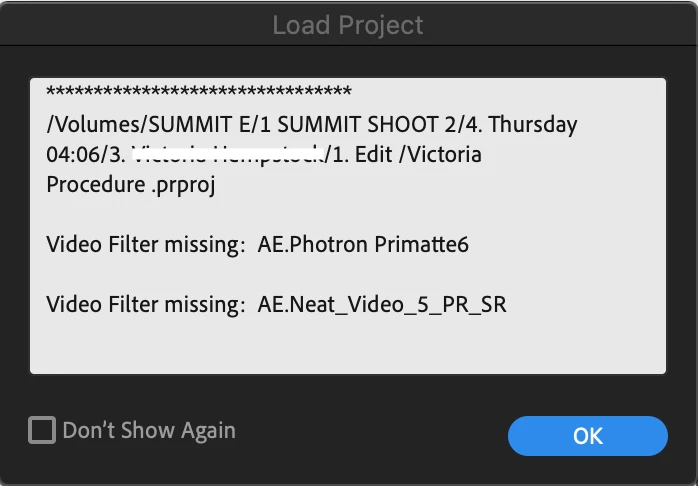
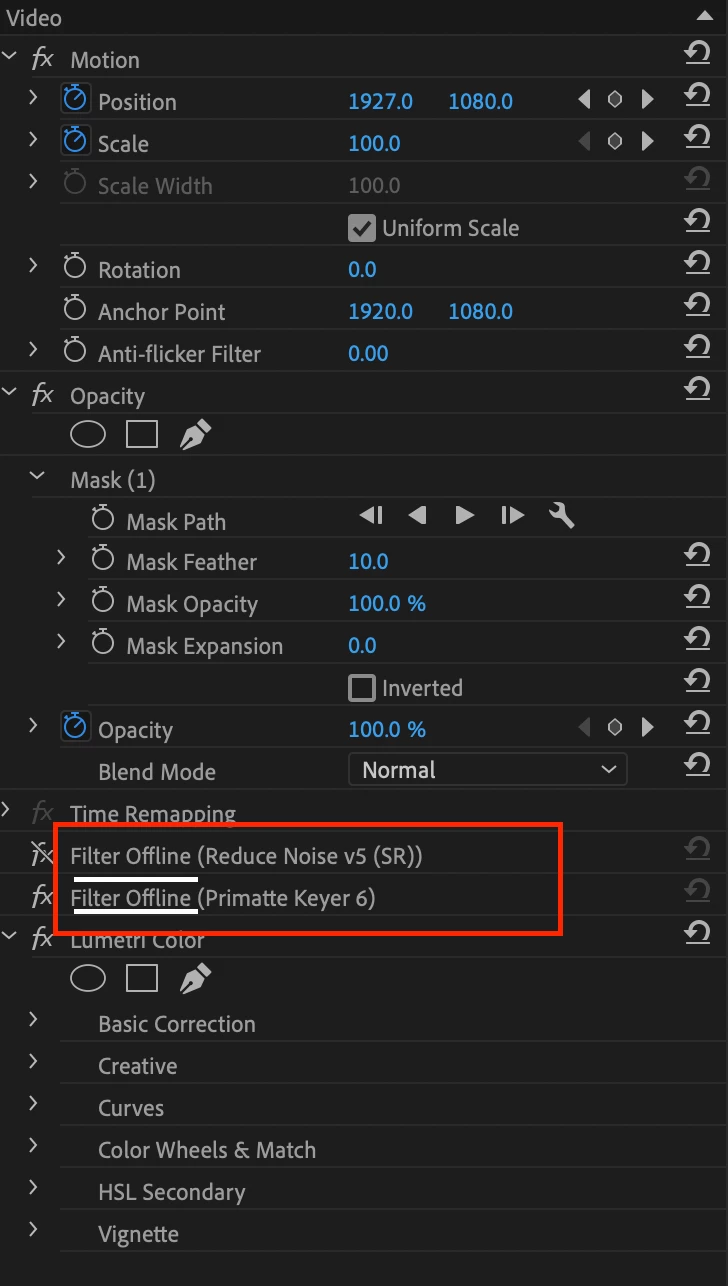
Premiere Pro "Filter Offline" message

PLEASE PLEASE HELP!!!, Premiere Pro has all of a sudden started giving me this error pop up and won't load plug-ins. I'm currently in the middle of a project and need these plug-ins, they were working 2 days ago. 

Version 14.6.0 

IMac 2019 Version 10.15.5

Thanks for the help 


Meilleure réponse par MSA Network

Im totally aware that this post was solved and it was posted 5 years ago, but the reason Im here it´s because I had the same problem and this one was the only post available in the whole internet talkinb about this issue, tried everything but the issue was not solved, so I investigated more and I finally solved.
If you are still with this issue and everything posted in here is now working try this:
Go to "effect controls" tab, the one on the top left where you modify scale, rotation, etc, in the tab right after "effect controls" you will see an icon with 3 lines, click on it, then "manage video effects", a pop up will open with all effects listed, you will see the effect that is offline there unchecked, you have to mark as checked again and that´s it.
This happened to me after an effect crashed my project, I reopened it and a popup asked me if I wanted to open the project without the effect making trouble, I clicked "yes" and after that the effect appeard as (offline), this works only if the same happens to you, sometimes the effect is obsolete cause the plugin has an update or because it´s no longer available, discontinued or replaced by a new version of it, this is not the case, this is only for available working effects that are offline.
Hope it helps.

3 commentaires

MSA NetworkRéponse
Participant
April 10, 2025

Im totally aware that this post was solved and it was posted 5 years ago, but the reason Im here it´s because I had the same problem and this one was the only post available in the whole internet talkinb about this issue, tried everything but the issue was not solved, so I investigated more and I finally solved.
If you are still with this issue and everything posted in here is now working try this:
Go to "effect controls" tab, the one on the top left where you modify scale, rotation, etc, in the tab right after "effect controls" you will see an icon with 3 lines, click on it, then "manage video effects", a pop up will open with all effects listed, you will see the effect that is offline there unchecked, you have to mark as checked again and that´s it.
This happened to me after an effect crashed my project, I reopened it and a popup asked me if I wanted to open the project without the effect making trouble, I clicked "yes" and after that the effect appeard as (offline), this works only if the same happens to you, sometimes the effect is obsolete cause the plugin has an update or because it´s no longer available, discontinued or replaced by a new version of it, this is not the case, this is only for available working effects that are offline.
Hope it helps.

guusv8535744
Participant
September 12, 2025

Hero! 

Kevin-Monahan
Community Manager
Community Manager
November 24, 2020

Graeme,

Might need to update these, as one has to do with new versions of software. Can you check with those folks?


Regards,
Kevin

Kevin Monahan - Sr. Community and Engagement Strategist – Adobe Pro Video and Audio
Participant
November 24, 2020

It's working now I deleted the plug-ins and reinstalled them and it seems to be working now. Thank you for the quick advice and response.

Participant
July 22, 2021

@Tasha Dobie , I encountered a similar problem after upgrading to the new Premiere M1 native release; now three video plugins are missing -- three-way color corrector, shadow/highlight, and color balance (HLS). 


How did you go about re-install the missing plugins? I'd like to try it as well.

Legend
November 24, 2020

Please tell us your system specs: OS version, Premiere version, amount of RAM, Hardware specs including graphics card

Have you done any updates recently?

Have you tried doing a OS seearch for the plug-ins

Have you tried reinstalling the plug-ins?  Certainly looks like they've gone offline...

Participant
November 24, 2020

Here you go, it looks like the plug-ins are in the correct place, Thanks for your help 

Legend
November 24, 2020

it's hard enough to help when we have all the information. 

Have you done any updates recently?

Have you tried reinstalling the plug-ins?


and Kevin's query is spot on