Participant
August 19, 2017
Answered

Premiere Pro will not properly import H.265 video shot in .mov

  • August 19, 2017
  • 1 reply
  • 2122 views

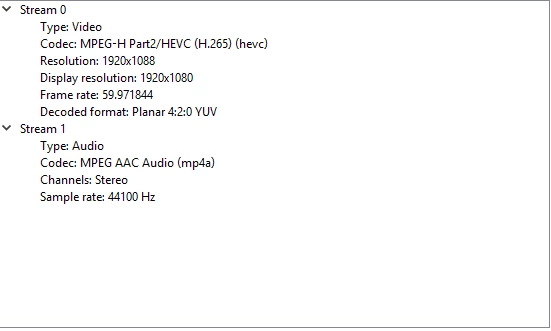
When I attempt to import my video in Premiere Pro, the audio works but I am greeted by a green screen. The video is however playable on media played on windows media players. This is a screenshot of the codec VLC media player uses. Thanks in advance if someone could help me find a way to import it properly into premiere.

    This topic has been closed for replies.
    Correct answer R Neil Haugen

    Realistically, that needs to be converted from VFR (variable frame rate) to CFR (constant) via Handbrake, then imported into PrPro.

    In Handbrake, make sure in the Video tab you both set it to "CFR" in the little button thing, and set a specific frame-rate number also. If you leave it at a "source" or "same-as/auto" type setting, you'll still get VFR out.

    Also check the compression settings ... it wanted to take my S7's 4k from 48Mpbs down to 1920x1080 at around 17 Mbps. I was not amused, so I created a preset that 1) kept the original frame-size and 2) was near to "placebo" settings for compression so it kept the original file data also.

    Further, you can set up the queue within Handbrake so it can process several gigs of clips to CFR overnight.

    Neil

    HandBrake download page:  https://handbrake.fr/downloads.php

    1 reply

    R Neil Haugen
    Legend
    August 19, 2017

    What recorded this media? Camera, screen-grab, phone, what?

    Neil

    Everyone's mileage always varies ...
    Participant
    August 19, 2017

    iPhone using iOS 11 beta, and that seems to be the problem.

    Thanks

    R Neil Haugen
    R Neil HaugenCorrect answer
    Legend
    August 19, 2017

    Realistically, that needs to be converted from VFR (variable frame rate) to CFR (constant) via Handbrake, then imported into PrPro.

    In Handbrake, make sure in the Video tab you both set it to "CFR" in the little button thing, and set a specific frame-rate number also. If you leave it at a "source" or "same-as/auto" type setting, you'll still get VFR out.

    Also check the compression settings ... it wanted to take my S7's 4k from 48Mpbs down to 1920x1080 at around 17 Mbps. I was not amused, so I created a preset that 1) kept the original frame-size and 2) was near to "placebo" settings for compression so it kept the original file data also.

    Further, you can set up the queue within Handbrake so it can process several gigs of clips to CFR overnight.

    Neil

    HandBrake download page:  https://handbrake.fr/downloads.php
    Everyone's mileage always varies ...