
Participant
May 8, 2018
Question

Problems with linking .mov files - Adobe Premiere Pro CC 12.1.1 2018

  • May 8, 2018
  • 2 replies
  • 1799 views

I have had some problems with Adobe Premiere Pro ever since the new updates in 2018.


At work we use multiple older Premiere project files, which were made around 2015/2016.
When opening them in the updated Premiere, some .mov files are not linked, and when I try to link them again, I get an error.
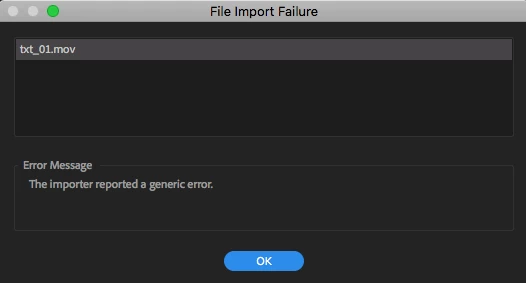
Even some .PNG files are even being weird and having a lot of bugs.

(Even though this issue was supposed to be fixed since the last update)

I now have to use two edit stations to edit, one with the older version and one with the newer updated version.

> I have never had any problem opening the older premiere project files before, ever since the new updates there are always some issues.

Is this ever going to be fixed?

This topic has been closed for replies.

2 replies

Participating Frequently
August 30, 2018

Hi,

This will fix your problem.

This easily converts .mov files to a codec that can be imported in to the current Premier Pro. I just tried it and it works. It's for Camtasia but works the same for Premier Pro   https://www.learncamtasia.com/cool-resources/convert-alpha-movs-to-work-in-camtasia-9/

Just follow the 5 min video and download the files below it.

I can now import all my older .mov alpha channel videos and they work as they should do.

grahamc16290953
Participant
August 31, 2018

I note this is for windows - sadly not helpful for a Mac.

Suggestions?

Participating Frequently
August 31, 2018

Try this option using QuickTime Player. You take it in to QT and export using the PNG setting. Short video below gives a demo.

Viddyoze (and other MOV) Alpha Fix Adobe Import Tutorial - YouTube

grahamc16290953
Participant
August 7, 2018

I have the added issue of it saying I don't have permissions to open the files.

It asked me to relocate the files to documents folder - made no difference at all.

Had no problems with opening other old files ever before the upgrades.

R Neil Haugen
Legend
August 7, 2018

It may depend on just how old those files are. Apple not only announced some time ago it was stopping support for QT7 era video files (I think that is the correct version) but also has asked other vendors working with video apps to drop support.

Adobe has officially accepted that request and the program manager of PrPro wrote a post here around a year ago announcing that as of a certain time period Adobe would drop support within PrPro for those older files as requested by Apple.

If those files are of that era, that is the issue you are having. This is a real problem of digital data. Formats change.

Years ago we used a word processing app that really had better wysiwyg than Word did, and was easier to master. That company got bought up for another app they produced and our documents were suddenly in a format that had no current app. But Word could read them, and see most of the formatting.

Then with an OS change,  the new Word we started using didn't read those formats. The version that did didn't run well on the newer OS. Very frustrating. So many letters and studio documents and minutes, that we have carefully kept on disc, but cannot open.

When I heard about this move by Apple, I couldn't understand why they were doing so. But as other apps may well also follow Apple's request those files may be difficult to access soon. I'll be going through my archives this winter to try to identify any files affected and with both 2015.3 and 2017 still installed will use Media Encoder to transcode them to a newer codec. Preferably not an Apple connected codec.

Neil

Everyone's mileage always varies ...
grahamc16290953
Participant
August 8, 2018

Thanks Neil,

I understand exactly what you are talking about - it has happened to me many times - just stuck with Premier Pro because it kept opening things easily & well - until now.

btw it opens no file types now . . . haven't tried creating a new one as I was going to build on the old ones.

So how do I go about reinstalling the older Premier Pro - as well as changing the media formatting?

Thanks,

kind regards

Graham Castle