

PrP export - audio settings - 90° phase shift -- what is it & why use it?
In exporting MPEG-Blu Ray, I'm trying Dolby Digital audio instead of the default PCM. (This is on the random hunch that PCM audio may be inferior. Feel free to correct me on that guess.) But Dolby has some weird default subsettings. E.g., DC high pass filter is turned on by default. This seems wrong, because you can apply a hi pass filter more precisely in Audition, and such filters are not automatic improvements! So why do a "blunt-object" standardized high pass filter on every export?
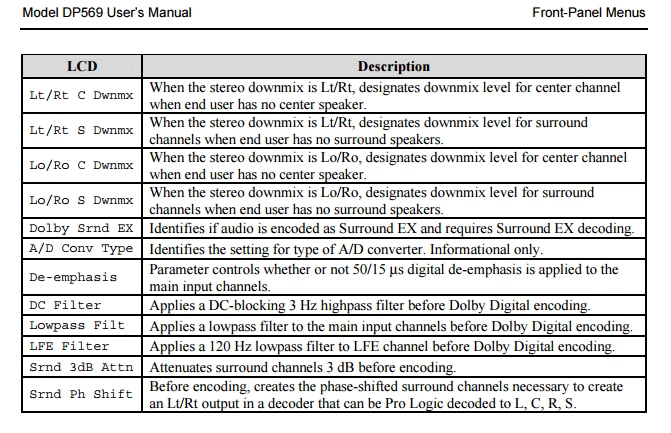
But the shocking default is 90° phase shift. I understand phase correction as something you apply very infrequently -- only when phase gets messed up. Applying a 90° phase shift by default in all PrP exports would badly damage your sound, 99% of the time. Therefore, I must be misunderstanding what is meant here ... right? But if so, then what do they mean by 90° phase shift in this panel ?
Is it some kind of trick like phase inversion in a balanced line -- where the 180° inversion in lead B allows cancellation of line-induced noised on recompositing leads A & B at the receiving circuit? If so, I can't find anything describing it. Can anyone point me in the right direction?
In general, I could sure use a line-by-line reference on these export options. Adobe does a nice job teaching at the "training wheels" stage, with all their video walk-throughs, their online manual, and forum. But once you're past that basic training, the hoard of fine-tuning options seem to have little or zero documentation, ... and users are left to either reverse-engineer their function, or just stumble through incredibly time-consuming trial and error testing to infer their function & impact. I wish Adobe offered any kind of tech reference for the line-by-line options settings. Even the notes from the programmers, in deep tech-speak, would be better than nothing.
Thanks!
 AdChoices