
joeym79462686
Participant
June 3, 2018
Answered

Quick Time export problem

  • June 3, 2018
  • 2 replies
  • 1310 views

Upon trying to export a video in premiere pro with the Quick Time (apple pro res) format, I am unable to change the export quality as it is greyed out. I have exported using these settings before and was able to change the quality from 100 to any value between 1 and 100, but now I am unable to.

Also, why must adobe limit fps options in export? Just let me type in the export fps instead of giving me set options. QuickTime is the only that actually will match source to 18fps.
This topic has been closed for replies.
Correct answer Byron Cortez

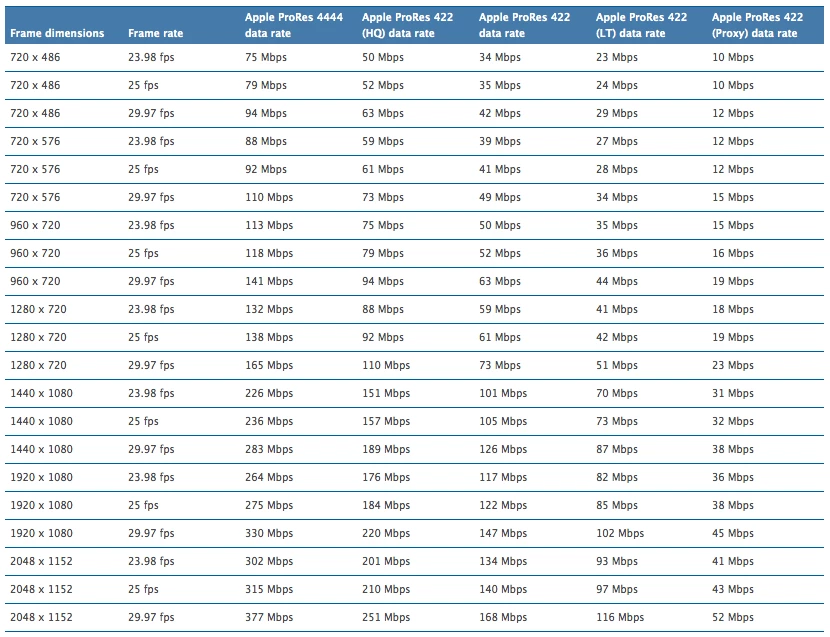
As far as I understand the Apple ProRes codec the datarate is not modified, you must choose one of them depending on the amount of compression or multigeneration you need to do. Here I leave a table with the approximate datarate for each version of Apple ProRes in their respective resolutions, plus a link with updated information about this wonderful codec.

https://www.apple.com/final-cut-pro/docs/Apple_ProRes_White_Paper.pdf

Regards!

2 replies

Byron CortezCommunity ExpertCorrect answer
Community Expert
June 16, 2018

As far as I understand the Apple ProRes codec the datarate is not modified, you must choose one of them depending on the amount of compression or multigeneration you need to do. Here I leave a table with the approximate datarate for each version of Apple ProRes in their respective resolutions, plus a link with updated information about this wonderful codec.

https://www.apple.com/final-cut-pro/docs/Apple_ProRes_White_Paper.pdf

Regards!

Byron.
Kevin-Monahan
Community Manager
Community Manager
June 16, 2018

Hi joeym,

I am unable to change the export quality as it is greyed out. I have exported using these settings before and was able to change the quality from 100 to any value between 1 and 100, but now I am unable to.

Which version was that? That may have been before export codecs were still 32 bit. QuickTime exports are all 64 bit only these days.

Also, why must adobe limit fps options in export? Just let me type in the export fps instead of giving me set options. QuickTime is the only that actually will match source to 18fps.

Try interpreting the footage in Premiere Pro, then export it.

Thanks,
Kevin

Kevin Monahan - Sr. Community and Engagement Strategist – Adobe Pro Video and Audio