

Wholeo
Known Participant
April 27, 2019
Answered

"Mask with text" does not show video

  • April 27, 2019
  • 2 replies
  • 10833 views

I type text on a layer above a video layer. I click "Mask with text". The text goes transparent. Alternatively I can add a Track Matte Key to the video, with Matte as the text layer and the text does act as a mask. Why doesn't mask with text work for me?
I upgraded Premiere Pro today (13.1.2 build 9), have not been having any other problems.
    This topic has been closed for replies.
    Correct answer Meg The Dog

    Yes, as I said in my first post, it only works on elements contained within the Essential Graphic. Your graphic only has type. You click on mask with text and there is nothing for the text to mask - so you get nothing displayed.

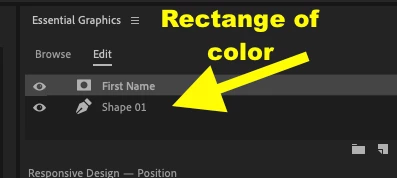
    In your graphic add another layer - like a square of color - beneath the text, as I showed in my example.

    Then you will see the text cutting a mask:

    You are working with the text graphic and an element outside the graphic itself - the video clip. In order for that text to be used as a mask for that video, you need to use the Track Matte Key effect, applied to the video clip and with the text clip chosen as the source for the matte.

    MtD

    2 replies

    Wholeo
    WholeoAuthor
    Known Participant
    April 27, 2019

    Text layer over video layer

    Click "Mask with text" box on text source and it goes invisible.

    Follow The Sand, a 5-year movie plan: Wholeo 2024
    Meg The DogCorrect answer
    Inspiring
    April 27, 2019

    Yes, as I said in my first post, it only works on elements contained within the Essential Graphic. Your graphic only has type. You click on mask with text and there is nothing for the text to mask - so you get nothing displayed.

    In your graphic add another layer - like a square of color - beneath the text, as I showed in my example.

    Then you will see the text cutting a mask:

    You are working with the text graphic and an element outside the graphic itself - the video clip. In order for that text to be used as a mask for that video, you need to use the Track Matte Key effect, applied to the video clip and with the text clip chosen as the source for the matte.

    MtD

    Inspiring
    April 27, 2019

    "Mask with Text" in Essential Graphics works only on elements contained within the graphic itself, such as this example that has text over a gray bar:

    If i select the text layer and check Mask with Text, it works:

    To do what you want, you must use the Track Matte effect.

    MtD

    Wholeo
    WholeoAuthor
    Known Participant
    April 27, 2019

    I said it works with Track Matte, but that scales the video with the text. I have just watched a video with Jason on Facebook where he clearly shows using the "Mask with Text" box. I cannot see how my setup differs from his. Just a minute I will find the video for you.

    Follow The Sand, a 5-year movie plan: Wholeo 2024
    Wholeo
    WholeoAuthor
    Known Participant
    April 27, 2019

    Here is the video I watched: https://www.youtube.com/watch?v=wv3fu1J1QT0

    Follow The Sand, a 5-year movie plan: Wholeo 2024