
Known Participant
July 21, 2021
Answered

Radial Shadow is obsolete? How to quickly add a white border?

  • July 21, 2021
  • 5 replies
  • 9861 views

I just updated to the new Adobe Premiere (not Beta) today with M1 support.


I was dissapointed to find that Radial Shadow is now under "obsolete". And it's also broken-- renders very different, with a big white gradient covering anything.


This effect was the quickest way to add a white border to something in Premiere. I often have to do this to 20 different elements and I need a fast way to do it without jumping into Photoshop.


Is there a way to fix this effect to behave like it used to? Or get the equivalent? Did I miss something somewhere in release notes where it was explained to be moved to being obsolete?
Correct answer Ann Bens


5 replies

wefollow
Inspiring
February 7, 2025

I didn't know they removed the Radio Shadow.

I reinstalled it twice and still can't find it. I ended up here looking for your message.

I love that Radio Shadow makes me so easy..  Hope someone out there hlep us


thank you for reading 

Ann Bens
Community Expert
Community Expert
July 27, 2025
Ann Bens
Community Expert
Ann BensCommunity ExpertCorrect answer
Community Expert
July 21, 2021


Geoff5CBFAuthor
Known Participant
July 23, 2021

One last follow-up to say, this new technique worked really well for me, thanks!


Question: If I'm using the rectangle tool to draw on the Program window, over an existing image, is there a way to snap my cursor to the image layer beneath where I'm drawing? It's hard to get the rectangle to be in exactly the right spot without a lot of zooming-in/adjusting.

Ann Bens
Community Expert
Community Expert
July 23, 2021

Turn on Snap in Program Monitor and use guides.

Instead of zooming use the Full Screen function.

R Neil Haugen
Legend
July 21, 2021

It can be used on an image or video clip as noted in my other post.


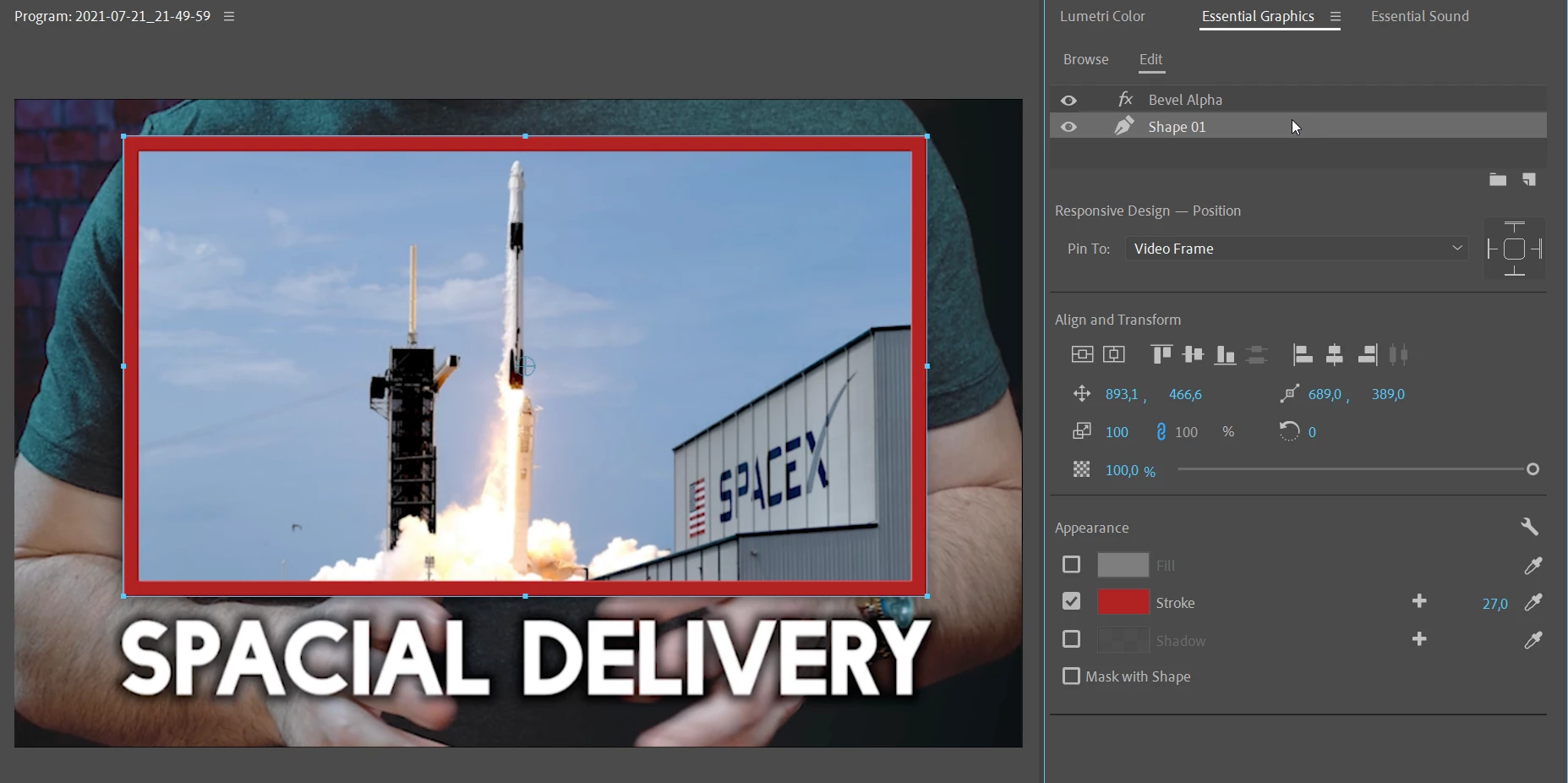
Say, you have a video appearing in the image, from another track. Go to the EGP, and make a new rectangle, size and place it to the video, and then add a stroke.


Being as you can both mask with shape and mask with text plus invert options in the EGP, there are many uses for that outside of actually doing text items.


Neil

Everyone's mileage always varies ...
R Neil Haugen
Legend
July 21, 2021

In the Essential Graphics panel, you can create a stroke for a shape or for text. Multiple strokes if you want.


You could create a rectangle shape the size of that "inner image", without fill, but add a stroke to it.


Neil

Everyone's mileage always varies ...
Geoff5CBFAuthor
Known Participant
July 21, 2021

Does that work on an image/video clip?

Geoff5CBFAuthor
Known Participant
July 21, 2021

I'm also just curious, why this was deprecated when it used to work?

R Neil Haugen
Legend
July 21, 2021

White border ... as in esentially a white box around something? A stroke? I'm not sure I understand your particular use.


Neil

Everyone's mileage always varies ...
Geoff5CBFAuthor
Known Participant
July 21, 2021

Yes, a white stroke. Is that possible to add in Premiere without jumping into Photoshop?


I can't just modify the images in Photoshop, since I use them for other purposes without the stroke, so I'd have to create copies... it used to be so easy with radial-shadow. Why was this one effect deprecated in the latest release?


I make 20 videos a week, each about a recent news headline, each with these stroke-white-outline:


See example: 

Orf
Known Participant
December 5, 2024

Did you find a substitute? I'm very disappointed by the removal of radial shadow too, for this same reason.