
MarkusEker
Known Participant
September 11, 2020
Question

Recording from Windows Game Bar not working properly in Premiere.

  • September 11, 2020
  • 3 replies
  • 5636 views

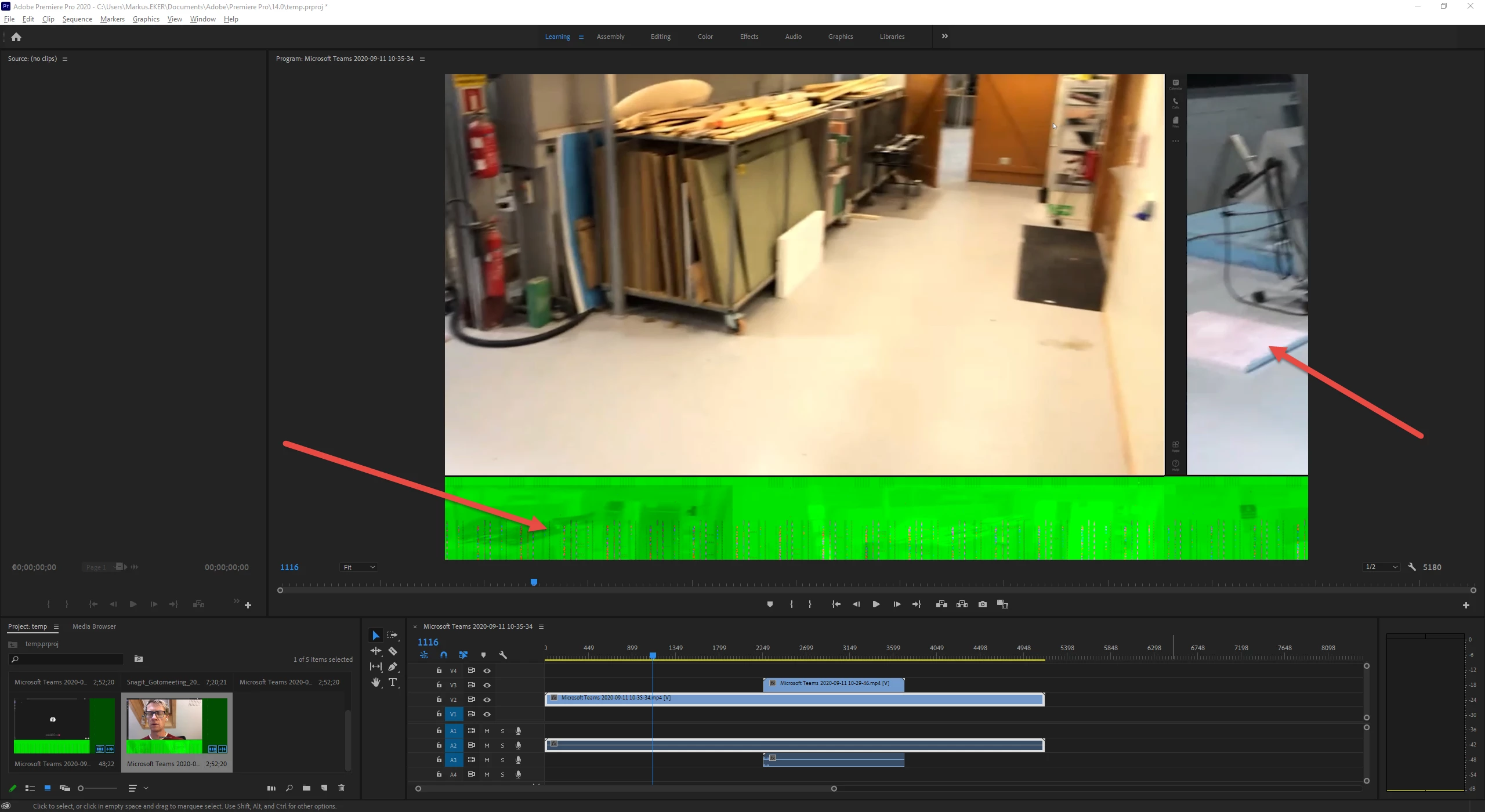
Hi, I've recorded something from my screen using the Windows game bar recorder (AKA Xbox Game Bar), however when importing the video into Adobe Premiere it looks bad and isn't decoded properly. It looks fine in Windows built in video player and VLC. What is the cause of this? Has anyone got any experience?
 

This topic has been closed for replies.

3 replies

Community Expert
September 14, 2020

FYI, I've been seeing more of this green bar thing pop up and was just working with someone on a Discord channel that was having this issue. It seems to be a specific Gamebar issue. In particular, the green bar would show up when trying to record at a resolution that wasn't native to the monitor. If you are in the same situation (recording a different resolution or aspect ratio than your monitor's native settings) you may want to try changing that. Otherwise, I don't know if this is something that will get fixed with a windows update in the future, but you might consider a different recording method.

Participant
March 16, 2021

How do i change that? because i have a 3440 by 1440 montier and im having the same problem?

Jeff Bugbee
Community Expert
Community Expert
March 16, 2021

Open the Game Bar recording settings and choose the same resolution as your monitor. It might say "native." If it says scaling, make sure it's at 100%.

Peru Bob
Community Expert
Community Expert
September 11, 2020

This might also be an issue:


Please use the free MediaInfo and post a screenshot the properties of your media in tree view:
https://mediaarea.net/en/MediaInfo

If the file is variable frame rate, which although Adobe says it will support, many users are having issues with VFR.

Use Hand brake to convert to constant frame rate:
https://handbrake.fr/downloads.php
Here is a tutorial:
https://www.youtube.com/watch?time_continue=34&v=xlvxgVREX-Y


Legend
September 11, 2020
MarkusEker
Known Participant
September 14, 2020

I'll change my macro. 


Thanks for the feedback.

Yes, it is variable framerate. I don't have this problem with screen recordings from Nvidia Shadowplay for example, and I haven't experienced problems with other formats, but I am on a brand new PC/System so I don't have much experience with it yet. I could try installing another Nvidia Driver.


Transcoding with Media Encoder gives the same problem, I will try with Handbrake.

MarekMularczyk
Community Expert
Community Expert
September 11, 2020

Does this happen on other clips you import into Premiere?

Green usually indicates an issue with Premiere and Graphics card so you could try updating graphics card drivers.

Adobe Community ExpertAdobe Certified Professional
Community Expert
September 11, 2020

I agree. Typically that type of thing indicates a GPU issue.