
Participant
April 28, 2020
Question

RX 580 driver not working for premiere pro.

  • April 28, 2020
  • 1 reply
  • 1470 views

So i just got an rx 580 graphics card running on an asus maximus hero 6 motherboard.


before the motherboard came with a geforce 780 and the driver didn't work with premiere pro and i got the screen below
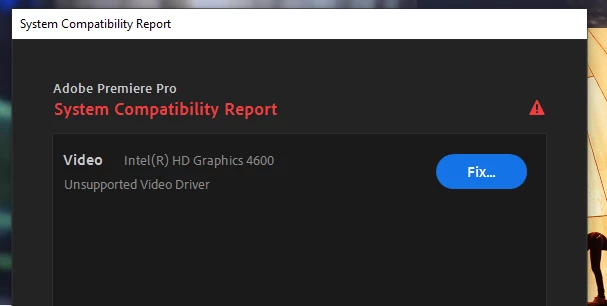
 

so I downloaded the basic windows driver instead of the 4600 and the program would work.

and I would switch back and forth.


Now that I have my rx 580 installed I get the message again that the driver doesn't work even though I downloaded the older and more stable version of the driver directly from the manufacturer.  The card works great with all my video games.
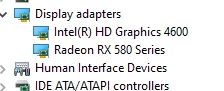
So I try to reinstall the basic driver which is no longer an option (only the 4600 and the rx 580 are choices now)  but now I get a message saying that my computer doesn't meet requirements.
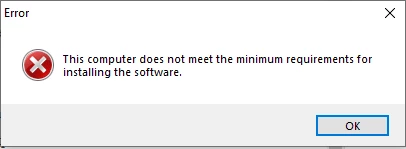
So I'm guessing that the BIOS firmware might be pushing information to the new graphics card and not allowing it to be programmed with the basic driver so I can run premiere pro...


but I really want to use the 580 driver to speed up Premiere pro tasks and this was one of the major reasons that I got the video card in the first place.  Can anyone help me find the right driver?

I'm running the MSI RX 580 Armor OC card.  Thanks.

This topic has been closed for replies.

1 reply

Legend
April 28, 2020

Actually, the lack of a driver warning for the RX 580 is a good thing. It simply means that the driver that had been installed for that particular GPU is valid. It it weren't detected, then the System Compatibility Report would have flagged that discrete GPU as "Unsupported Graphics Hardware."


The Intel HD Graphics 4600 is, on the other hand, too old for Premiere Pro 2020. You see, Intel had already discontinued mainstream support for everything prior to the 6th Generation CPUs. Since the first release of Windows 10, only security patches had ever been released for these older CPUs (the most recent being released earlier this month). Your CPU is only a 4th-Generation CPU. So the program compatibility for your CPU is now permanently locked to year-2015 levels.


The only way to circumvent this would be to permanently disable the Intel graphics in your system's BIOS/EFI settings. This is done by either force-disabling the Intel graphics or by setting that to "AUTO" and not connecting anything at all whatsoever to the motherboard's video outs.


By the way, you should have carefully read the official minimum hardware system requirements for the newer versions of Premiere Pro before you update that program. Adobe now officially requires a newer computer system than what you have in order to run Premiere Pro 2020 properly (specifically, you have only a 4th-Generation CPU, but Adobe now requires a 6th-Generation or newer CPU). And it is not caused by Adobe per se. Intel itself is forcing everyone to update their programs' system requirements. Future versions of the Creative Cloud desktop app should better detect your system's hardware and the age of it, and then flag down anything that has determined that your system's hardware is too old or deficient for that particular app as "Not Compatible," in which case the CC app will not let you download or install that program at all. And if Premiere Pro is the only CC app that you've subscribed for, and your system is determined to be too old for it, then you will be forced to either change your CC membership plan or cancel the subscription.