
Miramar
Participant
January 22, 2017
Answered

Saturated sound with AirPods

  • January 22, 2017
  • 6 replies
  • 18692 views

Hi all,

I have a weird issue when using Apple's AirPods: whenever I use Premiere CC, the sound suddenly becomes very saturated, and low at the same time (I have to max out the volume to hear anything).

The funny thing is the AirPods work perfectly with Audition CC and any other software on my Mac.

Maybe I messed up the configuration?

FYI, here's my configuration in Preferences>Audio Hardware:

Defaut Input & Defaut Output: AirPods

Master Clock: In: Airpods

I/O Buffer size: 256

Sample rate: 8000

Map output for: Adobe desktop audio

Also, Premiere CC is up to date and works flawlessly with my inbuilt speakers.

Thanks!

Seb
This topic has been closed for replies.
Correct answer KKodec

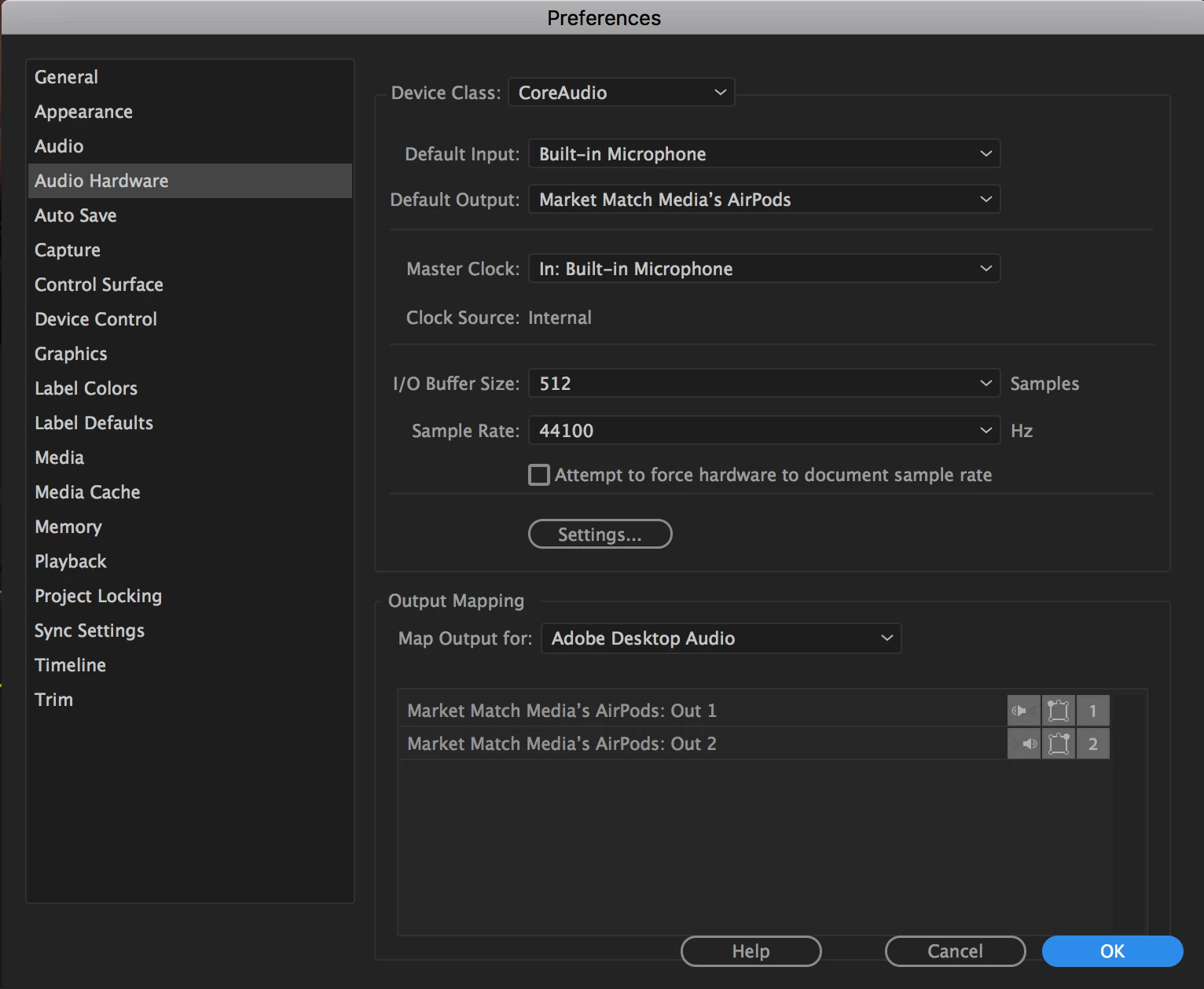
I somehow found settings that worked for the airpods. Hope this helps

6 replies

rochinski
Participant
April 29, 2020

This worked perfectly for me

Participant
December 6, 2017

The audio is okay now after trying some of these settings but playback is a bit choppy,it skips frames sometimes, and it's only while using AirPods....

Participant
August 17, 2017

I have a similar issue, I am not getting any audio in playback. I have changed my settings multiple times to what others have that is working for them and still I get a small crackle in my Airpods as soon as Premiere loads but no audio and continued crackles after. In my desktop the audio file plays fine, as soon as I open it in Premiere there is no audio playback but there is visible movement of sound waves. If anyone has any ideas - thanks!

KKodecCorrect answer
Participant
August 15, 2017

I somehow found settings that worked for the airpods. Hope this helps

Participant
October 26, 2017

This fixed it for me.

Anytime I would open Premiere CC audio to the AirPods would suddenly crap out as others described and I would hear pops even when nothing was playing. This persisted into other apps, even after Premiere was closed.

These settings seemed to remedy the situation.

Participant
March 22, 2017

Not working for me either ^^ tried that trouble shooting as it's still not working. It appears the program Premiere is not routing the audio properly. Not sure why its not working well.

Inspiring
March 22, 2017

I don't have AirPods so can't check this but try setting the Premiere Pro Audio Hardware Preference for Built-in Output

Then go to the Apple menu > System Preferences  > Sound, click on the Output Tab and if the AirPods are listed there, select them.

MtD

vle26274633
Participant
March 14, 2017

1) go to MacOs preferences and change input audio device to internal microphone.

2) Go to the utilities > Audio MIDI setup. Choose Built-in microphone as input device.

3) Then change in Premiere CC Sample Rate to 44000.

4) Restart Premiere CC.