
Participant
July 24, 2018
Answered

Sequence & transparency compatibility

  • July 24, 2018
  • 2 replies
  • 2364 views

One issue that’s come up has been transparency errors. Previously when using DVC Pro HD 1080i60 sequences, PNG files and other files containing an alpha channel worked fine as expected. However when using an AVC- Intra 50 1080i60 sequences, for the most part everything has been fine except for dealing with alpha channels. On an AVC-I 50 sequence with Mercury Playback Engine GPU Acceleration (CUDA) turned on, some png files will show up properly with the alpha channel implemented.  But others don’t display at all, leaving only a black screen when the playhead is stopped. Other times, some png files will display an mirror image when the playhead is moving.  Once the playhead is stopped, the video once again shows black.  When Mercury Playback Engine Software Only is selected, everything works fine.

I was curious as to how Adobe Premiere handles alpha channels for each codec. Is it a color space issue or an error in metadata of the file?  What info is Premiere looking for in a file to translate transparency properly?  I've tried updating the the graphics card driver to no avail. This issue is present in Premiere 2017 and 2018.
    This topic has been closed for replies.
    Correct answer roslynd84563493

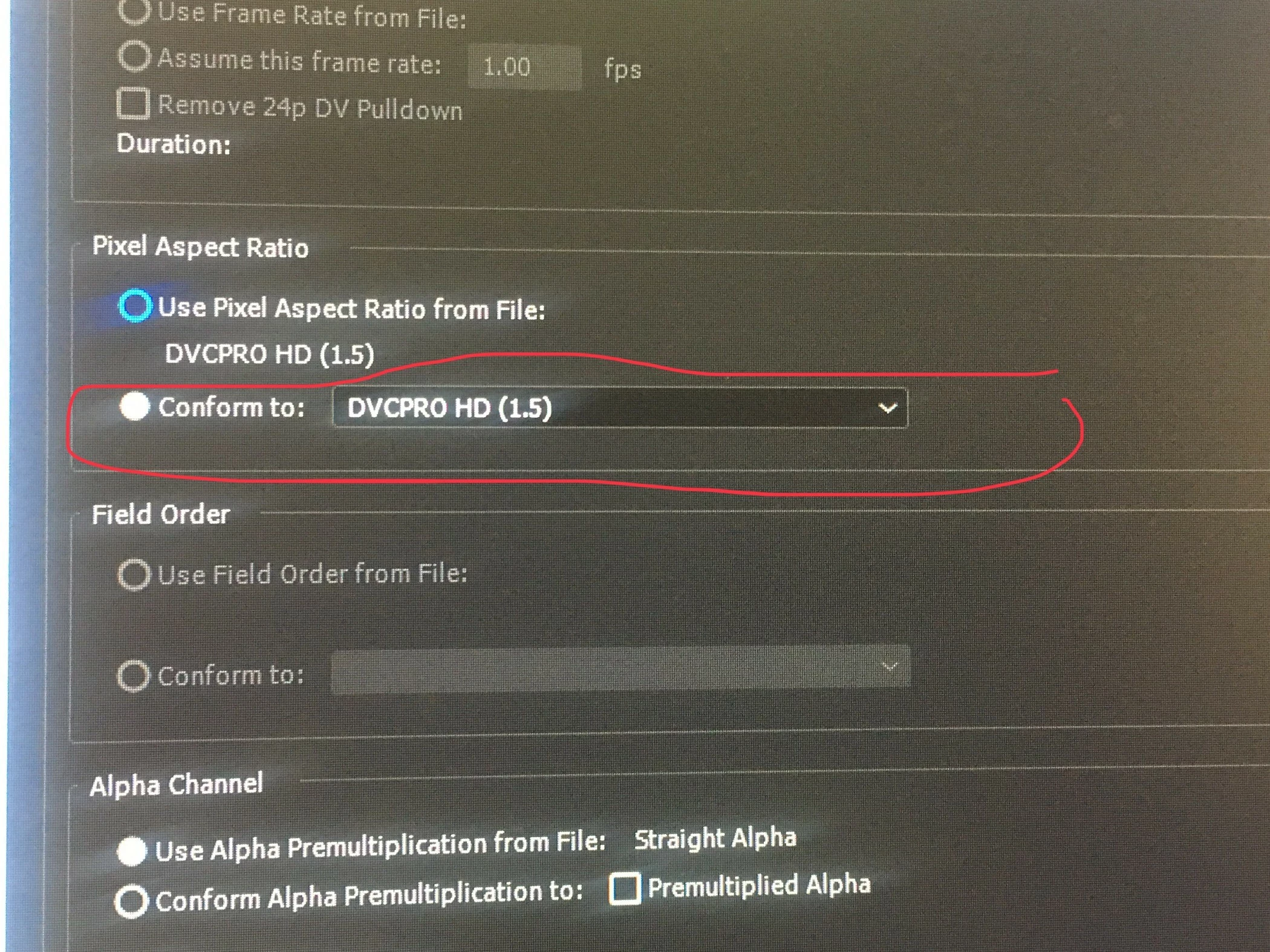
    I was able to resolve the issue.  It appears to be a Premiere bug.  The problem occurs when PNGs with alpha channels that have 1.5 aspect ratio are placed on any 1440x1080 sequences. Besides AVC-I 50, this resolution applies for some variations of XDcam sequences.

    By default Premiere imports the file using the native aspect ratio of the source file.  But once the pixel aspect ratio is modified, then the image appears normal on the sequence.  I chose to conform the image to a pixel aspect ratio of 1.5 (like the source) and everything displayed normally. 

    2 replies

    Participant
    July 24, 2018

    Thanks Carlosz.  But my issue seems to be with the AVC-I 50 sequence setting & CUDA.  No issues appear when I place a png on a DNX, DVCPro HD or AVC Intra 100 sequence while using CUDA.  But with AVC-i 50, I'm not seeing any video when playback is stopped.  Or sometimes the png image displays as reversed.

    Community Expert
    July 24, 2018

    Seems to me like your Graphics Card supports certain sequence settings with GPU acceleration

    while it does not support others. Even if you update the driver ...

    This again from HELP might be useful :

    Premiere Pro CC supported file formats

    roslynd84563493AuthorCorrect answer
    Participant
    August 1, 2018

    I was able to resolve the issue.  It appears to be a Premiere bug.  The problem occurs when PNGs with alpha channels that have 1.5 aspect ratio are placed on any 1440x1080 sequences. Besides AVC-I 50, this resolution applies for some variations of XDcam sequences.

    By default Premiere imports the file using the native aspect ratio of the source file.  But once the pixel aspect ratio is modified, then the image appears normal on the sequence.  I chose to conform the image to a pixel aspect ratio of 1.5 (like the source) and everything displayed normally. 

    Community Expert
    July 24, 2018

    To answer how Premiere handles Alpha Channel, no better place but the PP Help :

    Alpha channels and mattes

    Color information is contained in three channels: red, green, and blue. In addition, an image can include an invisible fourth channel, called an alpha channel, that contains transparency information.

    An alpha channel provides a way to store images and their transparency information in a single file without disturbing the color channels.

    When you view an alpha channel in the After Effects Composition panel or a Premiere Pro Monitor panel, white indicates complete opacity, black indicates complete transparency, and shades of gray indicate partial transparency.

    A matte is a layer (or any of its channels) that defines the transparent areas of that layer or another layer. White defines opaque areas, and black defines transparent areas. An alpha channel is often used as a matte, but you can use a matte other than the alpha channel if you have a channel or layer that defines the desired area of transparency better than the alpha channel does, or in cases where the source image doesn’t include an alpha channel.

    Many file formats can include an alpha channel, including Adobe Photoshop, ElectricImage, TGA, TIFF, EPS, PDF, and Adobe Illustrator. AVI and QuickTime (saved at a bit depth of Millions Of Colors+), also can contain alpha channels, depending upon the codecs used to generate these file types.

    For instructions on how to export video with an alpha channel (transparency)

    And I guess this thread might help you out :

    exporting clip with alpha channel