
Legend
July 9, 2019
Answered

Setting Up Multiple Hard Drives in PPro and AE, Cache, Previews, etc.

  • July 9, 2019
  • 2 replies
  • 3630 views

I've read a few discussions, but can't find an overall set up for multi drives for PPro and AE working together, in regards to which drive gets what?

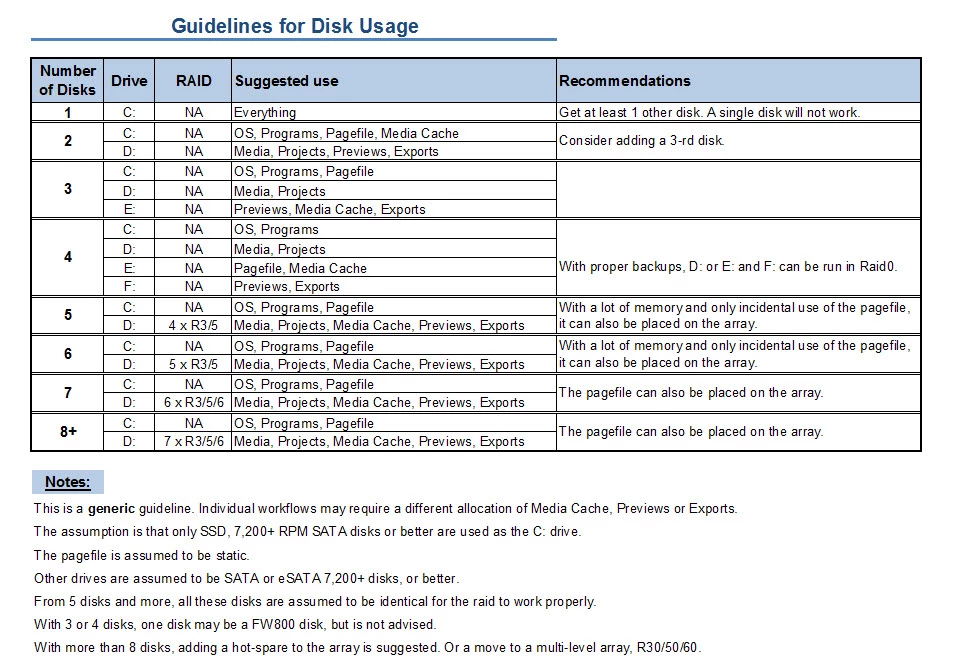
For a 4 disk hard drive set up:

C: OS, Programs  (seems to be a standard setting)

E: Media and Project files (.prproj)

F: Page File, Media Cache, After Effect Cache

G: Previews, Exports, Auto Save

Does that look like a decent work up?

IF Yes,

1) where do the "media data base" files go?

2) I thought Media Cache files and previews were the same thing?  What exactly should go on F: "Media Cache"

and

3) What exactly should go in G: "Previews"  ?

pek files, cek files, mcdb files, PEAK FILES?  And should the files be save next to the original film clips?  (preference setting)

Sorry, it's all so confusing sometimes.

I'm worried something will get bottle necked if it's not set up right.

If that set up looks bad, feel free to tell me watcha got.

Thanks! I feel a great many people will be helped by your comments.

Leticia

I found this guy's format, but it left out a few things mentioned above, AE cache, and which goes where regarding all those weird preview files and such.
This topic has been closed for replies.
Correct answer Peru Bob

Conformed audio files are considered 'audio files' ?  or do they also go on the cache disk E:  ?


Letty2019  wrote

Conformed audio files ... do they also go on the cache disk E:  ?

Yes.

2 replies

Legend
July 10, 2019

I recommend a minimum of five internal drives for best organization and performance.

C: Windows & Programs (Let Windows manage the Page file)

D: Project files, audio files, still images

E: Cache and Scratch

F: Camera media and proxies

G: Exports

Letty2019Author
Legend
July 11, 2019

where do you locate all the pek, peak, cek files? and those other weird files?  E: ?

Do you have the pek and cek files :"next to" the original film clips?

and where do you locate the After Effects cache files?

Thanks!

Peru Bob
Community Expert
Community Expert
July 11, 2019

Letty2019  wrote

where do you locate all the pek, peak, cek files? and those other weird files?  E: ?

Yes.

and where do you locate the After Effects cache files?

E:

Peru Bob
Community Expert
Community Expert
July 9, 2019
Letty2019Author
Legend
July 9, 2019

How is this a "hardware" question?

It's asking How to set up drives in regards to preview files and media cache locations in the Premiere Pro program....

It's NOT asking how to install hard drives.

Please place back in the Premiere Pro section, thank you.

Peru Bob
Community Expert
Community Expert
July 9, 2019

It is a hardware issue, but I will move it as per your request.