
Participant
March 16, 2017
Answered

Show Head And Tail (Premier Pro 2017)

  • March 16, 2017
  • 2 replies
  • 2221 views

It's been a while since I have needed this option, but I was looking for the Show Head And Tail thumbnail option for a particular track and can't find it in Premier Pro 2017.  The wrench only gives the option to Show Video Thumbnails, not if you want just head, tail, head and tail, or all frames like PP used to.
This topic has been closed for replies.
Correct answer Meg The Dog

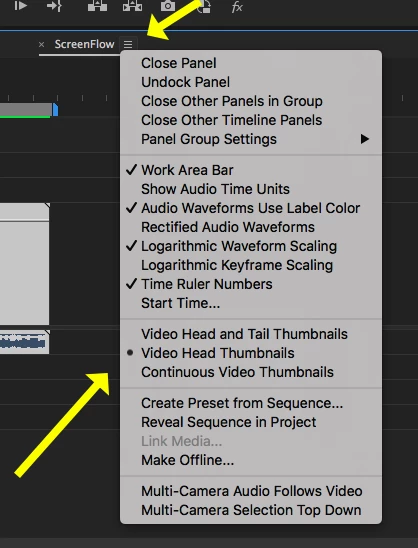
In the timeline, on the sequence tab, click on the three lines next to the name, it will reveal a drop down menu:

MtD

2 replies

Ann Bens
Community Expert
Community Expert
March 16, 2017

https://forums.adobe.com/people/Mark+%22St.+Louis%22+Jones  wrote

Show Head And Tail thumbnail option for a particular track

The solution given by MTD is for all tracks. There is no option for just one track.

Edit: last version that had the option for one track was CS6.

Meg The DogCorrect answer
Inspiring
March 16, 2017

In the timeline, on the sequence tab, click on the three lines next to the name, it will reveal a drop down menu:

MtD

Participant
March 16, 2017

Awesome.  Thank you.