


Beenden
  • Globale Community
    • Sprache:
      • Deutsch
      • English
      • Español
      • Français
      • Português
  • 日本語コミュニティ
  • 한국 커뮤니티

Sony XDCAM to H.264

Entdecker ,
Dec 03, 2018 Dec 03, 2018

I'm still a little new to Premiere Pro, as I have only recently transitioned over from FCPX.

I work as a freelance editor, and from time to time I need the ability to edit proxy files while on the go. The type of media I generally deal with is a mixture of 5D Mark 4, 5D Mark 3, Sony XDCAM & DJI Drone.

I've gone through a few YouTube videos in order to wrap my head around what others are doing when using a proxy workflow. From what it seems, a lot of YouTubers are transcoding to quarter sized H.264 as their proxy choice.

At this stage I have successfully managed to create proxy files from both 5D cameras, plus the DJI drone footage. However when I attempted to transcode any clip shot on the Sony XDCAM, being a .MXF file, I get this error message.
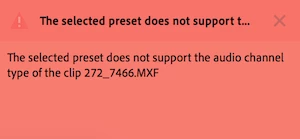
Screen Shot 2018-12-04 at 9.21.47 am.png

Further investigating this through forums, I've come to the knowledge that H.264 does not support the 8 channels of audio the camera produces, therefore I need to use a codec with an "uncompressed" audio setting. From what I understand is that I need to choose from either the GoPro CineForm codec, or possibly the Apple ProRes 422 (Proxy) one.

I have tried both these codecs, and although everything seems to work out to be perfectly fine with the transcoded proxies, It's a little hard to swallow the file size difference, and not to mention the quality of the proxies between the three codecs.

So I guess my question is, does anyone know if there is a way to transcode the .MXF files to a "H.264" type that retains the audio, plus benefit from the smaller file size and better quality proxy image?

Like mentioned above, I come from FCPX where one doesn't even have to think about what is happening in the background, the proxies just get made, and they are VERY acceptable to work with. I know they end up being a lot larger in file size than H.264, but all that aside, you just don't have to worry if you've chosen the right frame rate, frame size etc....

574
Übersetzen
Melden
Community-Richtlinien
Seien Sie freundlich und respektvoll, geben Sie die ursprüngliche Quelle der Inhalte an und suchen Sie vor dem Absenden Ihres Beitrags nach Duplikaten. Weitere Informationen
community guidelines
LEGENDE ,
Dec 03, 2018 Dec 03, 2018

Many of us use the Cineform proxy preset that ships with PrPro. As I'll be deleting them after finishing the project, I don't worry about the file size ... just the playback.

And quarter-size Cineform's with the program monitor set to full res playback show beautifully on my system.

Neil

Übersetzen
Melden
Community-Richtlinien
Seien Sie freundlich und respektvoll, geben Sie die ursprüngliche Quelle der Inhalte an und suchen Sie vor dem Absenden Ihres Beitrags nach Duplikaten. Weitere Informationen
community guidelines
Entdecker ,
Dec 03, 2018 Dec 03, 2018

Cheers for that Neil, I guess I'll stick with CineForm then .

Just another question regards the CineForm/ProRes Proxy codecs, I happen to do a "quality" comparison where I created a ProRes Proxy using Media Encoder, then compared it with the one FCPX generated within the software. For some crazy reason the Media Encoder version was really poor!

Have you ever experienced this?

I made sure both versions had the same frame rate/frame size, but yeah.... like I said the Media Encoder one was somewhat shocking

Übersetzen
Melden
Community-Richtlinien
Seien Sie freundlich und respektvoll, geben Sie die ursprüngliche Quelle der Inhalte an und suchen Sie vor dem Absenden Ihres Beitrags nach Duplikaten. Weitere Informationen
community guidelines
LEGENDE ,
Dec 03, 2018 Dec 03, 2018
AKTUELL

Which flavors of ProRes were used on each?

Übersetzen
Melden
Community-Richtlinien
Seien Sie freundlich und respektvoll, geben Sie die ursprüngliche Quelle der Inhalte an und suchen Sie vor dem Absenden Ihres Beitrags nach Duplikaten. Weitere Informationen
community guidelines