
Participant
April 4, 2020
Answered

Subtitles timing off upon export (Premiere Pro 14.9 and earlier)

  • April 4, 2020
  • 6 replies
  • 7180 views

Premiere captions timing does not match with the exported .srt timing. What to do?

Within Premiere, I have created subtitles that sync with my 30fps sequence. Everything syncs up fine within Premiere.

However, when I export the file to .srt, all of the timings change.
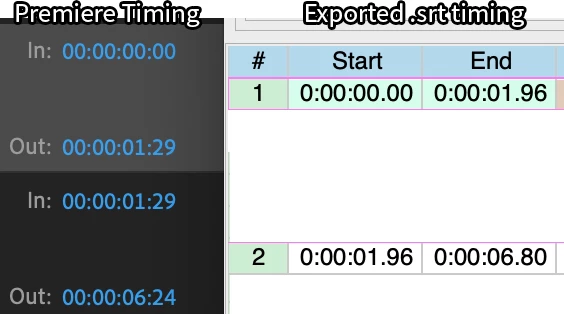
The image shows the difference in timestamps for the captions within premiere and in the exported .srt file.


I tried fixing this by changing framerates in Subtitle Edit and by using the Point Sync feature, but to no avail. Any ideas?

This topic has been closed for replies.
Correct answer Stan Jones

The timecode in your second example appears to be different.


The 1,935 corresponds to 01:23 (i.e. 935 milliseconds is 23 frames in 29.97).


When I created the test with your first timings (1:29 and 6:24), the SE source was 1,968 and 6,806. 


So, as I say, are you sure the timings are off when played with your exported video?


You can test this further by burning in the captions and playing back with the srt on/off.


Stan


6 replies

Stan Jones
Community Expert
Community Expert
December 10, 2020

Please provide a screenshot example of the differences you are seeing.


Stan

Known Participant
July 6, 2022

Hello all!

I'm having a similar issue, I think... Everything times fine in the timeline but I export my .srt from Premiere Pro (2022) and import into my existing Vimeo page for the video and the subs are about 3 seconds early throughout. I've double checked the frame rate on both the Vimeo file and the Premiere file exporting the .srt and they match. Any ideas?

Thanks

Stan Jones
Community Expert
Community Expert
July 6, 2022

In the srt, what is the timecode of the first sub? Is that correct with the start of the spoken word?


> about 3 seconds early throughout


From start to finish, the same?


Stan


Participant
December 10, 2020

Here the same problem, but then on a frame rate of 23,976... 

I am struggling for 24 hours now on a subbed clip of 1 hr 10 mins.

I do not understand what your solution is, Stan. What must I do step-by-step in Premiere to resolve this problem?

I'm getting crazy down here...


Greetings from The Netherlands,

Maurice

Participating Frequently
February 8, 2023

I have the same problem and don't understand what the solution is... 😕😕

I'm working with a 24fps sequence. Exporting the captions as SRT and then attaching them to the video shows them out of sync. However, exporting them burnt in shows them completely in sync.

Would really appreciate a solution and explanation to the SRT issue.

Thanks!

D.

Stan Jones
Community Expert
Community Expert
February 9, 2023

Donik,


Thanks for reporting your test of burn in vs srt.


What version of PR?


24fps or 23.976? Any mixed framerates, time changes in the sequence?


What media player or streaming etc.


Stan


Stan Jones
Community Expert
Community Expert
April 4, 2020

Excellent! Glad you got it sorted. Yes, some of my knowledge is also the product of those long, frustrating sojourns into what turns out to be simplicity.


Stan

Participant
April 4, 2020

You indeed are a life saver. I can't believe I spent six hours trying to figure this out.


Working between Premiere, Subtitle Edit, Aegisub and YouTube got me confused. Thanks again, Stan.

Stan Jones
Community Expert
Stan JonesCommunity ExpertCorrect answer
Community Expert
April 4, 2020

The timecode in your second example appears to be different.


The 1,935 corresponds to 01:23 (i.e. 935 milliseconds is 23 frames in 29.97).


When I created the test with your first timings (1:29 and 6:24), the SE source was 1,968 and 6,806. 


So, as I say, are you sure the timings are off when played with your exported video?


You can test this further by burning in the captions and playing back with the srt on/off.


Stan


Stan Jones
Community Expert
Community Expert
April 4, 2020

They actually appear to be correct - except that the display of the timecodes in your export is cutting off the end of the milliseconds. Look at the "Source view" in Subtitle Edit. Are they actually out of sync with the video?


SRT files are often written with the frames converted to milliseconds. You'll see in PR that the option for milliseconds vs frames is now greyed out, and you only have the option for milliseconds.


Your 1:29 and 6:24 convert to 1.968 and 6.806


How did you change the framerate in SE? I thought I knew how and couldn't find it doing a recent test.


Stan

Participant
April 4, 2020

Hi Stan,

These are the source views for the exported .srt file. Is there something that I am missing?


1

00:00:00,000 --> 00:00:01,935


2

00:00:01,935 --> 00:00:06,773


As for changing the framerate in Subtitle Edit, click Synchronization > Change frame rate, then select the options for input/output frame rate.


If you can give me some guidance as to syncing the exported .srt, I will be eternally grateful.


Cheers,

hellomister