


Timeline not loading/glitchy
New to Premier Pro and definitely not a computer genius, but I know this isn't how Pr is supposed to work...
When I open the project I'm working on, the timeline is initially blank. When I click on the blue cursor on the upper right-hand window with the video image then the timeline appears below with all my edits etc.
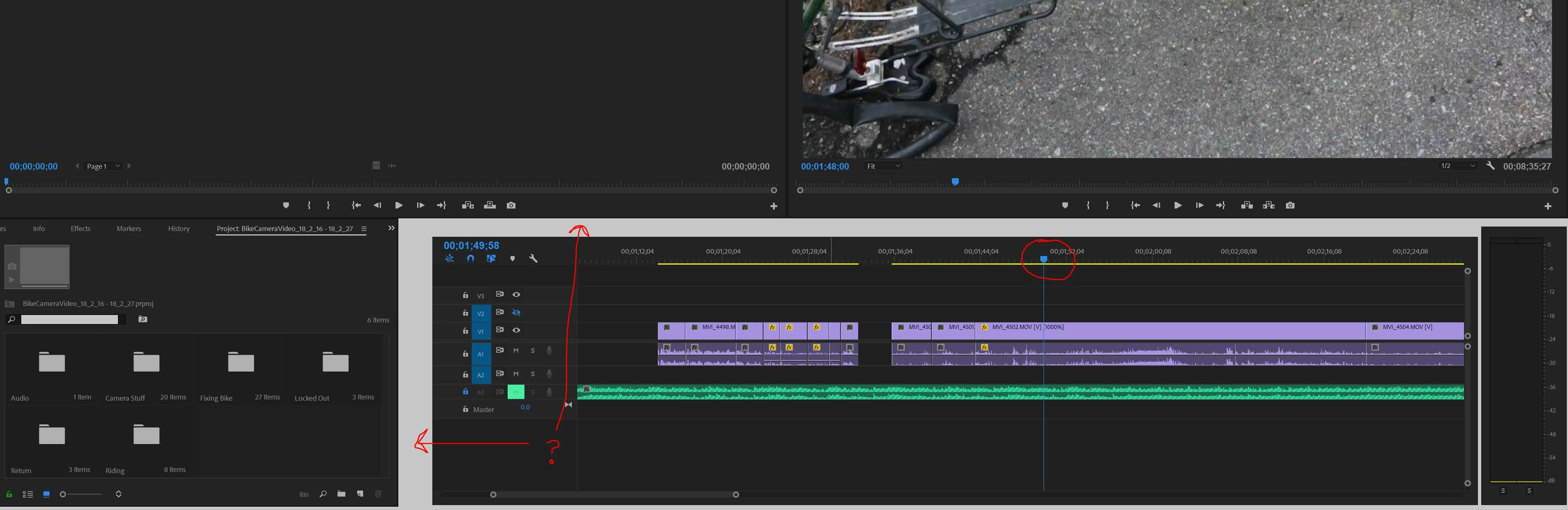
HOWEVER the blue cursor with the vertical blue line on the timeline wont move (red circle in image below). I can click and drag this cursor and the images in the upper window go backwards and forwards as normal but the cursor on the timeline stays in the same spot even as I click and drag it with my mouse.
I reset preferences as explained here FAQ: How to reset preferences in Premiere Pro? But nothing changed. When I minimize the window and then maximize it again it get's even more glitchy with large sections of blank white space (red arrows in image below).
I'm new to premier pro and finding this glitchyness pretty frustrating.
Can post a video or computer specs or whatever but in short I have 16GB of RAM and Pr is using very little of it right now.
Not having any issues with my PC or other programs.
Would love to get back to editing and actually get what I payed for here 
Cheers, Simon
 AdChoices