

Track Output Channel Assignments For Ambisonic Mixing
Hoping to get some help understanding the "Track Output Channel Assignments" selection screen as it relates to Ambisonic mixing. This guy says in order to get ambisonic audio configured properly, you need to map each audio track to a matching single audio channel, but doesn't really explain why?
https://youtu.be/UtUzbnxq9so?t=628
Hoping the forum might be able to provide further explanation about what's actually happening when changing the track channel selections and why it works?
And three's Jason Levine's great tutorial on ambisonic monitoring but he doesn't seem to reference what the proper setting should be for each track and each channel in a quad (4 Channel Mix). Does that mean it's not necessary to go through the Track/Channel mapping steps?:
https://www.youtube.com/watch?v=MqBDQLV7xZI&feature=youtu.be
When right clicking a single track in the timeline, this screen can be accessed, but how can a single track have 4 track options to select? Shouldn't there just be 1 Track visible based on which track you right click? Or are those Master Track Channels 2, 3, and 4 indicating "subtracks"?
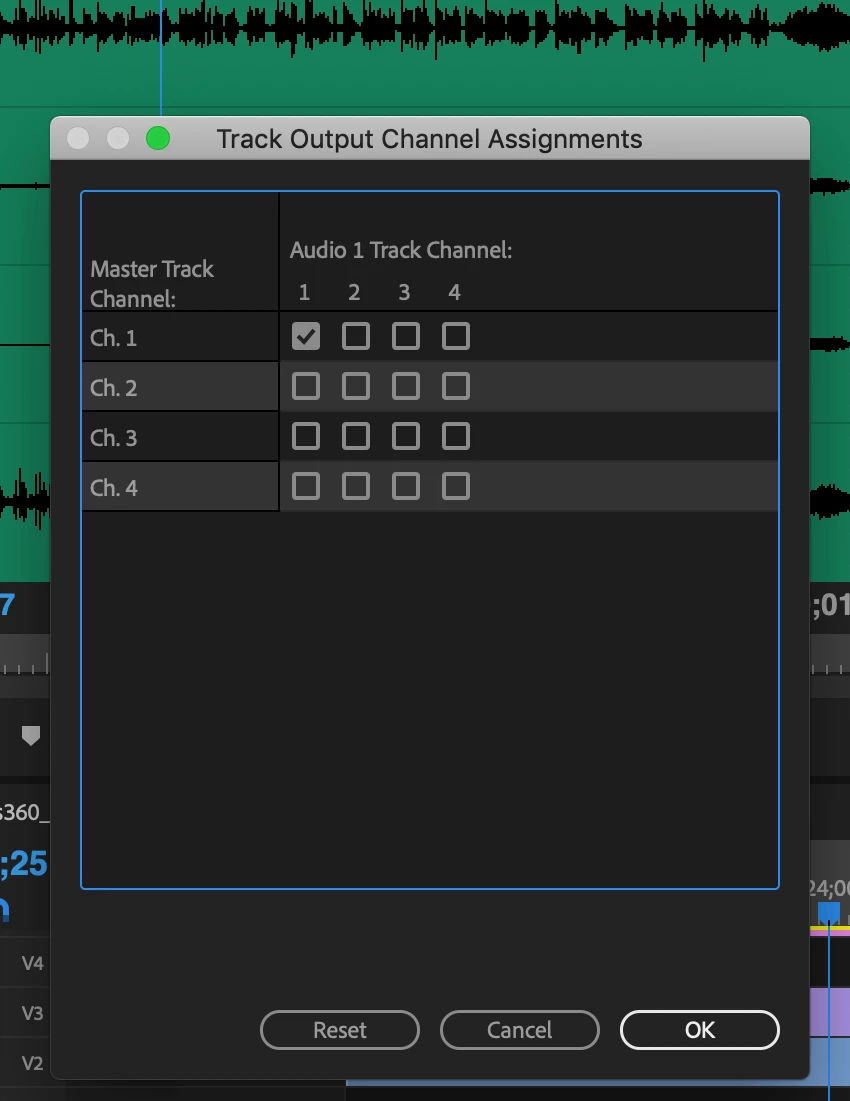
Any help better understanding this screen would be most appreciated. And is it correct to assume that you can mimic 'headlocked' audio by setting one of the tracks to map to all 4 channels?
Thanks in advance for your help!
 AdChoices