
joep16927975
Participant
August 26, 2020
Question

Unable to render video with a simple Jpeg or Png

  • August 26, 2020
  • 1 reply
  • 3177 views

Hi

I've been using Premiere Pro with no issues on this Windows 10 PC for almost 2 years now.

However recently  I'm unable to export a simple music video with the album cover (Jpeg or png) file for YouTube. The prgram monitor goes black when playback is stopped, the image displays when playback is resumed, and sometimes just doesn't display again at all. When trying to render Premiere is unable able to render the thumbnail therefore I'm unable to export the video. I receive this message:
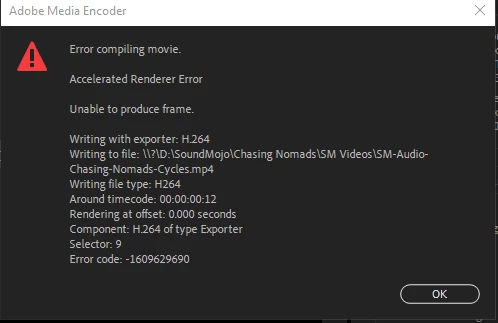


I have no problems rendering regular videos. 


Version 14.3.2 (Build 42)


System info

Windows 10

Intel i5-9600K @3.7GHz

32 gigs ram


Thanks! 

This topic has been closed for replies.

1 reply

gerikp
Community Expert
Community Expert
August 27, 2020

How big is the photo? If it's really big you might try sizing it down closer to your timeline size before importing it into Premiere Pro.

joep16927975
Participant
August 27, 2020

Thanks, Some are large but mostly jpegs. so in this particular case, It was a png of 12.8mb. So I converted it to a jpeg so 4.69mb and had the same issues. I started a completely new project to make sure there wasn' something else in the project causing the issue and I still had the problem. After about 10 tries of restarting Premiere it ended up rendering the video, but it's been occurring frequently the last month or 2. 


thanks again! 

Ann Bens
Community Expert
Community Expert
August 27, 2020

Premiere is only interested in height and width in pixels not in filesize.

Try .psd.