
Participating Frequently
December 25, 2017
Answered

very complicated frame rate scenario - please help

  • December 25, 2017
  • 4 replies
  • 4050 views

Hi to all.

I want to create a video clip.

It is a piano performance captured from 3 cameras.

The most important thing for me is audio and sync.

Piano player is pressing piano keys very fast and I want this to be perfectly synchronized with the audio from the beginning to the end.

so

I have 3 video sources

1) Go PRO - 29.97 fps

2) Samsung Galaxy S8 - 30.01 fps

3) Screen capture - 30 fps

What is the best way to combine it and be "in sync" ???

I know that if there are different frame rates for the video and audio after a while it will eventually get out of sync

Should I convert all the videos to 30 fps or 29.97 fps ? How to do this ?

Should my project in Adobe Premiere be set to 29.97 or 30 fps ?

And there is dfps (drop frame) setting as well which makes everything even more complicated.

I can take care of the audio in Cubase and export a WAV mixdown.

I have 4 options in Cubase to choose for export

29.97 fps

29.97 dfps

30 fps

30 dfps

So which one should I use for Audio ???

This is very confusing to me.

I have 3 video files - 3 different fps

then I have audio file that i have to choose fps as weel

also i have to choose the timecode (fps) in adobe premiere

and when export i have to choose fps as well...

Thank you very much for helping me out.

I could do everything alone with 1 video or 3 videos with the same sample rate but now I am honestly lost

and don't see a light to find a way out of it.

Please help.
    This topic has been closed for replies.
    Correct answer Ann Bens

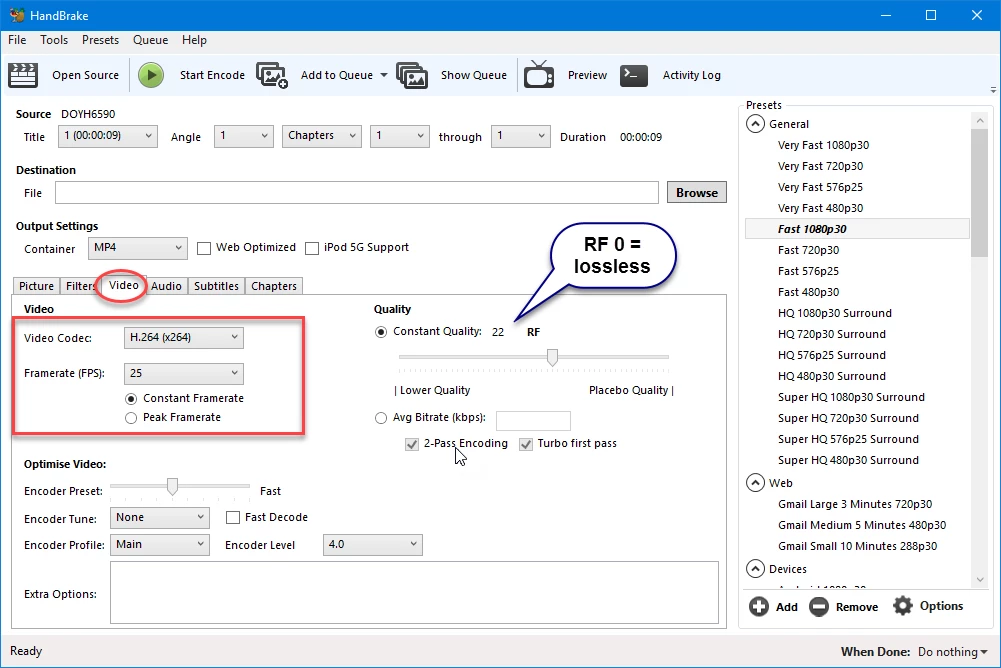
    First you have to convert the phone footage and screencapture from variable framerate to constant framerate with HandBrake.

    Otherwise you will never get it in sync.

    Then take the best audio as the main audio track.

    4 replies

    woocaashAuthor
    Participating Frequently
    December 26, 2017

    I already posted for help in the handbrake forum but maybe somebody here can guide me.

    Screenshot from Ann Bens was very helpful however there are many more additional settings in the handbrake that you can modify.

    There is Picture tab with Anamorphic / Modulus settings

    There is Video Tab with Encoder settings

    and finally there is advanced tab that you can enable

    Maybe I need to have correct settings to keep the clip exact same length

    P.S> I am considering to buy camcorder as well

    Canon Vixia HF R800 or Sony CX405

    I know that Canon has 29.97 but SONY says 30 fps.

    I also read somewhere that manufactures often give rounded numbers. Anybody familiar with those ?

    I already have gopro that is 29.97 so if I buy SONY I will still have the same problem with sync correct ?

    THX

    woocaashAuthor
    Participating Frequently
    December 26, 2017

    I am experimenting. You gave me some direction.

    I tried format factory software and it converted the file however it was even shorter than handbrake.

    I read online a solution that might work.

    Using the same software that I am using to capture the screen ( OBS ) i can record the video.

    You just play it in VLC and capture the screen with a constant frame rate.

    The files are huge though (uncompressed avi 7GB for 1 minute clip) and I dont think it is a proper way to do it.

    I records the screen so it records a mouse cursor, VLC GUI, and windows.

    You have to maximize VLC window and disconnect the mouse so 20 sec of your recording is wasted...

    It is just hard to believe.

    I read that Premiere Pro should be the most powerful Video editor. Professional standard software.

    Good that I tried trial instead of annual subscription.

    I am working in audio industry.

    There is no such file that I can not open with my DAW (either Cubase or ProTools) and convert it to any other format.

    I can change variable and constant bit rates.

    I can change the sample rate, quality, processing, bits...

    I can time scratch.

    I never had to look for third party software (freeware) with my audio.

    Those I can call professional software.

    Adobe Premiere Pro software can not simply handle to combine couple video files together.

    Another ridiculous thing is that you have to use open source free converter.

    Premiere can not even convert ???

    To me it looks like a joke.

    You can basically say that this software is not compatible with cell phone videos.

    Is there any other software that can accomplish what i need ???

    I don't need filters and other fancy editing stuff.

    Combining and converting should be the basic.

    The most important thing for me is audio-video precise sync in a long run.

    Thank you

    Inspiring
    December 26, 2017

    woocaash  wrote

    The most important thing for me is audio-video precise sync in a long run.

    Then you will want to shoot it correctly, with three cameras are that are both timecode synced and genlocked to the same sync generator that is feeding the audio recorder.

    Doing so will result in flawless syncing between cameras an audio.

    I am working in audio industry.

    There is no such file that I can not open with my DAW (either Cubase or ProTools) and convert it to any other format.

    I can change variable and constant bit rates.

    I can change the sample rate, quality, processing, bits...

    I can time scratch.

    I never had to look for third party software (freeware) with my audio.

    Those I can call professional software.

    You would have the same problem if you recorded a single sound source simultaneously with a dictation machine, a cell phone, and a Zoom recorder - if they are not sync locked, they will drift out of sync over time.

    You can basically say that this software is not compatible with cell phone videos.

    It is not at this time directly compatible with any variable frame rate video - cellphone or other device. Until recently, variable frame rate source material was not use in "professional" video production - or if it was, workflows were put in place to prepare and covert the files to constant frame rate for use in post. The continuously changing "standards" used by cellphone as other devices are a moving target. If you choose to shoot with a cellphone, you need to understand the consequences of doing so.

    MtD

    woocaashAuthor
    Participating Frequently
    December 26, 2017

    Thank you for the info.

    I could agree with everything except:

    "You would have the same problem if you recorded a single sound source simultaneously with a dictation machine, a cell phone, and a Zoom recorder - if they are not sync locked, they will drift out of sync over time."

    No way.

    I would not have any problem combining the audio from the sources you mentioned.

    It is very simple. You find the first beat (sound/note) of each of those waves and you just align them in DAW. That's it.

    No more than 60 sec of moving the mouse. They will be in sync for hours. They don't stretch by themselves nor change the speed.

    The time distance between first beat (sound/note) and the last one is exactly the same in all 3 sources you mentioned.

    (It doesn't matter what sample rate you are using, what container, file format etc.)

    I don't need any sync generator. I could align and sync everything precisely if instead of a cell phone I would use cheap cam with constant frame rate

    We can probably both agree that Adobe Premiere is the best video editor

    but

    It is just funny and silly that such a simple basic stuff you have to do in an external open source freeware...

    Meg The Dog

    Do you know any soft that can deal with my scenario ?

    I have 2 options now. Get a software or get a hardware.

    I would prefer the first one.

    Thank you

    woocaashAuthor
    Participating Frequently
    December 26, 2017

    I tried to convert the video using handbrake.

    Now frames are OK and constant but the length of the clip changed.

    It is a little bit shorter than the original and I think they should be exactly the same to perfectly sync.

    Any other suggestions ?

    Thank you

    Ann Bens
    Community Expert
    Community Expert
    December 26, 2017

    I dont have any suggestions you will have to experiment on what works best.

    Ann Bens
    Community Expert
    Ann BensCommunity ExpertCorrect answer
    Community Expert
    December 25, 2017

    First you have to convert the phone footage and screencapture from variable framerate to constant framerate with HandBrake.

    Otherwise you will never get it in sync.

    Then take the best audio as the main audio track.

    woocaashAuthor
    Participating Frequently
    December 26, 2017

    Thank you very much Ann.

    I will not use any audio from those video sources.

    Audio will be separate and I have to add it in premiere.

    While mixing the audio I have following options

    29.97 fps

    29.97 drop fps

    30 fps

    30 drop fps

    which one should I choose ?

    I am using OBS for screen capture and i can set the recording to either 29.97 or 30 fps.

    So my understanding is that my cell phone records with variable frame rate and I should have everything at 29.97 ?

    Thanks