


Inspiring
July 17, 2019
Answered

Video Card Issues

  • July 17, 2019
  • 1 reply
  • 12521 views

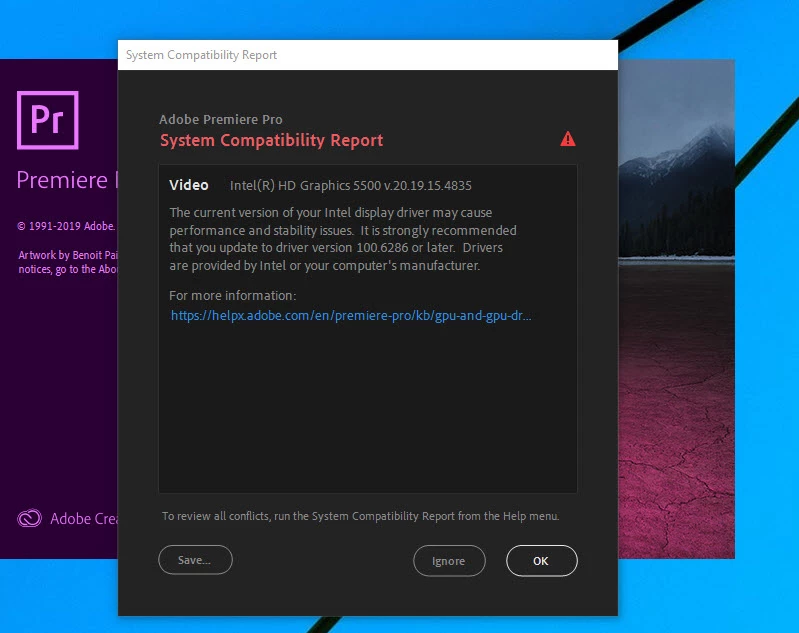
Hi! I am wondering if anyone else is having this issue. In the last few days, I get this message whenever I try yo open Premiere (see attachment). I've attempted to update the driver both through Windows !) device Manager, as well as the Intel site and they, claim I have the latest driver. Premiere is now slower than ever and I am not sure what the issue is. Is my laptop now incompatible with the new version of Premiere? That would not be a good thing.

If anyone has answers, thanks in advance!

I am using the following:

Intel HD Graphics 5500  driver version 20.19.15.4835

Dell 7348 Laptop

Intel Core i5  5200 CPU 2.20Ghz

Premiere Version 13.1.3

Windows 10 version Build 1903
    This topic has been closed for replies.
    Correct answer Vinay Dwivedi

    Try this.

    1. Download the latest driver for your platform manually from the link shared in the KB
    2. Disconnect your internet connection
    3. Right-click on the Start icon and select Apps and Features
    4. Search for and uninstall ‘Intel® Processor Graphics‘
    5. Select reboot once complete
    6. Install the newly download driver from step 1
    7. Select reboot once complete
    8. Verify the correct driver is installed
    9. Reconnect the internet connection

    1 reply

    Vinay Dwivedi
    Adobe Employee
    Adobe Employee
    July 17, 2019

    Hi Steven,

    This driver mentioned below is really old. Check the below KB for Intel Driver Requirement and get to the latest one.

    Intel HD Graphics 5500  driver version 20.19.15.4835

    GPU and GPU driver requirements for Premiere Pro

    //Vinay

    stwoodsAuthor
    Inspiring
    July 17, 2019

    Thanks for responding Vinay!

    Both the Intell and the Dell driver tool say that the version I have is the latest. Additionally, the driver that Adobe recommends is not compatible with my laptop. Not sure what other steps I can take.

    Thanks in advance!

    Vinay Dwivedi
    Adobe Employee
    Vinay DwivediCorrect answer
    Adobe Employee
    July 17, 2019

    Try this.

    1. Download the latest driver for your platform manually from the link shared in the KB
    2. Disconnect your internet connection
    3. Right-click on the Start icon and select Apps and Features
    4. Search for and uninstall ‘Intel® Processor Graphics‘
    5. Select reboot once complete
    6. Install the newly download driver from step 1
    7. Select reboot once complete
    8. Verify the correct driver is installed
    9. Reconnect the internet connection