
Inspiring
September 18, 2017
Answered

Video Device/Mercury Transmit - Keyboard?

  • September 18, 2017
  • 3 replies
  • 2472 views

I know this may have been discussed in the past, though I can't find an answer.  Is there a way to set a keyboard shortcut for the Mercury Transmit of Video to my external monitor?  There are time I do not wish to see the video on that monitor and instead use it for other things.  Right now I have to go into the menu, edit, preferences, playback and select the monitor on and off.  Be nice to find something easier.
    This topic has been closed for replies.
    Correct answer Meg The Dog

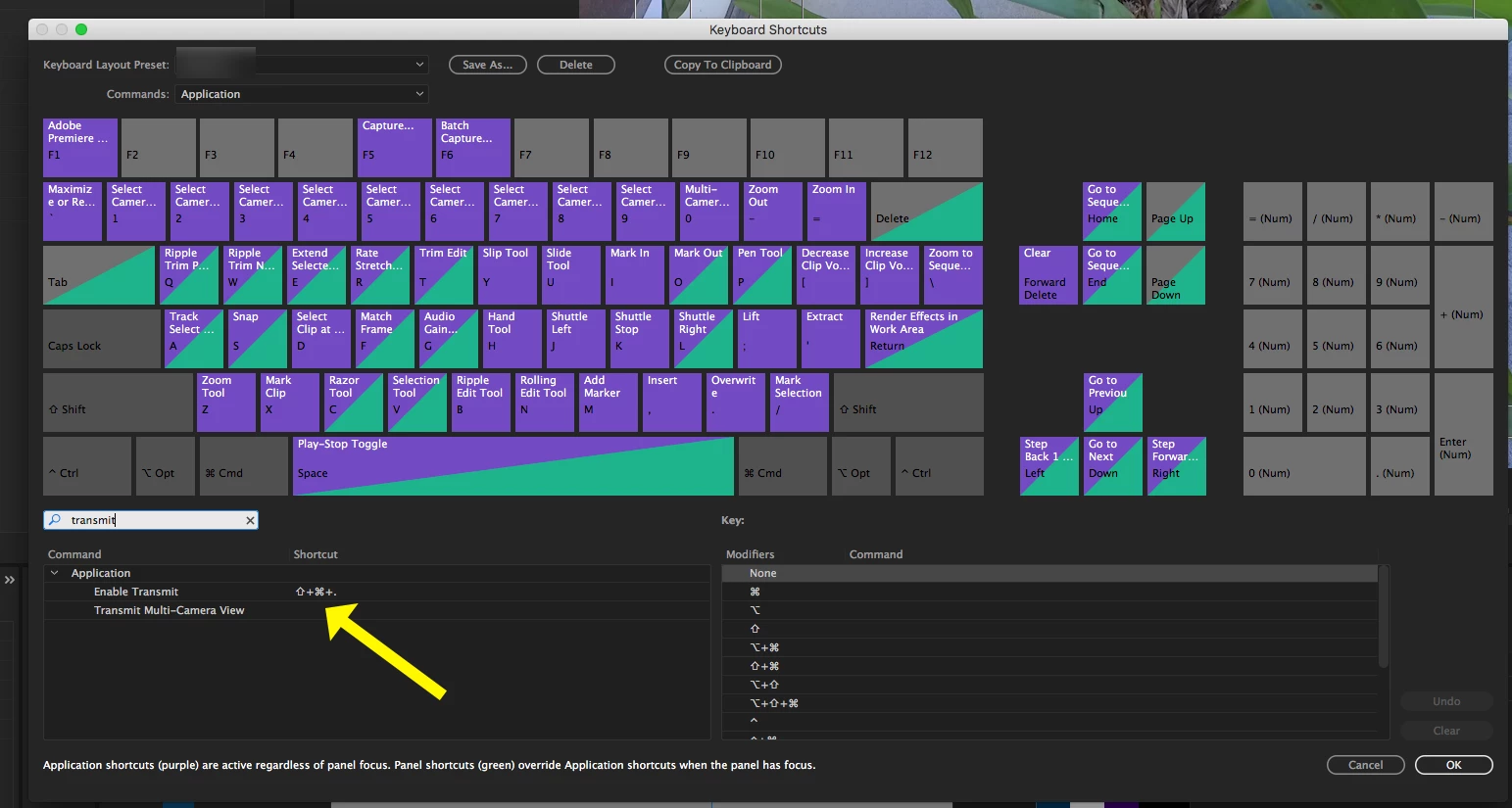
    You can set up whatever keyboard shortcut you wish, I use Shift+Command+> to toggle it on and off:

    Use Keyboard Shortcuts to set it up:

    MtD

    3 replies

    R Neil Haugen
    Legend
    July 2, 2020

    Pierre,


    No. There's only on/off toggling for the Transmit Out, and to change which monitor it goes to, you need to go to the Preferencees dialog and change which is set for T-O.


    And also no ... there is no way to link a monitor to a workspace.


    Neil

    Everyone's mileage always varies ...
    pierreo96500351
    Participant
    July 2, 2020

    Thanks!

    That would be a neat feature to have. Even if I agree that it would only be usefull to a few editors out there!

    R Neil Haugen
    Legend
    September 18, 2017

    As MtD, I set it up through the keyboards short dialog to Shift-C.

    Neil

    Everyone's mileage always varies ...
    pierreo96500351
    Participant
    July 2, 2020

    Good info.

    Now is there a way to use shortcuts to switch between several "Video Devices" in the prefs window?


    My system has three monitors and I'd like to be able to send the full screen video to a different monitor (to the client monitor) in one click/keystroke.


    Also, is it possible to link a Video Device to a Workspace? Same idea: I'd love to be able to send my timeline and other panels to different monitors when I switch Video Device to another output.


    Thanks!

    Meg The DogCorrect answer
    Inspiring
    September 18, 2017

    You can set up whatever keyboard shortcut you wish, I use Shift+Command+> to toggle it on and off:

    Use Keyboard Shortcuts to set it up:

    MtD