
Sam Eilertsen
Participant
August 31, 2017
Question

Video Limiter woes

  • August 31, 2017
  • 4 replies
  • 2585 views

Hi all,

I see a few other posts about this form years ago but wondering if anyone has since found a fix. I've never gotten the Video Limiter to actually work on export, it will show legal levels in the Lumetri scopes in PPro, but then if I render and bring that file back in Premiere the levels will no longer be legal.

For example, here's the scope from a clip with the Limiter applied:


Looks good, right? OK here it is after rendering as a QuickTime ProRes and bringing it back in:
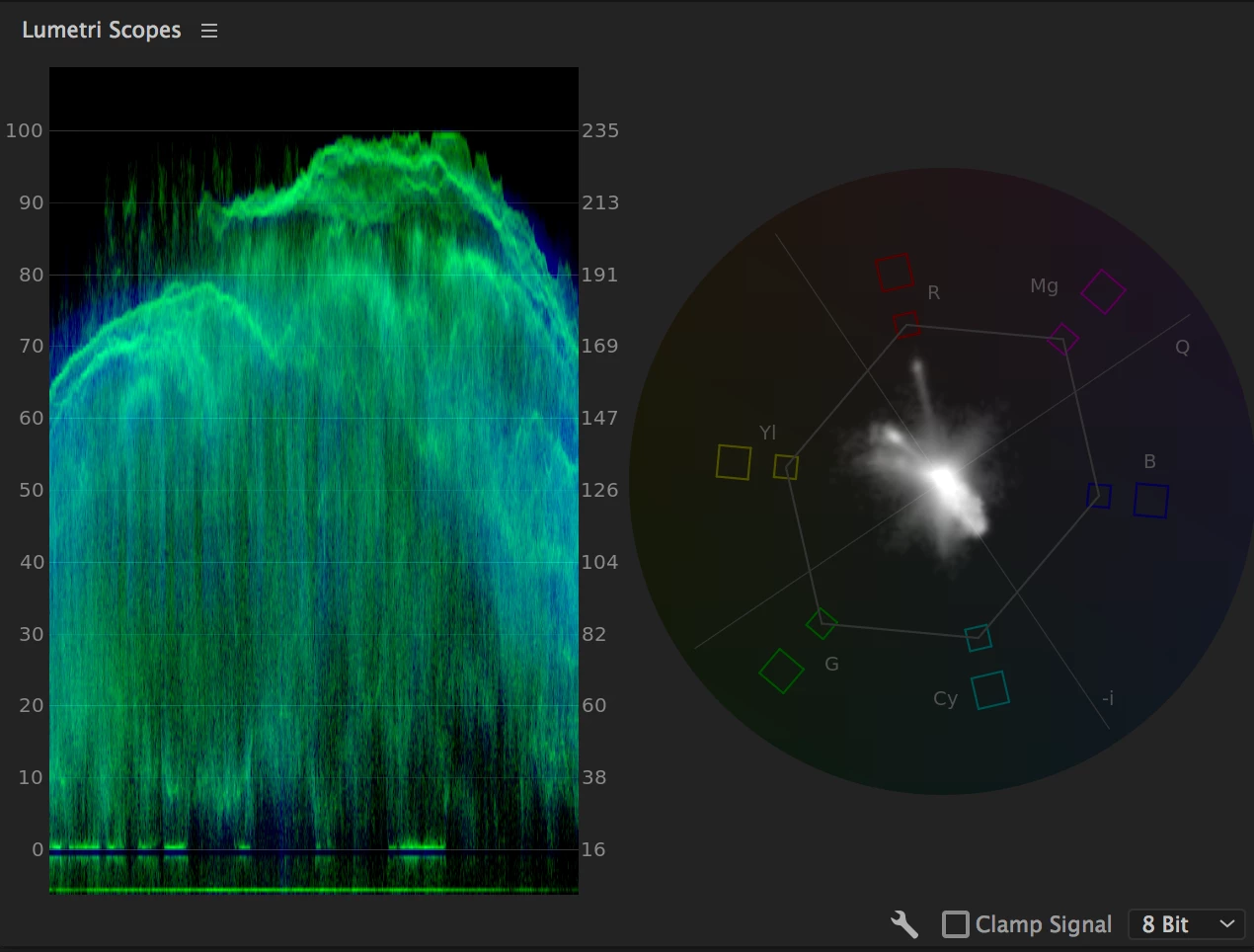
That's not going to get through QC!

I've also tried exporting as DNxHR MXF, same problem. Running it through the broadcast legalizer in AE doesn't seem to work any better. My work-around for the past year has been to run anything that needs to be legalized through FCP7's broadcast legalizer AFTER rendering in PPro. But that adds hours of time for a feature film, and now that Apple has announced the OS X is dropping support for FCP7, my days of using this as a fix may be numbered.

Has anyone figured this out?

This topic has been closed for replies.

4 replies

laurlau
Inspiring
August 28, 2018

same thing here. tried different codecs, tried as an adjustment layer. tried with the (legacy) video limiter.nothing.

when importing the clip back to AP, it has nothing to do with the clip on the timeline(the clip with the video limiter preset)

it won;t keep the video limiter preset.

R Neil Haugen
Legend
August 28, 2018

Are you on 12.1.2?

The new video limiter in that version has tested quite well for most people ... make sure not to use the 'legacy' one in the Obsolete folder.

Neil

Everyone's mileage always varies ...
laurlau
Inspiring
August 29, 2018

yes. 12.1.2

the first image is with the vireo limiter (ebu r103)

the second one is the export as dnxhd

tried multiple exports as 8/10 bit, multiple formats, the effect applied directly on the footage from the timeline and also as an adjusment layer above.

Legend
September 1, 2017

First thing I notice about the Limiter is that it's not compressing the signal to 16-235.  It remains the full range 0-255.

chrisw44157881
Inspiring
August 31, 2017

another option is a broadcast preset I made that automatically legalizes luma and chroma. Haven't gotten any negative feedback yet.

Plus it has soft rolloff built in, looks way better imho.

this will legalize all video to lumin 16-235

and chroma to 90% YUV and fit in all boxes of vectorscope YUV

CreativeCOW

R Neil Haugen
Legend
August 31, 2017

I'm not able to replicate your results. After getting into the same scope setup as you're using, I applied Video Limiter to a clip, and set it to the settings as shown ...

Producing the following scope ...

Exported/re-imported that section, and got the following scope on the imported clip ...

The original clip had material down to about 1 and up to around 98 on the left-hand scale, so this was bringing both shadows and brights well in from their original readings.

Neil

Everyone's mileage always varies ...
Sam Eilertsen
Participant
September 1, 2017

Hi all, thanks for your replies! Just to explain a little further, the source material is mostly stuff I had graded in Resolve that is already graded to look right at 16-235, but has some stray pixels above and below legal limits (the shot I had screencapped, is a particularly dramatic example, because I had dropped a title from a PSD file over it so the blacks weren't set for video range).

]chrisw44157881​ what your preset seems to do is condense the entire range, but that would only look right if the file were graded for 0-255, not 16-235. Instead, I just want to cut off anything above or below the 16-235 range. So for instance, this is what that shot looks like with your preset applied:

Which is actually NOT what I want, doing this makes the image look very washed out. Instead, that sharp green line that's around 8IRE should be back down at 0, but the green below it should be clipped to 0 as well so there's no luma below baseline. Likewise, the white should be at 100/235, but anything above that should be clipped.

Basically what I want is the equivalent of a hard limiter in audio (which is what the limiter in my OP seemed to be doing, but it wasn't showing up on the export), while your preset is the equivalent of a compressor.