
Participant
December 31, 2017
Answered

Voice Over with Mac (Premier Pro CC)

  • December 31, 2017
  • 3 replies
  • 2421 views

Hello,

I'm unable to record using my Mac and Blue Yeti mic in Premier Pro CC. I've been using an old version of Premier and decided to buy the CC again, only to find that it's impossible to voice over. The mic icon is greyed out on the timeline and I can see no way of rectifying this.

I'm really hoping someone can help me on this forum as it seems to be the only way to access any help at all for this product (is that also correct? seems odd at over $50 a month)....
This topic has been closed for replies.
Correct answer Meg The Dog

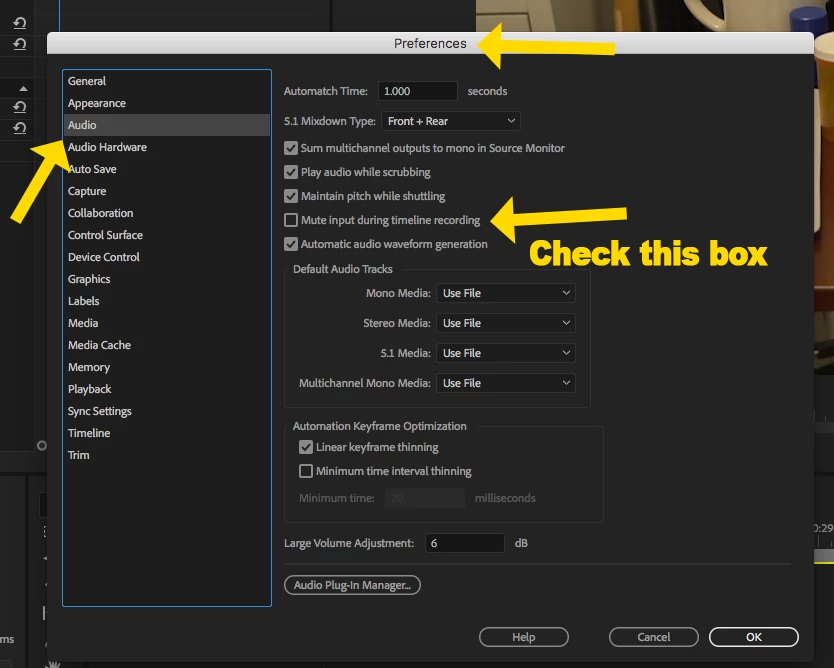
Go to Preferences > Audio and check the box for Mute Audio During Timeline Recording:

MtD

3 replies

stevef30209121
Known Participant
April 10, 2020

I had the same (PC Wondows 10) but that didn't solve it for me. Go to Edit > Preferences > Audio Hardware and check your mic is checked in the drop down box. But it was a good tip as I knew where to look in settings, Thx

Legend
December 31, 2017

Premiere Pro often has issues with USB audio.  I recommend not using it.  Stick to the normal audio connections.

Additionally, I also recommend recording voiceover with a hardware recorder, something like a Zoom or Tascam unit.  They're generally very reliable.

GermanTV
Inspiring
December 31, 2017

Be sure that your microphone is activated in the preference settings of premiere. 2 reasons why it is not maybe: 1. it is not set as the default mic of Windows (How to Setup default microphone on your windows system - YouTube ) 2. It was plugged in after starting premiere. There might be reasons beyond that... However, be sure your mic is plugged in and than start premiere. After doing that check if it is activated in the preference settings of premiere (the following clip shows how to get there in the first 2 minutes; be sure thet you select the INPUT devices, as that must not be the case by default: How to Setup default microphone on your windows system - YouTube)

Participant
December 31, 2017

Hello GermanTV,

I'm actually using a Mac, does that make a difference? The voice-over icon is greyed out on my Macbook pro but it all works perfectly on my iMac, which seems really odd.

I've managed to get it to allow me to voice-over, probably because I plugged the Yeti in before turning PP on as you suggested, thank you.

I've now got the issue of SO MUCH feedback from the mic that I can't hear a thing. Using headphones with the Yeti makes no difference at all. I must have one of the settings wrong. I have built-in output set on preferences and have no other sound tracks on the timeline.

I'm so confused, I've been doing voice-over for years with PPCS6 and never had any of these issues with the same equipment. But I'm getting the feedback with both Macbook pro and iMac desktop.

Thanks so much for your useful help.

Meg The DogCorrect answer
Inspiring
December 31, 2017

Go to Preferences > Audio and check the box for Mute Audio During Timeline Recording:

MtD