
Participant
April 20, 2017
Answered

VR video enabled

  • April 20, 2017
  • 1 reply
  • 4821 views

Hi,

Couple weeks ago I started a project in Premiere Pro. I imported images (360degree) and I could check them in VR.
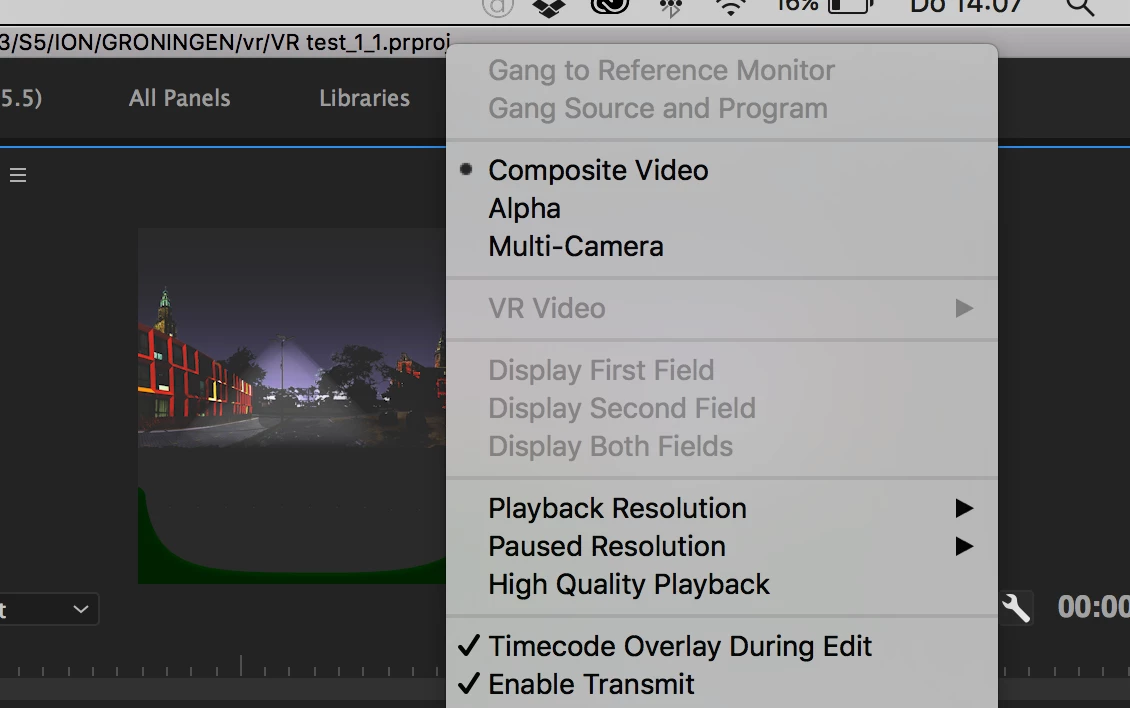
Now I want to work in the project again, but the VR VIDEO menu isn't clickable.

I also created a new project, but also there: VR video is disabled. Couple of weeks ago it was clickable and I could change the settings.
    This topic has been closed for replies.
    Correct answer premieregal

    Hi boyke93 - I just tried it out myself using some stitched video footage I shot on a Ricoh Theta S Camera and the VR Video menu item is working. Premiere Pro automatically should recognize 360˚ video, but sometimes there can be some errors.  Here are a couple suggestions I have:

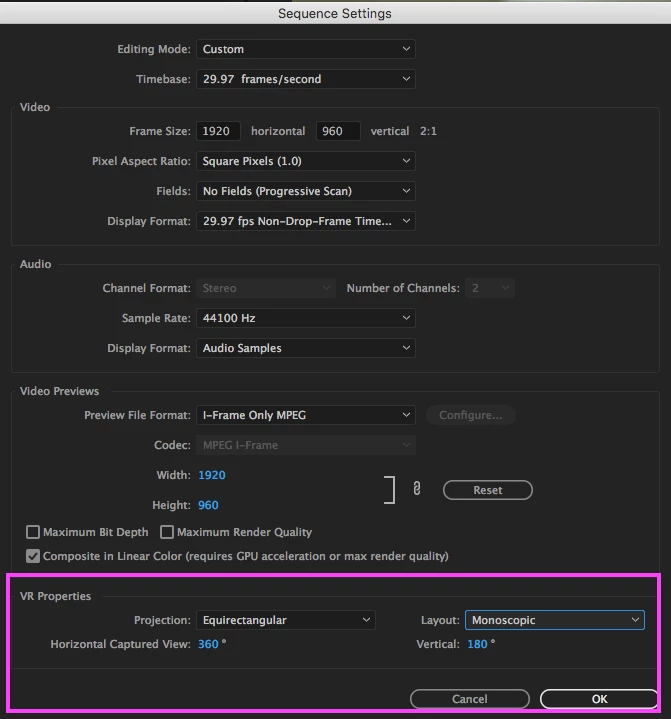
    (1) Right click on your sequence and select "sequence settings." At the bottom, make sure that the VR properties reflect the layout and projection of your footage. I can't see your full VR image, but it looks stereoscopic side-by-side.  Here is an image:

    (2) Second, have you tried using the toggle VR animation button in the Program panel? You can add it by clicking on the "+" button in the lower right of the pane. Here is an image:

    1 reply

    premieregal
    Community Expert
    premieregalCommunity ExpertCorrect answer
    Community Expert
    April 20, 2017

    Hi boyke93 - I just tried it out myself using some stitched video footage I shot on a Ricoh Theta S Camera and the VR Video menu item is working. Premiere Pro automatically should recognize 360˚ video, but sometimes there can be some errors.  Here are a couple suggestions I have:

    (1) Right click on your sequence and select "sequence settings." At the bottom, make sure that the VR properties reflect the layout and projection of your footage. I can't see your full VR image, but it looks stereoscopic side-by-side.  Here is an image:

    (2) Second, have you tried using the toggle VR animation button in the Program panel? You can add it by clicking on the "+" button in the lower right of the pane. Here is an image:

    boyke93Author
    Participant
    April 20, 2017

    Thanks, the problem was the sequence settings. Don't know why it changed, maybe cuz of an update.