
Weird bug (noise line at bottom of some video clips)
I've already searched a lot here and on the web and didn't find anyone with this same problem, so here it is:
when editing (Premiere Pro CC 12.1, MacOS 10.13.6) some clips shows a strange kind of "coloured white noise" line at the very bottom of it.
I first saw them at program window, but when I click on the those clips on Program to open on Source window, it's also there.
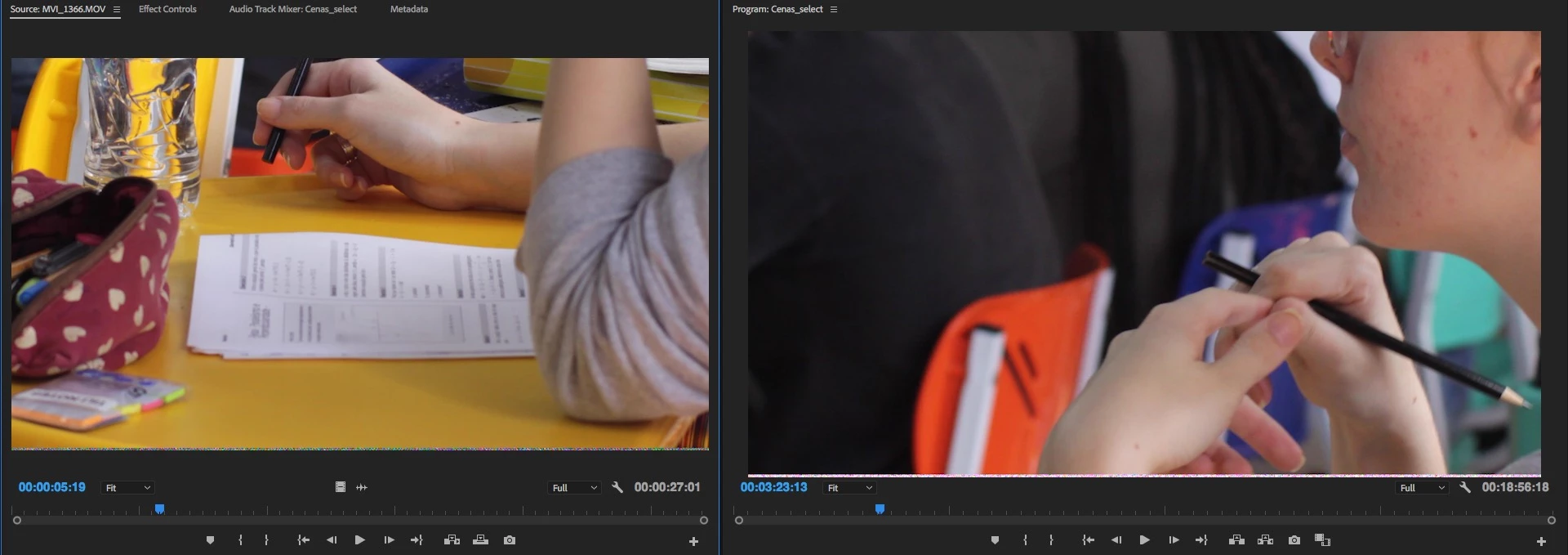
I tried some things: re-import footage on same project; exclude and re-import on same project; close this and open another (new) project) and the same happens.
When I export these lines also appears, but when I open the raw footage on other softwares, no lines there.
Tried cleaned all cache files, restart the computer and still there...
Based on this, looks like Premiere is creating some information related (metadata, XMP?) to affected clips, so once appears, ever appears.
This is happening on random clips, as long all the footage was recorded using same equipment (DSLR, h264 MOVs).
Post-production workflow is also the same. No effects or plugin applied, just raw files thrown on timeline.
It's the third project this happens.
The workaround I'm using is scale the clips a little bit, so the lines goes off screen.
But I really like to fix this.
Any ideas?
Thanks!
 AdChoices