
Participant
October 27, 2017
Answered

Which files/maps am I to import?

  • October 27, 2017
  • 4 replies
  • 2298 views

Hi!

I'm new at using Premiere Pro for video editing. Whilst I'm rather familiar with the editing part, I'm quite lost when it comes to what to import. So, on forehand, sorry for asking silly questions.

I am filming with a Sony A7S which gives me files in .mp4. When I find these files in the finder window, they are accompanied with some .xml-file.
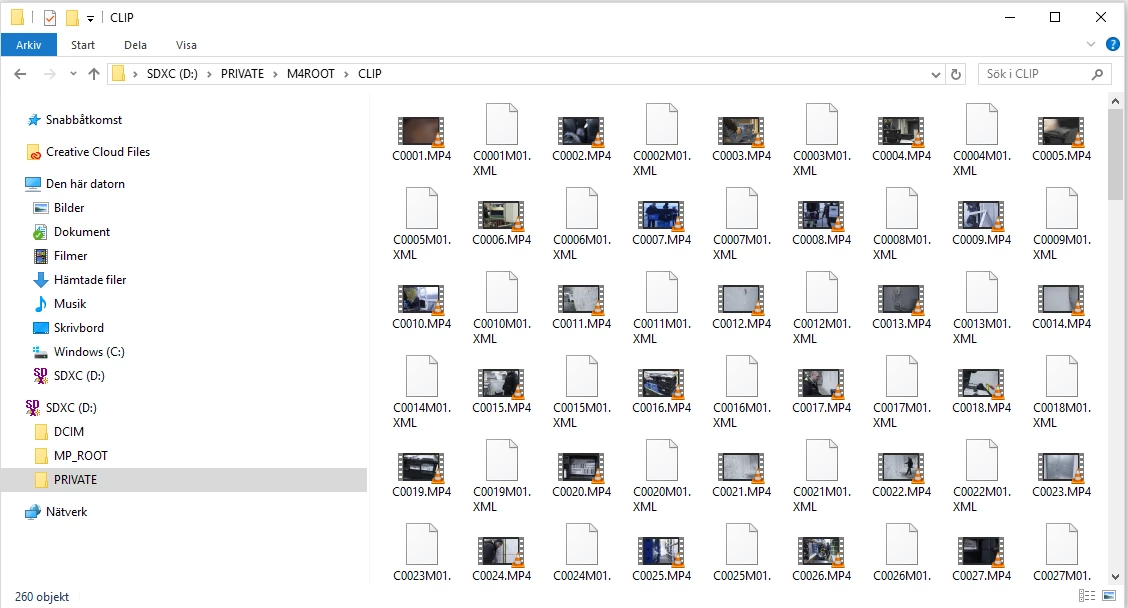
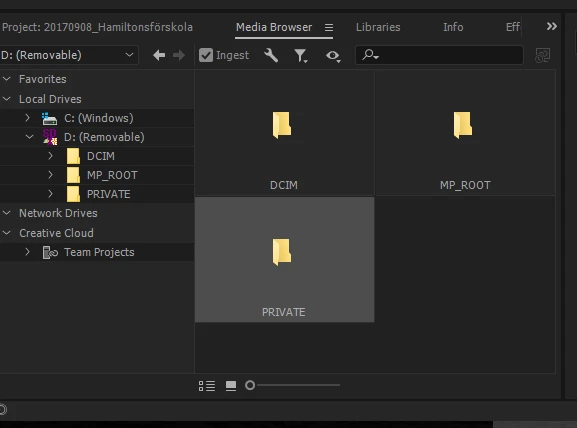
Am I to import all of these files, or the entire map PRIVATE? Or maybe all the maps DCIM, MP_ROOT and PRIVATE?

Looks like this in PP:

Also, the recording format for the SonyA7S is AVCHD 2.0/mp4/XAVC S.

I've understood that the XAVC-format is supposed to be better at storing information, that it gives me more in terms of colour, light an so on whilst editing. I can however only find .mp4-files. Has this something to do with the settings of the camera or is PP not able to import the XAVC-files?

Thank you!

/Sara

This topic has been closed for replies.
Correct answer Meg The Dog

Sara_NordGen  wrote

I've understood that the XAVC-format is supposed to be better at storing information, that it gives me more in terms of colour, light an so on whilst editing. I can however only find .mp4-files. Has this something to do with the settings of the camera or is PP not able to import the XAVC-files?

Thank you!

/Sara

We work with XAVC files from the A7s all the time without issue. The XAVC files are found on the camera card in the directory PRIVATE > M4ROOT > CLIP.  They have a .mp4 extension because XAVC is a variant of the MPEG format. Each clip has an associated XML file which contains metadata about the clip. Some editing software/players use that metadata, some do not.

You can either import the clips in that directory individually by navigating to the clip itself, selecting and importing it or you can import all the clips by navigating to the Clip folder ( PRIVATE > M4ROOT > CLIP), selecting the Clip folder and importing. As Premier will be attempting to load the .XML files that are included in the folder, when the import is done, Premiere will report that there were invalid files in the folder that it did not import. Those are the .XML files which you don't need and the warning can be dismissed.

The XAVC format is the best format to work in with that camera.

MtD

4 replies

Meg The DogCorrect answer
Inspiring
October 27, 2017

Sara_NordGen  wrote

I've understood that the XAVC-format is supposed to be better at storing information, that it gives me more in terms of colour, light an so on whilst editing. I can however only find .mp4-files. Has this something to do with the settings of the camera or is PP not able to import the XAVC-files?

Thank you!

/Sara

We work with XAVC files from the A7s all the time without issue. The XAVC files are found on the camera card in the directory PRIVATE > M4ROOT > CLIP.  They have a .mp4 extension because XAVC is a variant of the MPEG format. Each clip has an associated XML file which contains metadata about the clip. Some editing software/players use that metadata, some do not.

You can either import the clips in that directory individually by navigating to the clip itself, selecting and importing it or you can import all the clips by navigating to the Clip folder ( PRIVATE > M4ROOT > CLIP), selecting the Clip folder and importing. As Premier will be attempting to load the .XML files that are included in the folder, when the import is done, Premiere will report that there were invalid files in the folder that it did not import. Those are the .XML files which you don't need and the warning can be dismissed.

The XAVC format is the best format to work in with that camera.

MtD

Participant
October 30, 2017

Great!

Thank you so much

Ann Bens
Community Expert
Community Expert
October 27, 2017

XAVC is a recording format and stored in your mp4 container. Check your camera manual.

Right click op PRIVATE and import.

After importing you get a error message of not imported xml files but that is ok. Dont need those in your timeline.

Ann Bens
Community Expert
Community Expert
October 27, 2017

Are you sure you want to use Premiere Pro, has a high learning curve.

Legend
October 27, 2017
Ten A
Community Expert
Community Expert
October 27, 2017

Your post moved from Import/Export under the Capitvate to Premiere Pro CC forum.