
Participant
Aug 15, 2013 8:50 PM UTC
Answered

White triangles on top corners

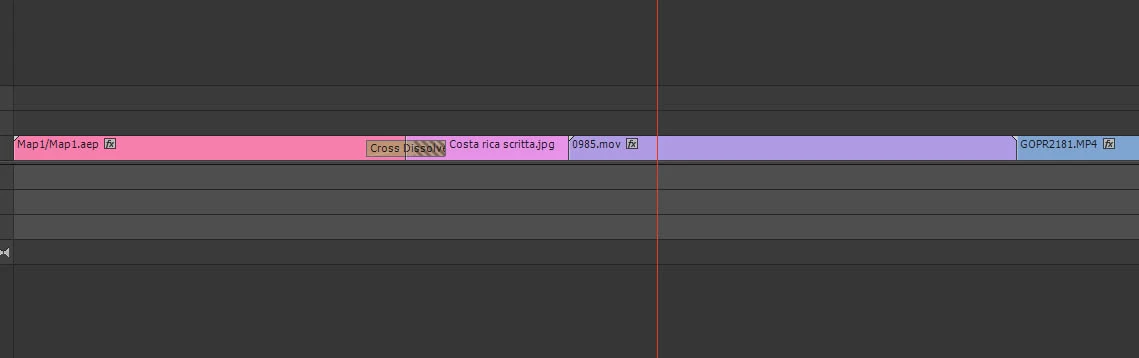
Hi there I'm new to Premiere so maybe this is an easy answer but i cannot figure out, i create a timelapse (.mov the purple clip) and when i add that to the timeline with other .mov clips from my gopro have this little white triangles like the left corner of the first clip in the timeline. With those triangles i cannot add transictions.

What did i do wrong?

Thanks

    This topic is closed to new replies. Start a new post to keep the conversation going.
    shooternz
    shooternzCorrect answer
    Legend
    Aug 15, 2013 9:08 PM UTC

    They indicate the limit or end of your clip.

    Therefore ...there are no frames to make a transition from.

    13 replies

    shooternz
    shooternzCorrect answer
    Legend
    Aug 15, 2013 9:08 PM UTC

    They indicate the limit or end of your clip.

    Therefore ...there are no frames to make a transition from.

    Translate
    kiko2929Author
    Participant
    Aug 15, 2013 9:11 PM UTC

    Hi shooternz, how can i change that? make a longher clip and cut it before to put it in the timeline?

    Translate
    shooternz
    Legend
    Aug 15, 2013 9:18 PM UTC

    You roll the camera longer or you make your After Effects Composition longer etc..

    You edit your shot within the limits eg within the head and the tai of the clip (asset) before you put it in the timeline (ex Source Monitor).

    You can edit (adjust) the edit points in the timeline as well.  This is editing basics.

    Translate