
Participant
June 15, 2020
Question

Why are 'Looks' appearing different in the creative preview than program monitor?

  • June 15, 2020
  • 5 replies
  • 3496 views

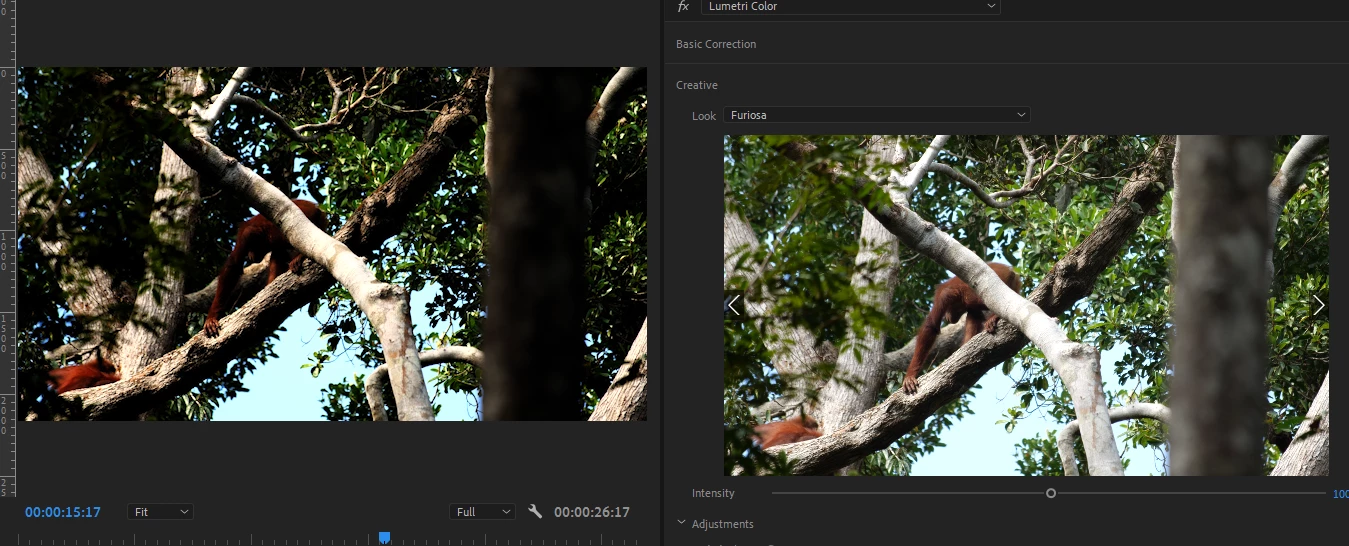
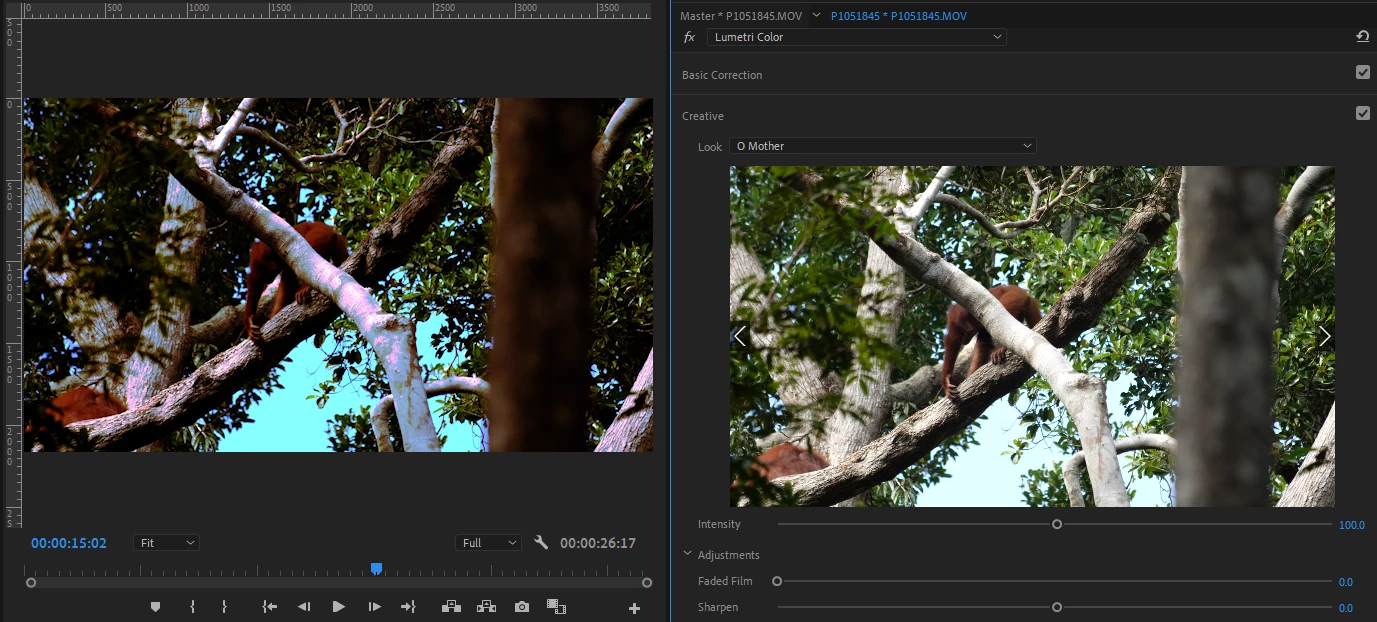
When browsing looks in the Creative tab of the Lumetri Color window, the preview can look drastically different to what it looks like in the program monitor when I apply it.

This is without making any other Lumetri adjustments on any of the tabs. The preview is definitely working as I can see it change as I flick through the different looks, and the colours that come out in the program monitor (as you can see in the 2nd example below) definitely don't look right.

If you have any ideas or suggestions they'd be greatly appreciated!

Here's a couple of examples (Preview window on the right, program monitor on the left):

This topic has been closed for replies.

5 replies

Participant
November 16, 2023

Hi, experienced the same issue. For me this was solved by

1. opening the lumetric color panel
2. in the lumetric color panel select the settings tab

3 select the display color submenu

4 check the Display Color Management option. 


see screenshot. hope this helps!

Participant
November 16, 2023
Participant
September 20, 2023

Just stumbled upon this as I was having the same 'issue'.


What I realised is that when playing around with Lumetri Colour, I had mistakenly chosen a LUT in the 'Basic Correction' panel and forgotten to turn it off when selecting another LUT in the 'Creative' panel. The creative preview was obviously apply the LUT to the raw image, but my program monitor was displaying the image with both LUTs applied.


Feel a little foolish but happy I solved it. As other's have said, perhaps there are other corrections active that you've maybe forgotten about?

Participant
March 31, 2023

Having the same issue. Tried exporting in a wide variety of formats and tried changing the sequence settings > video preview. No luck. Feeling very dissapointed in the basic functionality of this 175 billion dollar company's flagship programs recently.

R Neil Haugen
Legend
March 31, 2023

Do you have any other effects applied to the clip prior to previewing the LUT? 


I think the preview applies to the 'Source' state of the clip, as imported. But not totally sure. 


@Fergus H  ... comments, please?


Neil

Everyone's mileage always varies ...
Participant
March 31, 2023

I'm realizing I may have misunderstood the thread here.


Im having an issue where the Program monitor looks pretty dirastically different from the exported video. Its a simple mp4 video with some lumetri color adjustments, but the program monitor has more saturation and contrast and occasional strange artifacts like magenta in the shadows similar to the side-by-side from Josh. I've made sure the encoder is exporting the effects as when I overcorrect with too much contrast, the exported product appears in slightly higher contrast.


Kind of lost here.

R Neil Haugen
Legend
June 15, 2020

For a user, I've got about as much experience/knowledge-of the Lumetri process as anyone. Yea, I've seen that occasionally you can get differences between the "preview" monitor and the Program monitor. I accept the accuracy of the program monitor. The preview monitor ... I'm not sure how tightly that is set in truth.


But then, I've never expected the preview monitor to be an end result.


Out of curiosity, if you go to the Creative tab's settings for Intensity of the look and back it down some, does it then look like in the preview window?


If you change your Premiere color managements setting in the Preference/General section (enable display color management) ... does that affect this?


Neil

Everyone's mileage always varies ...
Participant
June 18, 2020

Oddly even if I reduce intensity to 0 it still comes out drastically different (see below).
I've also, on your recommendation turned on display color management, but to no avail. 
Thanks for your help but let me know if you have any other suggestions

Participant
January 31, 2023

Did you end up resolving this issue? I am having the same problem!

Inspiring
June 15, 2020

Does this same problem occur if you use the included looks that are provided in Lumetri versus third party?

I'm not seeing this issue, but am not using any looks other than the Adobe provided and/or camera manufacturer suppied ones.


MtD

Participant
June 15, 2020

To be honest no, it only seems to happen with 3rd party ones, but not all of them. But I don't understand how this could happen, if the preview is reading the look properly, how is it getting messed up when being applied? 

Inspiring
June 15, 2020

Don't know, but likely the 3rd party looks are not compliant in some way - or they rely on adjustments that force the image components out of range of the format you are working with on the timeline. Just a guess -don't use luts that often.

Hang around, maybe someone will offer a solution.

MtD