Known Participant
August 3, 2017
Answered

Why do I lose my effects when I nest a sequence?

  • August 3, 2017
  • 2 replies
  • 7724 views

I have made a master clip made up of several nested sequences. On the final and third sequence when I add it to the master timeline all of the effects are lost.. but they  still remain in the original sequence. Please help.

This topic has been closed for replies.
Correct answer Ashley7

thanks very much

I have made new sequences using these settings -  for sequences that hold combination of jpeg and video images

and have successfully nested 4 sequences in a master clip!

Thanks for your help - much appreciated.
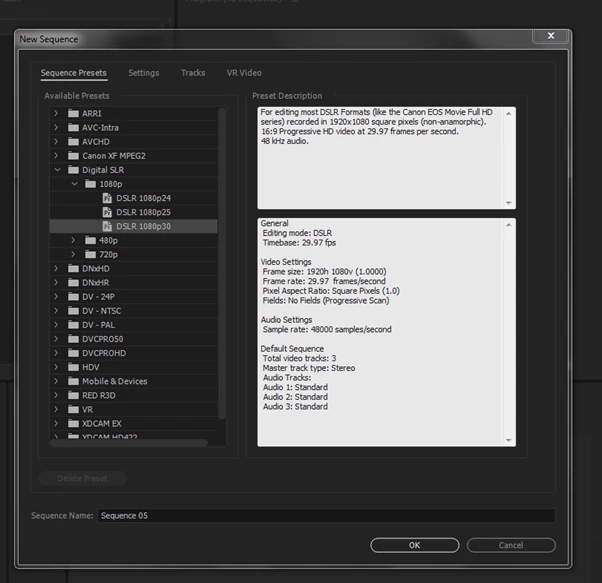

KathyScottCompass  wrote

I have made new sequences using these settings -  for sequences that hold combination of jpeg and video images

and have successfully nested 4 sequences in a master clip!

[edited to correct typos]

That's great to hear... one thing to keep in mind... it's not bad to create lower-level or foundational sequences which avoid cropping and scaling source material which is larger than your output resolution (i.e., 1080p). In fact, sometimes you want to absolutely avoid doing so. For example, consider the following cases...

  • You plan to use the same image in several places, each one focused on only a portion of the larger original source image, cropped to 1080p. In this case, down-scaling the image in a foundational (source) sequence as part of importing and setting things up can lead to lost quality later when you up-scale for your various uses.
  • You plan to pan the larger image within a 1080p space... meaning the 1080p window within which the viewer watches your video will pan across the larger image which is not entirely visible at once... it is panned. In this case, you want your pan to be the best possible quality... down-scaling on import or in a foundational (nested) sequence will just lead to up-scaling senselessly later, hurting quality.

It can't hurt to have a foundational sequence with oddball resolution settings matching an image you imported... just remember to scale/crop it when using it in a sequence matching your export format such as 1080p. For standard photo montages where someone imports and needs to use each image only once, and therefore can crop/scale each image once... often getting the images to the export format right away is best... just beware it's not always best to do that. It can sometimes hurt quality. If one has multiple uses of images planned, including tighter cropping with scaling later, cropping/scaling "too soon" it can damage quality.

This is all to say your original sequence hosting the JPEG which had non-1080p / 16:9 resolution settings was fine... you could have scaled it down when using it in the higher-level sequence. If you only have one use for the image, with one cropping... then scaling it down/cropping it to 1080p right away is fine, otherwise, consider cropping/scaling as desired per usage in the project, keeping the source or foundational sequence unscaled or as relatively unscaled as makes sense.

2 replies

Legend
August 3, 2017

In addition to details Jim mentions, in the interim, a good way to try to isolate an issue like this is to use a sort-of divide-and-conquer approach with a copy of the original project...

For example...

  1. You are currently seeing the issue with ProjectA.
  2. Ensure all of your work is backed up.
  3. Save As ProjectA to something else like ProjectA-FindProblem etc.
  4. With ProjectA-FindProblem loaded in Premiere, ripple delete from the main timeline all of the sequences leading up to the first problem sequence (the first sequence where you see the "effects missing" issue.
  5. After that, export that and see if you observe the issue. If it's too long to do a full export, just export IN to OUT a portion which tends to be missing effects. Note, if you take this exporting IN-to-OUT approach (which can be faster), insert a step #3b above where you render IN to OUT a baseline problem section so you are certain exporting a small IN to OUT portion of the trouble section actually still reproduces the issue. If it does not, you cannot use that faster approach because it means exporting the entire sequence leads to the issue whereas IN-to-OUT of your choice apparently does not...  you must perform a baseline to verify exporting IN to OUT as a good verification, else you don't know since exporting IN to OUT itself may be skip the issue.
  6. If you still see the issue, in the same test project ProjectA-FindProblem delete sequences after the problem area and retry step #4 through #6 ... rinse/repeat.The goal is to get a small section which exhibits the problem or otherwise observe when it goes away... those observations usually can help at least find a workaround if not understand the problem better, perhaps even lead to a bug being discovered.

The above steps #4 and #5 are somewhat abstract in that what you do to reduce things down depends on the nature of your project... just use wisdom to try to reduce the problem to something simpler.... something's got to give at some point... the problem will either be greatly reduced (therefore simpler to observe/discuss, and perhaps understand), or it will go away... either way you can backtrack or take workaround steps and/or report a bug etc.

The above is something you can do to try to move forward faster while you throw more details in the thread here.

Best of luck finding the cause and a good fix/workaround!

Known Participant
August 3, 2017

Hi

thank you for trying to assist

The segment on its own doesn't have the problem.

Only when I play the sequence as part of the nest.. the effects are lost  (the other sequences in the retain their attributes)

If I double click and open the problem sequence within the nest.. the effects are found.

I have made duplicate copies.. I have even re edited the whole sequence.. and everytime I attach the sequence to the nest of sequences I lose the effects ( in that particular sequence).

I have also closed and restarted the program.

As you suggested I exported the set of nested sequences to see if the problematic sequence behaves when exported.. but the effects are lost.

I am a baffled.

kathy

Legend
August 3, 2017

KathyScottCompass  wrote

...

the effects are lost  (the other sequences in the retain their attributes)...

...

[edited since posting for typos]

Can you elaborate on the meaning of lost? Do you mean lost as in not visible if you drill down into the nest to the problem sequence, or do you mean lost an in have no effect on the exported output when you export the higher level host of the nests?

A screenshot(s) may help convey what you're saying. In case it helps, here is what I envision you're generally saying...

You have a SequenceA... within that Sequence are nested SequenceA1,SequenceA2,SequenceA3, etc.

If SequenceA2 were the problem sequence, I think you're saying that when SequenceA2 is played directly/standalone, it is fine and all effects work (are either present and/or function correctly). When you play SequenceA2 indirectly by playing its SequenceA (the higher level sequence hosting/holding/containing the nests), you either do not see the effects working or perhaps when you open SequenceA2 directly the effects aren't visible in the Effects Control panel? I assume the former but the meaning of "lost" is unclear. Again, a screenshot or two can and/or specifics can really help.

From what you're saying, it seems as though the issue is when you play back the higher level SequenceA as well as when exporting. But if playback is an issue within the app, we should probably focus on that. I think you are clarifying, though, that exporting shows the same results... this is important to know only because I have personally seen issues with audio playback when using nested sequences, where the lower level nests intermittently exhibit a buzzing along with the normal audio... it never exports that buzzing so I don't worry about it.... I think you're saying effects are completely inert ... or the effects themselves physically disappear from the Effects Control panel. (???)

My prior steps still apply, by the way... you can take steps to slowly unravel the nest to see where the problem either goes away or where it's better understood.

If you are able to have just SequenceA with one nest, SequenceA2 the problem sequence, then that's a good step... can you reproduce this issue with such a simplification, or do you find the other nested sequences need to be there? If you can simplify it that much, I'd then start recommending you remove effects one by one and see if the remaining effects work when played indirectly from the higher-level nest. See what I mean? When troubleshooting this, don't worry about keeping the "investigation" copy of the project in good form... that's your scratch area to pick things apart to try to discern what the problem effect is, or problem sequence arrangement, etc. Through trial-and-error, some prodding, adding removing things, de-nesting, re-nesting, you should be able to start to see where this issue goes away and arises at the very least. You may even find out something more specifically beyond those general things. 

What effects are lost or missing? Do you have any keyframes? How many levels of nests? Can you just provide a little detail on the structure?

If you need to move forward urgently I'd recommend de-nesting and working with a more flat timeline if viable. I actually denested some of my project when experiencing those harmless playback (not export) audio issues. However, since then I've regained some confidence in nested sequences because I view them this way now: use them judiciously where it makes sense, or even to organize things, but be prepared for quirks which may require you to de-nest or investigate. Mostly I've been okay with my nests... but I hear generally that can sometimes exhibit issues.

Legend
August 3, 2017

That's certainly not normal.  Let's get some details.

How To Ask For Help