
IsraeliIdan
Known Participant
October 19, 2017
Answered

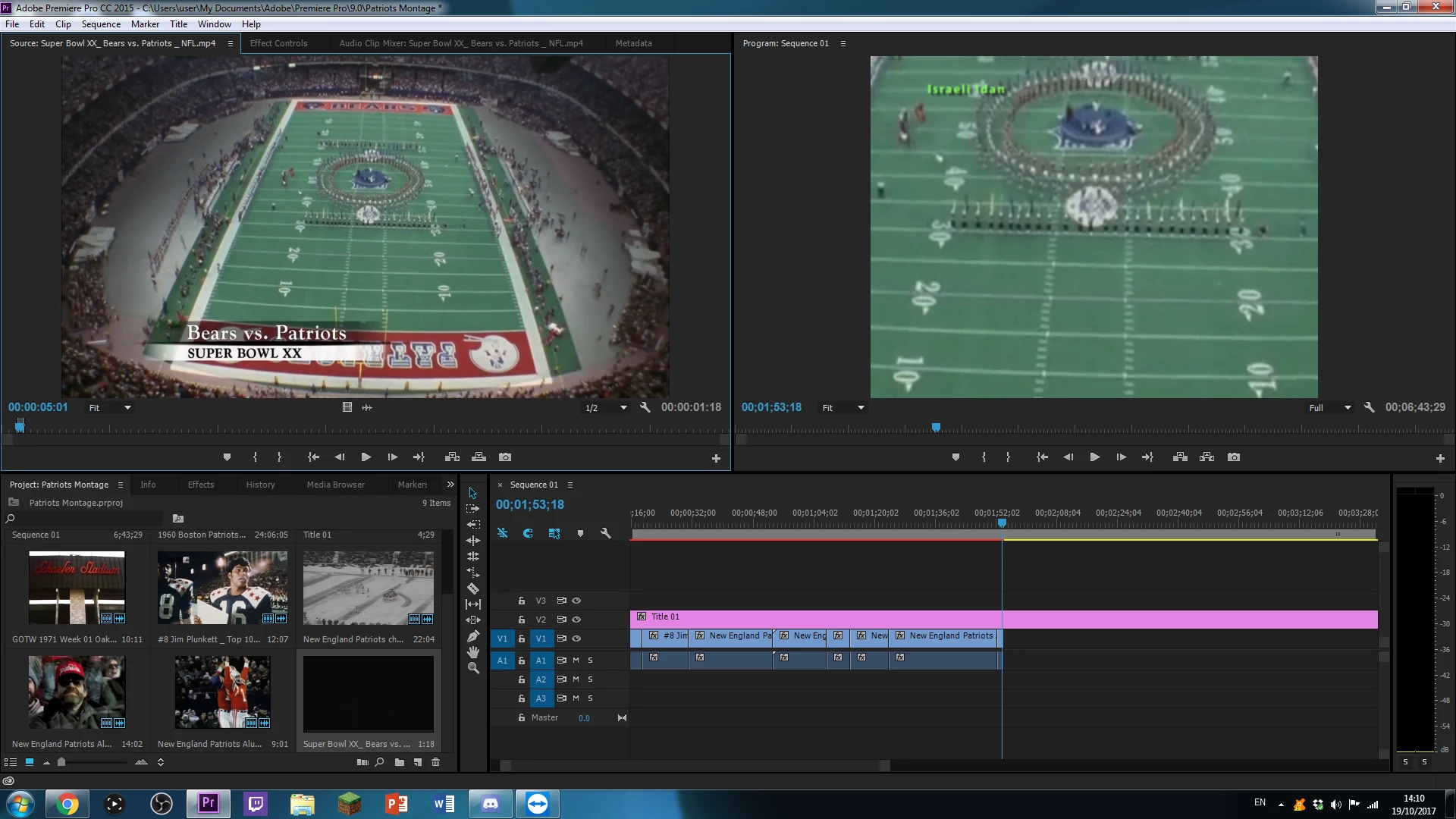
Why is the video showing like this? Auto zooms in...

  • October 19, 2017
  • 4 replies
  • 1088 views

Hey while editing a montage of videos together I wanted to add another one. No matter which video I added it automatically zoomed in. How do I fix this? See what I mean in the picture below:
    This topic has been closed for replies.
    Correct answer Ann Bens

    In your sequence setting:

    the original clip looks widescreen your Program Monitor shows 4:3...

    4 replies

    Legend
    October 19, 2017
    Inspiring
    October 19, 2017

    Right click clip in timeline > Scale to Frame Size. Or go to Effect Controls > Motion > Scale.

    IsraeliIdan
    Known Participant
    October 19, 2017

    Thank You. This does make it like this though, I can work with that for the time meaning

    Edit: I mean I don't like the black bars

    Community Expert
    October 19, 2017

    See Ann's answer 3, you have widescreen footage in a 4:3 sequence, you either have the black bars top and bottom of you can zoom in but you will loose the left and right of the picture. The best answer is to make a widescreen sequence as explained in previous answers.

    IsraeliIdan
    Known Participant
    October 19, 2017

    I do not get the two previous replies but I found my sequence settings. Two things: Where do I see the pixel size of the sequence and I do not know the pixel size of the footage.

    Ann Bens
    Community Expert
    Community Expert
    October 19, 2017

    Do one of the two to get a matching sequence for your footage:

    Community Expert
    October 19, 2017

    Are your sequence settings the same pixel size as your footage?

    IsraeliIdan
    Known Participant
    October 19, 2017

    How do I check that?

    Ann Bens
    Community Expert
    Ann BensCommunity ExpertCorrect answer
    Community Expert
    October 19, 2017

    In your sequence setting:

    the original clip looks widescreen your Program Monitor shows 4:3...