

KeithHopkin
Inspiring
June 5, 2018
Question

Window > Project Disappeared!

  • June 5, 2018
  • 2 replies
  • 7022 views

I thought I was nuts. I closed the Project panel and then needed to reopen it. Went to the Window dropdown (hey, I can only remember so many keyboard shortcuts in my life). And 'Project' was gone!
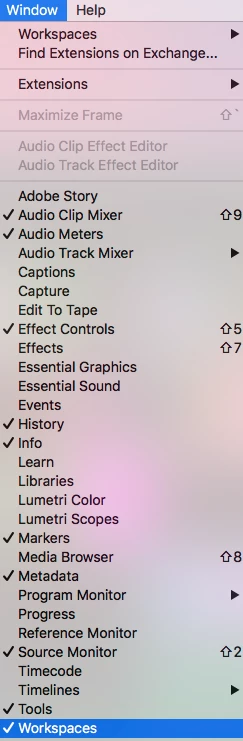
I restarted Premiere (because, you know, that's what we all spend half of our days doing, amiright??) and viola. It's back. WHAT???
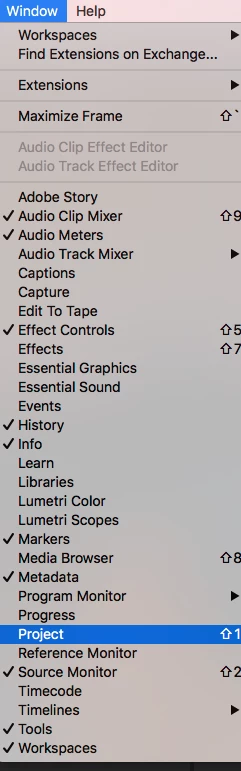
Version 12.1.1

    This topic has been closed for replies.

    2 replies

    KeithHopkin
    Inspiring
    June 6, 2018

    The funny thing about this is, before restarting Premiere I selected a different workspace which then resulted in a completely blank workspace. Some other bug that I probably wrote about someplace else.

    Kevin-Monahan
    Community Manager
    Community Manager
    June 5, 2018

    KeithHopkin,

    I believe this is the default behavior of Premiere Pro if you close an open project if it's the only one you have open. Keep in mind you can open multiple projects at a time now. In your case, choose File > Open Project to reopen any of your projects.

    Thanks,
    Kevin

    Kevin Monahan - Sr. Community and Engagement Strategist – Adobe Pro Video and Audio
    KeithHopkin
    Inspiring
    June 5, 2018

    But I didn't close the project. I only closed the project panel. The project was still open. So other than the keyboard shortcut there was no way to re open the panel. This has never happened to me.

    Peru Bob
    Community Expert
    Community Expert
    June 5, 2018

    Try resetting the preferences:

    FAQ: How to reset preferences in Premiere Pro?

    If that doesn't work, try resetting the Workspaces:

    Reset a workspace

    Reset the current workspace to return to its original, saved layout of panels.

    1. Do one of the following:
      • Click the Workspace menu icon and select Reset to Saved Layout.
      • Choose Window > Workspace > Reset to Saved Layout.

    from here:

    https://helpx.adobe.com/premiere-pro/using/workspaces.html