
Participating Frequently
August 2, 2023
Answered

InDesign 2022 MENA Version in German UI on MacOs

  • August 2, 2023
  • 3 replies
  • 747 views

I installed the "English with Arabic Support" version of InDesign 2022 via Creative Cloud. After installation the app always starts as en_AE, but I want to use the MENA version with German UI.


In the past I did the same with InDesign 2021 and it automatically started with the German UI, and had all the R-T-L features and Arabic paragraph style settings available.


I tried to switch the language via MacOS system settings, but that does not work either. German is the default language for my MacOS installation anyways.

Is there a settings file which could simply be changed to de_DE to get the German UI for the 2022 MENA version, just like in my InDesign 2021?


Thanks in advance
This topic has been closed for replies.
Correct answer leo.r

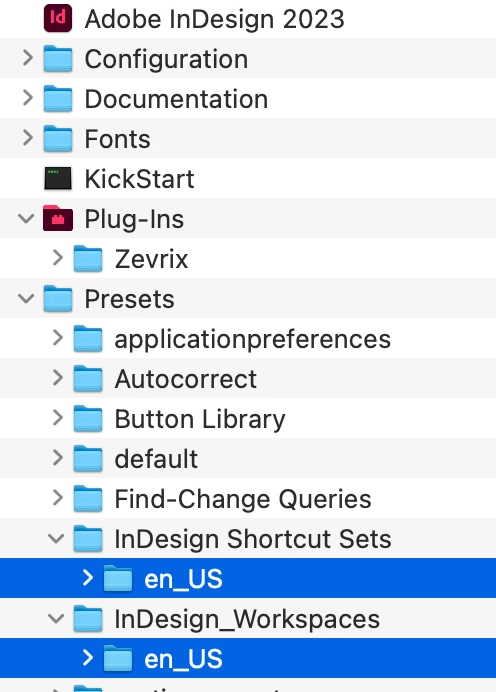
I wonder if that's the solution you're looking for: to change the UI language, you need to rename the selected folders accordingly:


tip taken from this video:


https://www.youtube.com/watch?v=IlZWNLzavR8

3 replies

Rishabh_Tiwari
Community Manager
Community Manager
August 2, 2023

HI @

Hello! I'm sorry to hear that you're having trouble with the language settings in InDesign 2022 MENA Version. Here are some steps you can try to switch the language to German:

  1. Open the Creative Cloud desktop app, select the Account icon in the upper right, then select Preferences.
  2. In the left sidebar, select Apps.
  3. From the list of languages, choose German (Deutsch).
  4. Select Done to save the changes.
  5. In the Creative Cloud desktop app, select Apps to view the list of available apps.
  6. From the list of available apps, install InDesign 2022 MENA Version by selecting Install.

    Please feel free to update the discussion if you need further assistance.


    Thanks
    Rishabh

Participating Frequently
August 3, 2023

Thanks for all the fast replies. I'll try some of the suggestions.
@Rishabh_Tiwari"InDesign MENA" is not listed as a separate App. The only way I can get a MENA version of InDesign is by switching my language in the Creative Cloud desktop app, and installing "InDesign". This leads to the creation of a settings folder in my user library "Preferences > Adobe InDesign > Version 17.0-ME" whereas my German settings are in a "Version 17.0" folder.
Now with InDesign 2021 it also created a ME folder: "Version 16.0-ME". Inside this folder exists a de_DE folder.
I assume this is the same situation i need inside my "Version 17.0-ME"  folder, but don't know how to achieve.

Willi Adelberger
Community Expert
Community Expert
August 2, 2023

Install first German, change APP language to a ME version, change language back to German.

Participating Frequently
August 3, 2023

Hi, thanks for your answer.
What exaclty do you mean by "change APP language to a ME version"?

- Trying to set a language for a specific application under MacOS system settings > Region & Language does not seem to achieve anything at all.
- Changing the language of the creative cloud app and reinstalling InDesign leads to a MENA version with English UI.
- Changing the creative cloud app language settings to "English with Arabic support" and then simply switching back to german does not achieve anything. (i'll try to switch, then restart the app, then switch back to german)


m

Willi Adelberger
Community Expert
Community Expert
August 3, 2023

In the CC desktop application you open the preferences and in Apps you scrol down to the end where you can change the lanhuage.

leo.r
Community Expert
leo.rCommunity ExpertCorrect answer
Community Expert
August 2, 2023

I wonder if that's the solution you're looking for: to change the UI language, you need to rename the selected folders accordingly:


tip taken from this video:


https://www.youtube.com/watch?v=IlZWNLzavR8

Participating Frequently
August 3, 2023

Thanks for the suggestion. I will try it as soon as my company Admin agrees. As a regular user a can't change the contents of the program folder.

Participating Frequently
August 3, 2023